

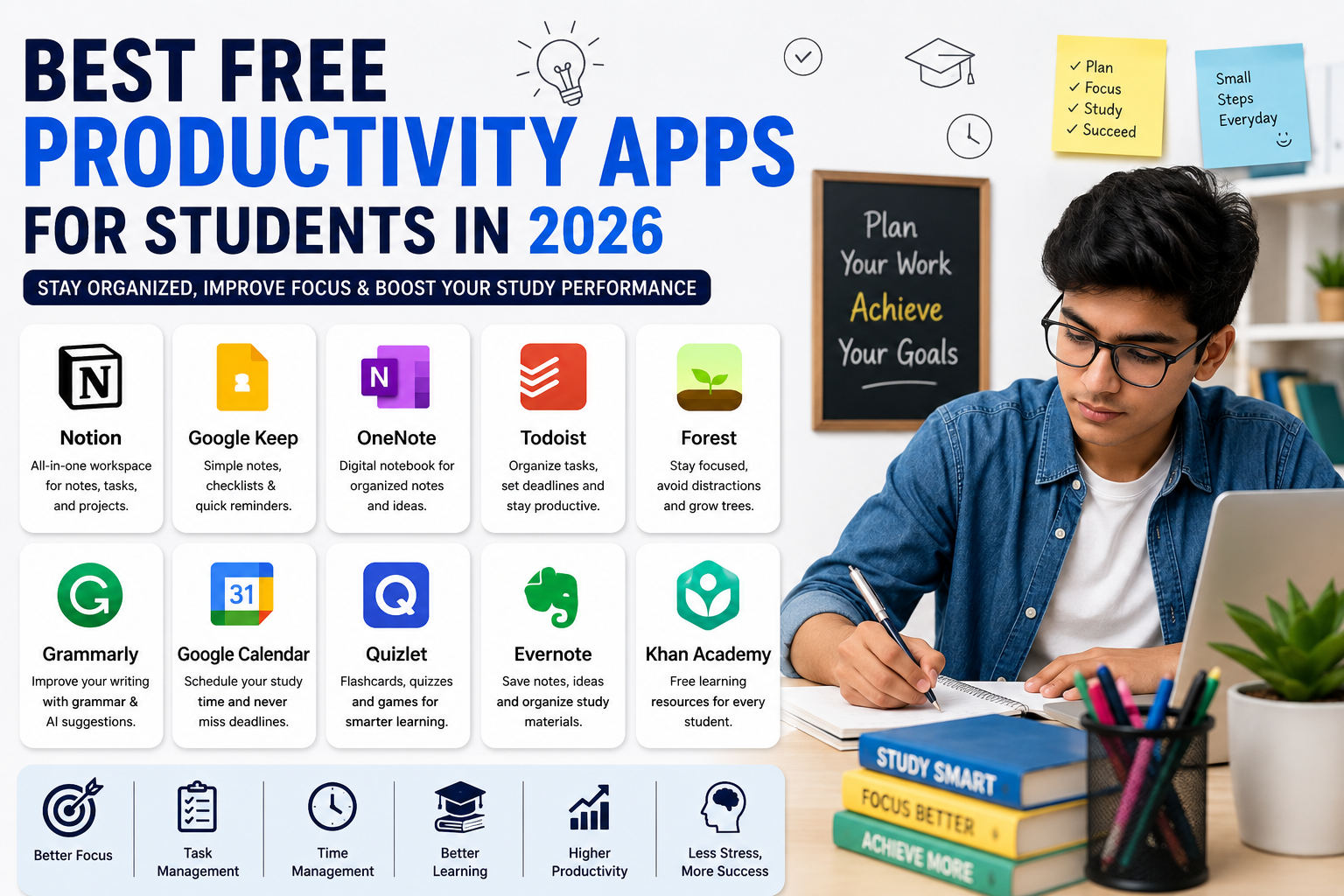
In today’s fast-paced digital world, students face increasing pressure to manage studies, assignments, exams, projects, and personal responsibilities efficiently. Technology has become an essential part of education, and productivity apps are helping students stay organized, focused, and productive like never before.
In 2026, free productivity apps offer advanced features powered by artificial intelligence, cloud synchronization, and smart automation. From note-taking and task management to focus enhancement and collaborative learning, these applications are transforming the way students learn and work.
Whether you are a school student, college learner, or preparing for competitive exams, using the right productivity apps can save time, improve concentration, and boost academic performance.
In this article, we will explore the best free productivity apps for students in 2026 and how they can help improve daily learning routines.
Why Productivity Apps Are Important for Students
Students often struggle with:
- Managing time effectively
- Organizing assignments
- Maintaining focus during study sessions
- Handling multiple subjects
- Avoiding distractions
- Tracking deadlines
Productivity apps simplify these challenges by helping students plan tasks, organize notes, improve concentration, and study more efficiently.
These apps reduce stress and increase overall productivity.
1. Notion – Best All-in-One Student Workspace
Notion remains one of the most popular productivity apps for students in 2026.
Key Features
- Note-taking
- Task management
- Study planners
- Project organization
- Collaborative workspaces
- AI writing assistance
Students can create personalized dashboards to manage subjects, assignments, schedules, and exam preparation.
Why Students Love It
Notion combines multiple productivity tools into a single platform, making it highly efficient for organizing academic life.
2. Google Keep – Best Simple Note-Taking App
Google Keep is perfect for students who prefer quick and simple note-taking.
Features
- Voice notes
- Color-coded reminders
- Checklist creation
- Image notes
- Cloud synchronization
Students can quickly save ideas, class notes, and reminders across devices.
Best For
- Quick study notes
- Daily reminders
- Shopping or task lists
- Fast idea organization
3. Microsoft OneNote – Best Digital Notebook
OneNote provides a complete digital notebook experience.
Main Features
- Handwritten notes
- Audio recording
- Drawing tools
- Cloud syncing
- Subject organization
- PDF annotation
Students can organize notes into sections and access them from multiple devices.
Ideal For
- College students
- Research projects
- Lecture note organization
- Group study collaboration
4. Todoist – Best Task Management App
Todoist helps students manage assignments and deadlines effectively.
Features
- Task scheduling
- Priority labels
- Productivity tracking
- Recurring reminders
- Calendar integration
The app provides a clean and simple interface that makes planning easy.
Benefits for Students
Students can stay organized and avoid missing important deadlines.
5. Forest – Best Focus App for Students
Forest is one of the best apps for improving focus and reducing phone distractions.
How It Works
Students plant a virtual tree before starting a study session. If they leave the app to use social media or other distractions, the tree stops growing.
Benefits
- Encourages deep focus
- Reduces smartphone addiction
- Improves concentration
- Makes studying more engaging
Forest uses gamification techniques to improve productivity.
6. Grammarly – Best Writing Assistant
Grammarly helps students improve writing quality and grammar accuracy.
Features
- Grammar correction
- Spell checking
- Tone suggestions
- AI writing support
- Vocabulary enhancement
Students can use Grammarly for essays, assignments, emails, and research papers.
Why It’s Useful
Strong writing skills are essential for academic success, and Grammarly helps students write more confidently.
7. Google Calendar – Best Time Management Tool
Google Calendar remains one of the most powerful free scheduling apps.
Features
- Study schedules
- Deadline reminders
- Event notifications
- Shared calendars
- Time-block planning
Students can organize study routines and manage exam schedules efficiently.
Best For
- Daily planning
- Time management
- Exam preparation
- Productivity routines
8. Quizlet – Best Flashcard Learning App
Quizlet helps students memorize information faster using digital flashcards.
Features
- AI-generated quizzes
- Flashcards
- Practice tests
- Learning games
- Collaborative study sets
Quizlet is especially useful for language learning and exam preparation.
Advantages
Students can learn through interactive study methods instead of traditional memorization.
9. Evernote – Best Multi-Purpose Study Organizer
Evernote helps students store and organize notes, documents, and ideas.
Features
- Web clipping
- Cross-device syncing
- Document scanning
- Voice notes
- Study organization
Students can save research materials and organize information efficiently.
10. Khan Academy – Best Free Learning Platform
Khan Academy provides free educational resources for students worldwide.
Subjects Covered
- Mathematics
- Science
- Economics
- Computer programming
- Test preparation
Why Students Use It
The platform offers easy-to-understand lessons and interactive exercises completely free.
AI-Powered Productivity Apps in 2026
Artificial intelligence is improving student productivity tools significantly.
AI Features Now Available
Modern productivity apps now include:
- Smart study recommendations
- Automatic note summaries
- AI-generated quizzes
- Personalized learning paths
- Voice-to-text conversion
- Smart scheduling assistants
These features help students study more efficiently while saving time.
Benefits of Productivity Apps for Students
Better Time Management
Apps help students plan schedules and complete tasks on time.
Improved Focus
Focus tools reduce distractions and encourage deep study sessions.
Organized Learning
Students can store notes, assignments, and study materials in one place.
Increased Academic Performance
Efficient study methods improve learning outcomes and exam performance.
Reduced Stress
Good organization reduces last-minute pressure and improves balance.
Tips for Using Productivity Apps Effectively
Avoid Using Too Many Apps
Using too many tools can become overwhelming. Choose only the apps that fit your needs.
Create Daily Study Routines
Consistency improves productivity and learning efficiency.
Use Notifications Wisely
Set reminders for important deadlines but avoid excessive notifications.
Combine Apps Strategically
For example:
- Use Notion for organization
- Forest for focus
- Quizlet for revision
- Google Calendar for scheduling
This creates a complete productivity system.
Future of Student Productivity Apps
Student productivity technology will continue evolving rapidly.
Future Trends Include
- AI-powered virtual tutors
- Smart learning analytics
- Augmented reality classrooms
- Personalized education systems
- Voice-controlled study assistants
Technology will continue making learning more interactive and efficient.
Conclusion
The best free productivity apps for students in 2026 are helping learners manage time, improve focus, stay organized, and achieve academic success more efficiently. From task management and note-taking to AI-powered study tools and focus-enhancing applications, technology is transforming modern education.
Students who use productivity apps wisely can reduce stress, improve study habits, and maximize their learning potential.
As digital learning continues growing worldwide, productivity apps will become even more essential for students seeking success in academics and personal development.
Also read Future of Smart Homes and Connected Devices in 2026









Leave a Reply