

Quick Summary
If you’re new to artificial intelligence, choosing the right AI tool can feel overwhelming. Fortunately, many AI platforms are now designed specifically for beginners, offering intuitive interfaces, affordable pricing, and powerful features.
This guide explores the best AI tools for beginners in 2026, comparing their strengths, pricing, ease of use, and ideal use cases. Whether you’re a student, content creator, freelancer, marketer, or business owner, you’ll find an AI tool that matches your needs.
What are the best AI tools for beginners in 2026?
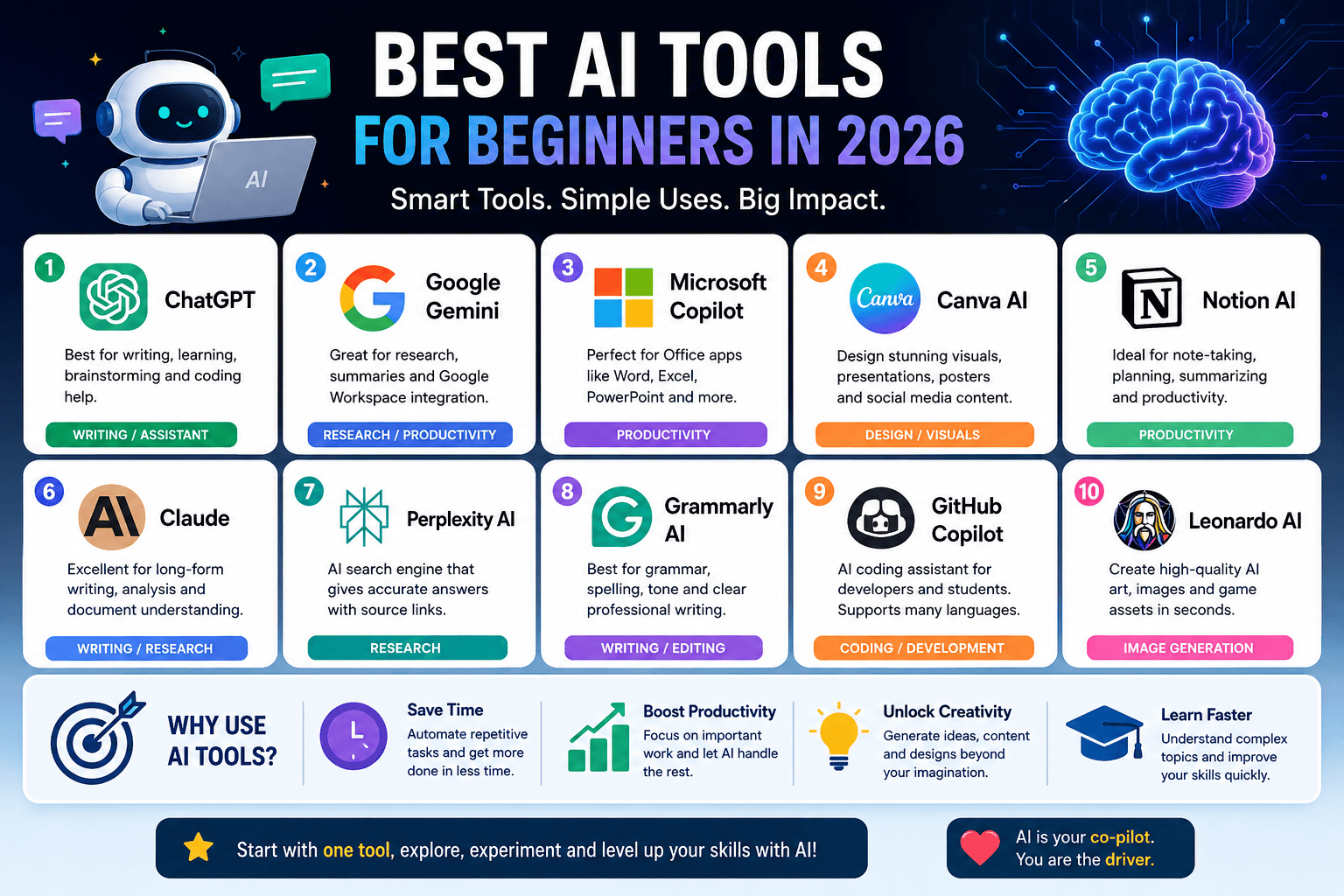
The best AI tools for beginners in 2026 include ChatGPT for writing and learning, Google Gemini for research, Microsoft Copilot for productivity, Canva AI for design, Notion AI for note-taking, Claude for long-form writing, Perplexity AI for fact-based research, Grammarly AI for editing, GitHub Copilot for coding, and Leonardo AI for image generation. These tools are easy to use, offer free plans, and help improve productivity across personal, academic, and professional tasks.
Introduction
Artificial Intelligence has become an everyday productivity companion. From writing blog posts and generating images to creating presentations and automating repetitive work, AI tools are helping millions save time.
According to industry estimates, over 80% of businesses are experimenting with AI-powered workflows, while individual creators increasingly rely on AI for faster content creation, brainstorming, and learning.
The challenge isn’t finding AI tools—it’s choosing the right ones.
That’s exactly what this guide will help you do.
What Are AI Tools?
AI tools are software applications powered by machine learning and large language models that help users complete tasks faster and more efficiently.
Common capabilities include:
- Writing articles
- Summarizing documents
- Generating images
- Creating videos
- Coding assistance
- Data analysis
- Presentation creation
- Research
- Translation
- Automation
Unlike traditional software, AI tools understand natural language, allowing users to interact conversationally.
Benefits of Using AI Tools
1. Save Hours Every Week
Many repetitive tasks can be completed within minutes.
Example:
Instead of spending two hours writing a first draft, AI can generate one in less than five minutes.
2. Improve Productivity
AI helps users focus on high-value work instead of repetitive tasks.
3. Reduce Learning Curve
Many AI assistants explain concepts in simple language, making learning easier.
4. Generate Creative Ideas
AI helps overcome writer’s block by suggesting:
- Blog ideas
- Business names
- Video topics
- Social media captions
- Marketing campaigns
5. Affordable for Beginners
Many AI tools now offer:
- Free plans
- Student discounts
- Low-cost subscriptions
How AI Tools Work
Although every platform is different, most AI tools follow a similar process:
- User enters a prompt.
- AI analyzes the request.
- Large Language Models predict the best response.
- AI generates text, images, code, or other outputs.
- User edits and refines the result.
The quality of the output depends heavily on how clearly the prompt is written.
Best AI Tools for Beginners in 2026
1. ChatGPT
Best For:
- Writing
- Research
- Brainstorming
- Learning
- Coding
Key Features
- Natural conversations
- Coding assistance
- Article writing
- Image generation
- Study help
- Business planning
Ideal for almost every beginner.
2. Google Gemini
Best For
- Google Workspace users
- Research
- Gmail assistance
- Google Docs
Highlights
- Deep Google integration
- Fast responses
- Multimodal capabilities
3. Microsoft Copilot
Best For
- Office users
- Excel
- PowerPoint
- Word
Perfect if you already use Microsoft Office.
4. Canva AI
Best For
- Social media
- Presentations
- Posters
- Graphic design
Features
- AI image generator
- Magic Write
- Background remover
- AI presentation creator
5. Notion AI
Best For
- Note taking
- Productivity
- Project management
Useful for students and professionals.
6. Claude
Best For
- Long-form writing
- Document analysis
- Research
Known for producing thoughtful, well-structured responses.
7. Perplexity AI
Best For
- Research
- Fact checking
- Citations
Excellent for finding reliable information with linked sources.
8. Grammarly AI
Best For
- Email writing
- Grammar
- Professional communication
Great for beginners who want polished writing.
9. GitHub Copilot
Best For
- Beginner programmers
- Developers
- Students learning code
Supports multiple programming languages.
10. Leonardo AI
Best For
- AI art
- Game assets
- Marketing images
Perfect for beginners interested in AI image generation.
Step-by-Step Guide: How to Start Using AI
Step 1
Choose one AI tool.
Avoid trying five tools on the first day.
Step 2
Create a free account.
Step 3
Learn prompt writing.
Instead of asking:
Write about AI
Try:
Write a beginner-friendly 1,000-word article about AI tools for students.
Step 4
Experiment daily.
Practice with:
- Emails
- Blog posts
- Homework
- Social media
- Image generation
Step 5
Review AI output.
Never publish AI-generated content without checking:
- Facts
- Grammar
- Originality
- Accuracy
Real-World Examples
Student
Uses AI to:
- Summarize textbooks
- Solve coding problems
- Create study notes
Blogger
Uses AI for:
- Keyword research
- Article outlines
- Meta descriptions
- Content ideas
Small Business Owner
Uses AI for:
- Customer emails
- Product descriptions
- Marketing campaigns
- Social posts
Freelancer
Uses AI for:
- Proposal writing
- Client communication
- Time-saving automation
Pros
✅ Beginner-friendly
✅ Saves significant time
✅ Easy to learn
✅ Improves productivity
✅ Affordable options available
✅ Supports multiple industries
✅ Works across devices
Cons
❌ Can produce inaccurate information
❌ Requires fact-checking
❌ Premium features often require subscriptions
❌ Generic prompts may produce generic results
❌ Privacy concerns when uploading sensitive data
Comparison Table
| AI Tool | Best For | Free Plan | Ease of Use | Overall Rating |
|---|---|---|---|---|
| ChatGPT | Writing & Learning | Yes | ⭐⭐⭐⭐⭐ | 9.8/10 |
| Google Gemini | Research | Yes | ⭐⭐⭐⭐⭐ | 9.6/10 |
| Microsoft Copilot | Office Productivity | Yes | ⭐⭐⭐⭐ | 9.3/10 |
| Canva AI | Design | Yes | ⭐⭐⭐⭐⭐ | 9.4/10 |
| Notion AI | Productivity | Limited | ⭐⭐⭐⭐ | 9.2/10 |
| Claude | Long Writing | Yes | ⭐⭐⭐⭐⭐ | 9.5/10 |
| Perplexity AI | Research | Yes | ⭐⭐⭐⭐⭐ | 9.4/10 |
| Grammarly AI | Writing | Yes | ⭐⭐⭐⭐⭐ | 9.2/10 |
| GitHub Copilot | Coding | Trial | ⭐⭐⭐⭐ | 9.3/10 |
| Leonardo AI | Images | Yes | ⭐⭐⭐⭐ | 9.1/10 |
Common Mistakes Beginners Make
Using vague prompts
Poor:
“Write something.”
Better:
“Write a beginner-friendly 1,500-word guide on AI tools for teachers.”
Trusting AI blindly
Always verify:
- Statistics
- Dates
- Financial advice
- Medical information
Ignoring editing
AI should assist—not replace—human review.
Trying too many tools
Master one or two tools before expanding your toolkit.
Expert Tips
Use AI as a Co-Pilot
Treat AI as an assistant rather than a replacement for your own judgment.
Write Better Prompts
Detailed prompts consistently produce higher-quality outputs.
Combine Multiple AI Tools
For example:
- Research with Perplexity AI
- Draft with ChatGPT
- Edit with Grammarly AI
- Design visuals with Canva AI
Stay Updated
AI evolves rapidly. Explore new features and updates regularly to improve your workflow.
Frequently Asked Questions
Which AI tool is best for complete beginners?
ChatGPT is one of the easiest AI tools to start with because it supports writing, brainstorming, coding, research, and learning through simple conversations.
Are AI tools free?
Many AI tools offer free plans with optional paid upgrades for advanced features and higher usage limits.
Can AI replace human creativity?
No. AI enhances creativity by generating ideas and drafts, but human judgment, experience, and originality remain essential.
Which AI tool is best for students?
Students often benefit from ChatGPT, Google Gemini, and Notion AI for studying, note-taking, and research assistance.
Which AI tool is best for content creators?
Content creators can combine ChatGPT for writing, Canva AI for graphics, Leonardo AI for images, and Grammarly AI for editing.
Is it safe to use AI tools?
Most reputable AI platforms are safe when used responsibly. Avoid uploading confidential, personal, or sensitive information unless you understand the platform’s privacy policies.
Conclusion
Artificial intelligence has become an accessible tool for everyone—not just developers or large businesses. The best AI tools for beginners in 2026 focus on ease of use, practical features, and affordability.
If you’re just getting started, begin with one versatile platform such as ChatGPT or Google Gemini, learn effective prompting, and gradually explore specialized tools for design, coding, or productivity. By combining AI with your own expertise and reviewing outputs carefully, you can work smarter, learn faster, and create higher-quality content.
Whether you’re a student, entrepreneur, or professional, now is an excellent time to build AI skills that will remain valuable for years to come.
Key Statistics
- More than 80% of businesses are exploring or using AI-powered workflows.
- AI-powered productivity tools can reduce time spent on repetitive tasks by 30–60%, depending on the workflow.
- Generative AI adoption continues to grow among students, marketers, developers, and small businesses due to increasing accessibility and lower costs.











Leave a Reply