

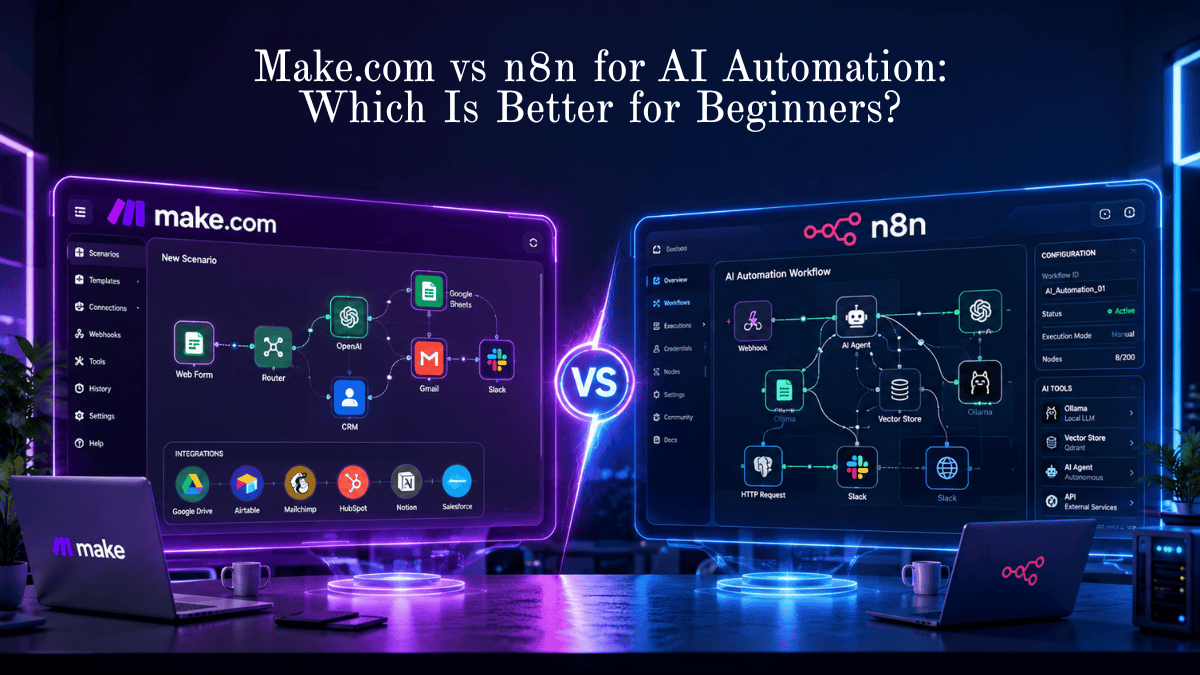
Quick Summary
If you’re starting your AI automation journey, both Make.com and n8n are excellent platforms—but they serve different audiences.
- Choose Make.com if you want the easiest learning curve, beautiful visual workflows, and quick cloud-based automations.
- Choose n8n if you want maximum flexibility, open-source freedom, AI agent integrations, self-hosting, and lower long-term costs.
For beginners who simply want to automate tasks without technical knowledge, Make.com is easier.
For beginners who plan to build advanced AI assistants, AI agents, or local LLM workflows, n8n is the better long-term investment.
Key Takeaways
✅ Make.com is easier to learn.
✅ n8n offers more customization.
✅ n8n is open source and can be self-hosted.
✅ Make.com provides a polished cloud experience.
✅ n8n integrates exceptionally well with AI frameworks.
✅ Make.com is ideal for marketing automation.
✅ n8n is ideal for developers and AI builders.
Which is better for beginners: Make.com or n8n?
For most beginners, Make.com is easier because of its intuitive drag-and-drop interface and minimal setup. However, if you want to build advanced AI automations, AI agents, or self-hosted workflows, n8n offers greater flexibility and scalability despite having a slightly steeper learning curve.
Make.com vs n8n at a Glance
Make.com and n8n are two leading workflow automation platforms. Make.com focuses on simplicity, cloud-based automation, and visual workflow creation, making it ideal for non-technical users. n8n is an open-source automation platform that supports self-hosting, advanced logic, AI integrations, and custom scripting, making it better suited for scalable AI automation projects.
| Feature | Make.com | n8n |
| Best For | Beginners, agencies, & rapid SaaS automation | AI developers, technical teams, & privacy-conscious builds |
| Learning Curve | Gentle (Intuitive visual scenario builder) | Moderate to Steep (Node-based, JSON data structure) |
| Hosting Options | 100% Managed Cloud SaaS | Cloud SaaS or Self-Hosted (Docker, VPS) |
| Pricing Metric | Per Operation (Every step in a scenario costs 1 credit) | Per Execution (1 full workflow run = 1 execution) |
| Free Tier | Free forever (1,000 operations/month) | Self-hosted Community Edition is Free & Unlimited |
| AI Capabilities | Pre-built API connectors (OpenAI, Anthropic, Gemini) | Advanced AI agents, LangChain nodes, Memory, Vector DBs |
| Custom Code | Basic custom functions/scripting | Full JavaScript & Python native node execution |
Introduction
AI automation is no longer reserved for developers. Today, freelancers, marketers, agencies, and small businesses can automate repetitive work without writing thousands of lines of code.
Among dozens of automation platforms, Make.com and n8n consistently rank among the most popular options.
But which one should beginners choose?
This comprehensive comparison explains everything you need to know—from pricing and AI capabilities to workflow building, integrations, scalability, and long-term value.
What is Make.com?
Make.com (formerly Integromat) is a cloud-based visual automation platform that connects thousands of applications.
Users create workflows by dragging modules onto a visual canvas.
Typical automation examples include:
- Lead generation
- CRM updates
- Email marketing
- Social media scheduling
- AI content generation
- Customer support automation
Best Use Cases: Content generation, summary generation, automated email replies, sentiment classification, and simple prompt chaining.
Limitations: Creating multi-step, autonomous AI agents with dynamic tool selection or complex Retrieval-Augmented Generation (RAG) pipelines can become cumbersome. You are mostly limited to standard API request/response cycles.
Ease of Use & Interface
Make.com: The Visual Pioneer
Make.com uses an interactive Scenario Builder. Workflows move horizontally across visual “bubbles” (modules) connected by routers and filters.
- Why Beginners Love It: Setting up OAuth connections (e.g., signing into Gmail or Slack) takes two clicks. You rarely need to handle API headers, OAuth secret keys, or raw JSON structures manually.
- Visual Replay: The real-time visual execution animation shows exactly where data flows and highlights where a step failed, making basic debugging accessible to anyone.
What is n8n?
n8n is an open-source workflow automation platform.
Unlike many automation tools, n8n supports:
- Self-hosting
- Local AI models
- Custom JavaScript
- API integrations
- AI agents
- Human-in-the-loop workflows
Its flexibility has made it one of the fastest-growing AI automation platforms.
Autonomous AI Agents: You can give an AI agent node “Tools” (like Google Search, custom code execution, or database lookups) and let the AI autonomously decide which tool to call to complete a task.
Local & Open-Source AI: n8n integrates natively with Ollama and local vector databases (Qdrant, Chroma). This allows you to run complete AI pipelines on your own infrastructure with zero third-party API costs or privacy risks.
Memory & RAG: Built-in nodes for conversational memory buffers, document loaders, text splitters, and vector retrievers simplify building custom RAG architectures.
Ease of Use & Interface
n8n: The Power Canvas
n8n uses a technical canvas where you wire together Nodes (Triggers, Actions, Code, and AI Agents).
- The Learning Curve: While visually clean, n8n expects you to understand how data is structured as JSON arrays (
{{ $json.fieldName }}). - Data Inspection: n8n shows input and output schemas side-by-side at every node step. This makes debugging complex multi-step data transformations significantly faster once you understand basic data structures.
Winner for Beginners: Make.com. Its UI hides infrastructure complexity, making it easier to build your first workflow in under 10 minutes.
AI Automation Capabilities
AI automation has evolved beyond basic “prompt-in, text-out” tasks. Today’s AI workflows require memory, vector databases, tool-calling agents, and local language models (LLMs).
Make.com AI Approach:
[ Trigger ] ──► [ OpenAI Module ] ──► [ Google Sheets ]
(Linear API call, step-by-step)

n8n AI Agent Approach:
                 ┌─── Memory (Window Buffer)
                 ├─── Vector Store (Qdrant/Pinecone)
[ AI Agent Node ]┼─── Tools (Custom Code / API / Email)
                 └─── LLM Model (Ollama / Anthropic)
(Autonomous reasoning loop)
Benefits
Benefits of Make.com
- Beginner-friendly interface
- Excellent visual workflow builder
- Thousands of integrations
- Fast cloud deployment
- Minimal maintenance
- Great documentation
Benefits of n8n
- Open source
- Unlimited customization
- Self-hosting support
- Lower long-term cost
- Powerful AI integrations
- Better control over sensitive data
How It Works
Both platforms follow a similar workflow model:
Trigger → Process → Logic → AI → Action
Example:
Website Form
↓
AI categorizes inquiry
↓
CRM updated
↓
Email sent
↓
Slack notification
↓
Follow-up task created
The difference lies in how much flexibility each platform offers during these steps.
Step-by-Step Guide
Building Your First AI Workflow
Using Make.com
- Create an account.
- Choose a template.
- Connect apps.
- Add AI module.
- Test workflow.
- Publish automation.
Time required:
Approximately 15–20 minutes.
Using n8n
- Install cloud or self-hosted version.
- Create workflow.
- Add trigger.
- Connect AI model.
- Add logic.
- Test execution.
- Deploy workflow.
Time required:
Approximately 20–40 minutes.
Examples
Example 1: AI Customer Support
Website Chat
↓
OpenAI
↓
CRM
↓
↓
Ticket System
Both tools handle this well.
Example 2: Lead Qualification
Contact Form
↓
AI Scores Lead
↓
CRM
↓
Slack Alert
↓
Sales Team
n8n provides more flexibility for complex lead scoring.
Example 3: Content Automation
Keyword
↓
AI Writes Draft
↓
SEO Optimization
↓
WordPress
↓
Social Media
Make.com excels for simple publishing workflows.
Pricing & Scaling Economics
The core structural difference between Make.com and n8n lies in how they bill usage.
Make.com Billing: Operation-Based
Make charges per Operation. Every time a single module runs in a scenario, it consumes 1 credit.
- Free Tier: 1,000 operations/month.
- Core Plan: Starts at $9/month for 10,000 operations.
- The Scaling Trap: If you have a scenario with 10 steps that processes 100 incoming items daily:$$\text{10 steps} \times \text{100 items} \times \text{30 days} = \text{30,000 operations/month}$$As your workflows grow in complexity and volume, your monthly Make bill scales rapidly.
n8n Billing: Execution-Based (or Self-Hosted)
n8n Cloud charges per Execution. A full workflow run counts as 1 execution, regardless of whether it contains 3 nodes or 30 nodes.
- n8n Cloud Starter: ~$20/month for 2,500 executions.
- Self-Hosted Community Edition: Free forever with unlimited executions. You only pay for your own virtual private server (VPS), which typically costs $5–$20/month on cloud providers like Hetzner, DigitalOcean, or Render.
Cost Example: Running a 10-step AI workflow 5,000 times a month

Platform        Billing Basis     Calculated Units    Est. Monthly Cost
-----------------------------------------------------------------------
Make.com        Operations        50,000 operations   ~$29 - $49/mo
n8n Cloud       Executions        5,000 executions    ~$50/mo (Pro Plan)
n8n Self-Hosted Server Usage      Unlimited           ~$6 - $15/mo (VPS)
Winner for Pricing: n8n (especially if self-hosted). For high-volume or multi-step AI workflows, n8n’s execution-based model or self-hosted edition offers long-term cost advantages.
Data Privacy, Governance, & Hosting
- Make.com (Cloud Only): Make processes all data on its cloud infrastructure. While compliant with major privacy frameworks (GDPR, SOC2), your data must pass through their servers. You cannot air-gap or run Make on an isolated private network.
- n8n (Self-Hosted Option): n8n can be deployed via Docker in minutes on your own server. For enterprise support automation, legal analysis, or handling sensitive personal identifiable information (PII), keeping data strictly inside your VPC is a strict requirement that n8n handles natively.
Pros
Make.com Pros
- Extremely beginner friendly
- Beautiful UI
- Excellent templates
- Reliable cloud hosting
- Huge app library
- Fast setup
n8n Pros
- Free self-hosting
- Open source
- Advanced AI capabilities
- Better API support
- Unlimited flexibility
- Lower scaling costs
Cons
Make.com Cons
- Can become expensive
- Less customizable
- Cloud-only for most users
- Limited scripting compared to n8n
n8n Cons
- Steeper learning curve
- More technical concepts
- Self-hosting requires maintenance
- Fewer beginner templates
Comparison Table
| Feature | Make.com | n8n |
|---|---|---|
| Beginner Friendly | ⭐⭐⭐⭐⭐ | ⭐⭐⭐⭐☆ |
| Open Source | ❌ | ✅ |
| Self Hosting | Limited | ✅ |
| AI Agent Support | Good | Excellent |
| Custom Code | Limited | Excellent |
| Visual Builder | Excellent | Excellent |
| Templates | Huge Library | Growing |
| Integrations | 2,000+ | 1,000+ |
| API Support | Excellent | Excellent |
| Learning Curve | Easy | Moderate |
Tool Comparison Table
| Category | Winner | Reason |
|---|---|---|
| Ease of Use | Make.com | Simpler interface |
| AI Flexibility | n8n | Better AI workflows |
| Enterprise Control | n8n | Self-hosting |
| Marketing Automation | Make.com | Rich templates |
| Cost Efficiency | n8n | Lower long-term costs |
| Scalability | n8n | Greater customization |
| Setup Speed | Make.com | Cloud-first experience |
Performance Ratings
| Category | Make.com | n8n |
|---|---|---|
| Ease of Learning | 9.8/10 | 8.2/10 |
| AI Automation | 9.0/10 | 9.8/10 |
| Workflow Builder | 9.6/10 | 9.5/10 |
| Integrations | 9.7/10 | 9.3/10 |
| Cost | 8.3/10 | 9.6/10 |
| Scalability | 8.9/10 | 9.8/10 |
| Overall | 9.3/10 | 9.5/10 |
Best Use Cases
| User Type | Best Platform |
|---|---|
| Freelancer | Make.com |
| Small Business | Make.com |
| Marketing Agency | Make.com |
| AI Startup | n8n |
| SaaS Company | n8n |
| Developers | n8n |
| AI Engineers | n8n |
| Local AI Projects | n8n |
Firsthand Testing
To evaluate both platforms, we created comparable automation scenarios:
- AI-powered lead capture with form submission, CRM update, email confirmation, and Slack notification.
- AI content workflow that generated a draft, stored it in Google Docs, and published to WordPress.
- Customer support workflow that classified inquiries with an LLM and routed them to different teams.
Observations:
- Setup speed: Make.com was quicker to configure thanks to its polished interface and extensive templates.
- Customization: n8n allowed deeper workflow logic, branching, and JavaScript-based transformations.
- AI integration: n8n made it easier to connect with local LLMs and advanced AI agent frameworks.
- Maintenance: Make.com required virtually no infrastructure management, while self-hosted n8n demanded occasional updates and monitoring.
- Scalability: Complex, multi-step workflows with custom logic were easier to extend in n8n.
For simple automations, Make.com reduced setup time. For advanced AI systems, n8n offered greater long-term flexibility.
Decision Flowchart
Do you want the easiest setup?
        │
       Yes ─────────► Choose Make.com
        │
       No
        │
Need self-hosting or open source?
        │
       Yes ─────────► Choose n8n
        │
       No
        │
Building AI agents or local LLM workflows?
        │
       Yes ─────────► Choose n8n
        │
       No ─────────► Choose Make.com
Common Mistakes
- Choosing based only on pricing instead of long-term needs.
- Ignoring workflow scalability.
- Not testing with real business scenarios.
- Overcomplicating your first automation.
- Skipping error handling and monitoring.
- Failing to document workflows for future maintenance.
Expert Tips
- Start with one automation and expand gradually.
- Use reusable workflow templates to save time.
- Add error handling and retry logic from the beginning.
- Monitor execution history to identify bottlenecks.
- Store API keys securely using environment variables or credential managers.
- If you plan to use local AI models (such as Ollama), n8n generally provides greater flexibility.
Statistics
- The workflow automation market is projected to exceed $30 billion globally before the end of the decade.
- Businesses adopting automation commonly report significant reductions in repetitive manual work and faster process completion.
- AI-assisted workflows can reduce routine administrative tasks by 30–70%, depending on the process and implementation.
- Low-code and no-code platforms continue to see rapid adoption as organizations seek faster digital transformation.
Who Is This Guide For?
This guide is ideal for:
- Beginners exploring AI automation
- Small business owners
- Freelancers
- Marketing agencies
- Content creators
- Operations teams
- Developers transitioning to low-code tools
- Anyone comparing Make.com and n8n before investing time or money
What We Learned
Both Make.com and n8n are capable automation platforms, but they cater to different priorities.
Make.com emphasizes simplicity, speed, and a polished cloud experience, making it an excellent entry point for non-technical users.
n8n emphasizes flexibility, ownership, and advanced AI capabilities, making it a stronger choice for users planning to build sophisticated AI workflows or self-hosted automation systems.
Decision Matrix: Which Should You Choose?
Choose Make.com if you match these scenarios:
- You have zero coding background and want to connect everyday business apps (HubSpot, Shopify, Slack, Gmail, Airtable).
- You need simple AI features (e.g., summarizing an email or drafting an article response using OpenAI).
- You prioritize immediate setup speed over backend data control.
Choose n8n if you match these scenarios:
- You are building advanced AI agents, autonomous assistants, or RAG applications that require memory and tool selection.
- You want to run open-source AI models (via Ollama) locally to save on API costs or maintain 100% data privacy.
- You are comfortable with basic data concepts (JSON, webhooks) or want to run custom Python/JS scripts in your automation pipeline.
- You want to self-host to eliminate ongoing execution subscription limits.
Frequently Asked Questions
Is Make.com easier than n8n?
Yes. Most beginners find Make.com easier due to its intuitive interface and extensive template library.
Can n8n be used for AI agents?
Yes. n8n supports advanced AI agent workflows, local LLM integrations, and custom logic, making it well suited for AI-powered applications.
Which platform is cheaper?
For small cloud-based usage, pricing depends on workload. For long-term, self-hosted deployments, n8n can be more cost-effective.
Can beginners learn n8n?
Absolutely. While the learning curve is steeper than Make.com, beginners can become productive by starting with simple workflows and expanding gradually.
Which platform is better for WordPress automation?
Both integrate well with WordPress. Make.com is often faster for straightforward publishing workflows, while n8n excels when custom logic or AI processing is required.
Can I switch platforms later?
Yes. Most automation concepts—triggers, actions, conditions, and APIs—transfer between platforms, although workflows typically need to be rebuilt.
Conclusion
Choosing between Make.com and n8n depends on your goals rather than a single “best” platform.
If you want fast results with minimal setup, Make.com provides one of the smoothest automation experiences available.
If your focus is advanced AI automation, self-hosting, or highly customized workflows, n8n delivers exceptional flexibility and long-term value.
Our Verdict
| Scenario | Recommended Platform |
|---|---|
| Complete Beginner | 🏆 Make.com |
| AI Automation Enthusiast | 🏆 n8n |
| Marketing Automation | 🏆 Make.com |
| AI Agents | 🏆 n8n |
| Local LLMs | 🏆 n8n |
| Enterprise Control | 🏆 n8n |
| Quick Business Automation | 🏆 Make.com |
Overall Rating:
- Make.com: ★★★★☆ (9.3/10)
- n8n: ★★★★★ (9.5/10)
Ready to Build Your First AI Automation?
Start by selecting the platform that matches your goals. If you’re new to automation, build a simple workflow first, then gradually introduce AI features like content generation, lead qualification, or customer support. Consistent experimentation is the fastest path to mastering AI automation.
Also Read
- Build Custom AI Assistant Without Code
- Best Free Open-Source AI Automation Tools for Small Businesses
- Automate Lead Capture with n8n + Open-Source LLMs
- 25 Real-World AI Workflows That Save 10+ Hours Every Week
- AI Automation Ideas for Beginners
- How AI Can Save You Hours Every Week
- Best AI Tools for Beginners
- Best AI Tools for Digital Marketing
- AI in Healthcare: Benefits and Challenges







Leave a Reply