

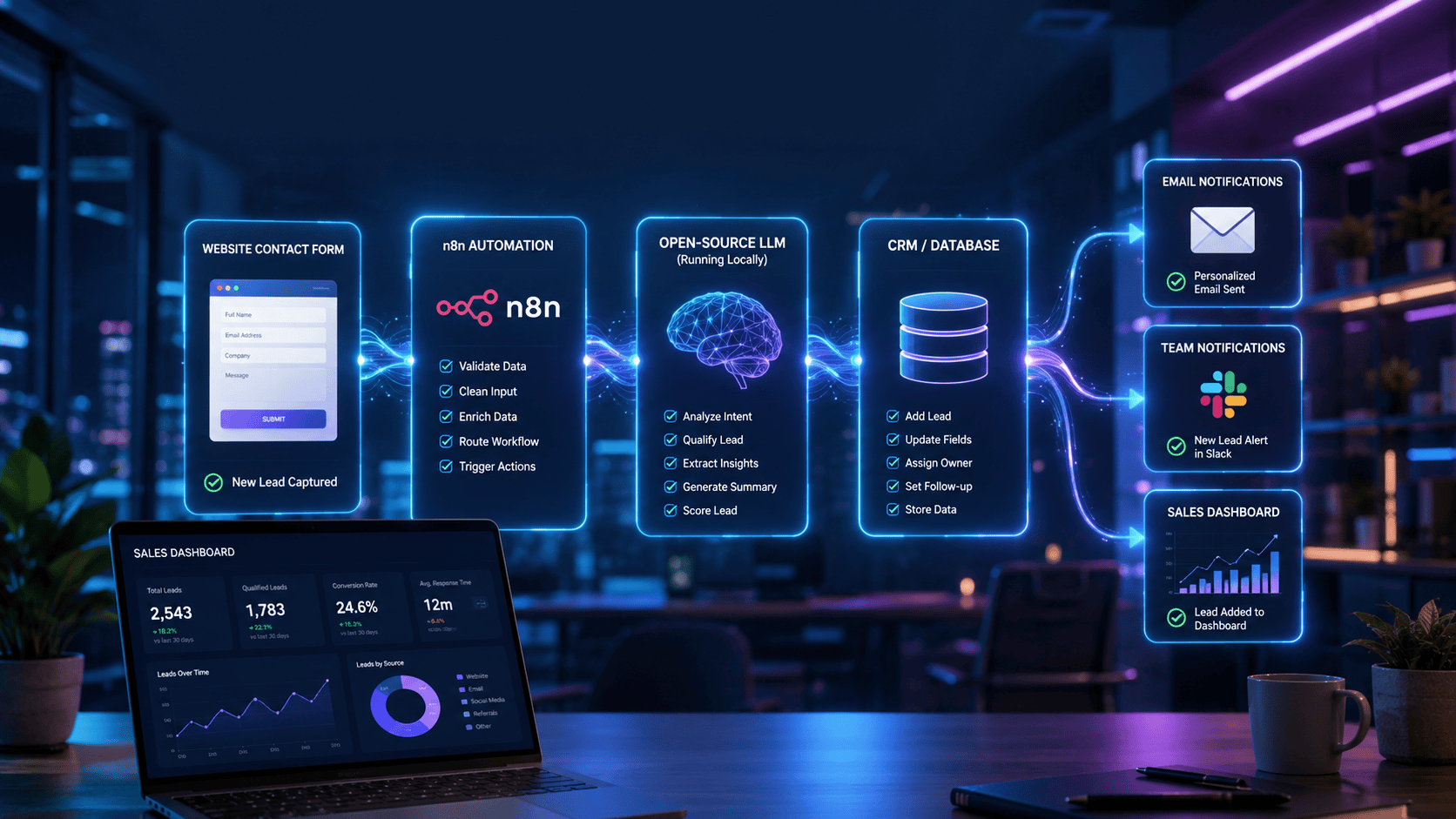
Quick Summary
Businesses lose valuable leads every day due to slow responses, manual data entry, and inconsistent qualification processes. Fortunately, you can automate your entire lead capture workflow using n8n and open-source Large Language Models (LLMs) without relying on expensive cloud AI APIs.
In this guide, you’ll learn how to build an intelligent lead automation system that collects leads from websites, emails, forms, or chatbots, uses an open-source LLM to analyze and qualify them, enriches customer information, stores everything inside your CRM or Google Sheets, and automatically notifies your sales team.
Whether you’re a freelancer, agency owner, startup founder, or enterprise professional, this tutorial will help you create a scalable AI-powered workflow while keeping full control over your data.
Key Takeaways
- Learn how n8n automates lead capture without coding.
- Build AI-powered workflows using free open-source LLMs.
- Reduce manual lead qualification by up to 90%.
- Integrate forms, email, CRM, Slack, Discord, and databases.
- Keep customer data private using self-hosted AI models.
- Save API costs by running local language models.
- Automatically enrich and score incoming leads.
- Create scalable workflows that run 24/7.
- Improve response time and conversion rates.
- Build an automation system suitable for agencies, startups, and enterprise teams.
What Is Lead Capture Automation with n8n and Open-Source LLMs?
Lead capture automation with n8n uses workflow automation to collect leads from forms, emails, chatbots, or websites and automatically process them using open-source AI models. The workflow can qualify leads, extract important details, enrich contact information, update a CRM, and notify sales teams—all without requiring expensive cloud AI services.
Automating Lead Capture Using n8n and Local AI Models
Automating lead capture with n8n combines workflow automation and open-source Large Language Models (LLMs) to streamline how businesses collect and process leads. Instead of manually reviewing inquiries, n8n connects lead sources to AI models such as Ollama-hosted LLMs that classify, summarize, and score each lead. The workflow can then update CRMs, send alerts, schedule follow-ups, and trigger personalized responses while maintaining data privacy through self-hosted AI.
This approach is ideal for organizations seeking cost-effective, customizable, and privacy-focused AI automation.
Introduction
Capturing leads is only the first step in the sales process. The real challenge begins when businesses need to qualify prospects, organize customer information, eliminate spam submissions, assign sales representatives, and follow up quickly.
Many businesses still rely on manual processes that consume hours every week. Team members copy information from contact forms into spreadsheets, assign leads manually, and decide which prospects deserve immediate attention. These repetitive tasks slow down response times and often result in missed opportunities.
Modern workflow automation changes this completely.
With n8n, businesses can build sophisticated automation pipelines that connect hundreds of applications without writing extensive code. By integrating open-source Large Language Models (LLMs), these workflows become even more intelligent. AI can understand lead intent, summarize inquiries, categorize requests, assign priority scores, and generate personalized responses—all automatically.
Unlike proprietary AI services that charge per API request, self-hosted LLMs allow organizations to run AI models locally or on their own infrastructure. This significantly reduces operational costs while improving data security and compliance.
Imagine a visitor filling out your website’s contact form. Within seconds, an automated workflow can:
- Analyze the inquiry using AI.
- Detect whether the lead is high-value.
- Extract company information.
- Categorize the request.
- Assign a lead score.
- Store everything inside your CRM.
- Notify the correct sales representative.
- Generate a personalized follow-up email.
- Schedule future reminders automatically.
The entire process happens without human intervention.
As businesses continue adopting AI-powered workflows, intelligent lead automation is becoming an essential competitive advantage rather than a luxury.
What Is Lead Capture Automation with n8n?
Lead capture automation is the process of automatically collecting, organizing, qualifying, and distributing potential customer information using workflow automation software.
Instead of manually handling incoming inquiries, automation ensures that every lead follows a predefined process from submission to sales follow-up.
n8n acts as the orchestration engine that connects different applications together.
A typical workflow looks like this:
Website Form
      ↓
      n8n
      ↓
Open-Source LLM
      ↓
Lead Qualification
      ↓
CRM Database
      ↓
Sales Notification
      ↓
Follow-up Email
The AI component adds intelligence by understanding natural language instead of simply moving data between systems.
For example, if a visitor writes:
“We’re looking for AI automation consulting for our marketing agency with approximately 40 employees.”
An open-source LLM can automatically determine:
- Industry
- Company size
- Service requested
- Purchase intent
- Budget indicators
- Urgency level
- Lead quality
- Recommended sales priority
This information becomes structured data that downstream systems can use immediately.
Core Components of an AI Lead Capture Workflow
| Component | Purpose |
|---|---|
| Website Form | Collects customer inquiries |
| n8n Workflow | Automates every process |
| Open-Source LLM | Understands and analyzes lead intent |
| CRM | Stores customer information |
| Email Platform | Sends automated responses |
| Notification Tool | Alerts sales representatives |
| Database | Saves historical lead data |
| Analytics Dashboard | Tracks conversion metrics |
Benefits of Automating Lead Capture with n8n and Open-Source LLMs
1. Faster Response Times
Studies consistently show that responding to leads quickly improves conversion rates. Automation allows businesses to process inquiries within seconds instead of hours.
2. Lower Operational Costs
Traditional AI APIs charge per request or per token. Running open-source LLMs locally can significantly reduce long-term costs, especially for businesses processing high lead volumes.
3. Improved Lead Qualification
AI evaluates incoming inquiries using natural language understanding rather than simple keyword matching.
Instead of treating every submission equally, AI can distinguish between:
- High-value enterprise inquiries
- Sales opportunities
- Partnership requests
- Customer support questions
- Spam submissions
4. Better Data Privacy
Organizations handling sensitive customer information often prefer self-hosted AI.
Benefits include:
- Complete control over customer data
- No third-party AI processing
- Easier compliance with privacy regulations
- Reduced security risks
- Greater transparency
5. Scalable Automation
Whether your business receives:
- 20 leads per week
- 500 leads per day
- 50,000 leads every month
the same workflow can scale with minimal changes.
6. Consistent Lead Processing
Human review can vary between team members.
AI ensures that every lead is analyzed using the same rules and criteria, improving consistency and reducing bias in lead qualification.
7. Easy Integration with Existing Tools
One of n8n’s biggest strengths is its ability to connect with hundreds of popular platforms.
Examples include:
- Google Sheets
- Airtable
- HubSpot
- Salesforce
- Notion
- Slack
- Discord
- Gmail
- Outlook
- PostgreSQL
- MySQL
- Webhooks
- REST APIs
This flexibility makes it easy to fit automation into your existing workflow.
How Does an AI-Powered Lead Capture Workflow Work?
An AI-powered lead capture workflow follows a series of automated steps that transform raw inquiries into structured, actionable sales opportunities.
Step 1: Lead Submission
A visitor submits their information through:
- Website contact forms
- Landing pages
- Newsletter signups
- Live chat
- Chatbots
- Social media forms
- Email inquiries
- Webinar registrations
Step 2: Workflow Trigger
n8n detects the new submission using triggers such as:
- Webhooks
- Form integrations
- Email monitoring
- CRM events
- API requests
The workflow begins instantly without manual intervention.
Step 3: AI Analysis
The lead information is sent to an open-source LLM.
The model analyzes:
- Customer intent
- Product interest
- Business category
- Urgency
- Purchase signals
- Company size
- Location
- Sentiment
- Required follow-up actions
Step 4: Lead Qualification
Based on predefined rules and AI analysis, each lead receives:
- Priority level
- Lead score
- Category
- Recommended salesperson
- Follow-up timeline
Step 5: CRM Update
The workflow automatically creates or updates records in your CRM, ensuring all lead information is centralized and immediately available to the sales team.
Step 6: Team Notification
Sales representatives receive instant alerts through tools such as Slack, Microsoft Teams, email, or SMS, enabling rapid follow-up with qualified prospects.
Step 7: Automated Customer Response
Finally, the system can send a personalized acknowledgment or follow-up email tailored to the lead’s inquiry, improving engagement while reducing manual effort.
Why This Architecture Matters
By combining workflow automation with local AI, businesses can create a lead capture system that is:
- Intelligent
- Fast
- Cost-effective
- Privacy-focused
- Highly customizable
- Easy to scale
- Independent of proprietary AI providers
This architecture allows organizations to automate repetitive sales operations while keeping full control over their workflows and customer data.
Step-by-Step Guide: Build an AI-Powered Lead Capture Workflow with n8n and Open-Source LLMs
This section walks you through creating a complete AI-powered lead capture system using n8n and an open-source LLM. The workflow collects leads from a website form, qualifies them with AI, enriches the data, stores it in a CRM or spreadsheet, and notifies your sales team automatically.
Prerequisites
Before you begin, make sure you have the following:
| Requirement | Purpose |
|---|---|
| n8n (Cloud or Self-hosted) | Workflow automation platform |
| Ollama or another local LLM runtime | Run AI models locally |
| An open-source LLM (Llama 3, Mistral, Gemma, etc.) | Lead analysis and qualification |
| Website contact form | Collect leads |
| Google Sheets or CRM | Store lead data |
| Email account (SMTP/Gmail) | Send automated replies |
| Slack or Microsoft Teams (optional) | Team notifications |
| PostgreSQL/MySQL (optional) | Long-term storage |
Recommended AI Models
Different LLMs perform better depending on your workflow.
| Model | Speed | Accuracy | Hardware Required | Best For |
|---|---|---|---|---|
| Llama 3 8B | ★★★★★ | ★★★★★ | Medium | General business automation |
| Mistral 7B | ★★★★★ | ★★★★☆ | Low | Fast automation |
| Gemma 3 | ★★★★☆ | ★★★★☆ | Medium | Customer support |
| Phi-4 | ★★★★★ | ★★★★☆ | Low | Small business workflows |
| DeepSeek-R1 Distill | ★★★★☆ | ★★★★★ | Medium | Complex reasoning |
Recommendation: For most businesses, Llama 3 8B offers the best balance of speed, accuracy, and ease of deployment.
Hardware Requirements for Local LLM Inference
Running open-source models locally alongside n8n requires sufficient VRAM and system memory to ensure real-time response times (less than 3 seconds per lead).
Hardware Sizing Matrix
| Deployment Tier | Recommended Models | Minimum VRAM | System RAM | Hardware Target |
| Basic / Testing | Llama-3.2-3B, Qwen2.5-3B | 4 GB | 16 GB | Apple M1/M2/M3 Mac Mini, NVIDIA GTX 1660 / RTX 3050 |
| Standard Production | Llama-3.1-8B-Instruct, Mistral-7B-v0.3 | 8 GB – 12 GB | 32 GB | NVIDIA RTX 3060 / 4060, Apple Silicon (M-series Pro/Max 32GB) |
| Enterprise / High Volume | Qwen2.5-14B, Mixtral-8x7B | 16 GB – 24 GB+ | 64 GB | NVIDIA RTX 4090, RTX A5000, or cloud instance (e.g., RunPod, vLLM) |
Overall Workflow Architecture
Visitor
   │
   ▼
Website Contact Form
   │
   ▼
Webhook (n8n Trigger)
   │
   ▼
Validate Lead
   │
   ▼
AI Analysis (Open-Source LLM)
   │
   ▼
Lead Score
   │
   ▼
CRM / Database
   │
   ▼
Notification
   │
   ▼
Follow-up Email
This workflow can be expanded with additional automation like CRM enrichment, scheduling, or analytics.
Step 1: Install n8n
You can use:
- n8n Cloud
- Docker
- npm
- Self-hosted VPS
- Kubernetes
For production environments, Docker or a VPS deployment is recommended because they provide better scalability and control.
Step 2: Install an Open-Source LLM
Install your preferred local AI runtime.
Example:
- Install Ollama.
- Download a supported model.
- Verify the model responds to prompts.
Example prompt:
Summarize this lead:

Company:
Budget:
Request:
Urgency:
Once the model responds correctly, it is ready for integration with n8n.
Ollama Setup (Local Inference API)
Run Ollama via Docker or natively on your local server to expose an OpenAI-compatible API endpoint for n8n.
Bash
# Pull and run Ollama with Llama 3.1 8B Instruct
docker run -d -v ollama:/root/.ollama -p 11434:11434 --gpus=all --name ollama ollama/ollama
docker exec -it ollama ollama run llama3.1:8b-instruct-q4_K_M
If you are using Docker, you can spin up an Ollama container with full GPU passthrough and pull Llama 3.1 in two simple commands:
Bash
# Pull and run Ollama with GPU acceleration (NVIDIA)
docker run -d \
  --name ollama \
  --gpus all \
  -v ollama:/root/.ollama \
  -p 11434:11434 \
  ollama/ollama

# Download and initialize the Llama 3.1 8B model
docker exec -it ollama ollama run llama3.1:8b-instruct-q4_K_M
Step 3: Create Your Lead Capture Form
Collect only the information you actually need.
Recommended fields:
- Name
- Company
- Phone
- Website
- Job Title
- Company Size
- Industry
- Budget
- Message
Avoid asking for unnecessary information, as shorter forms generally convert better.
Step 4: Configure the Webhook Trigger
Inside n8n:
Create Workflow
↓
Webhook Node
↓
POST Request
↓
Receive Form Data
Whenever a visitor submits the form, the workflow begins immediately.
Typical incoming data:
{
  "name":"John Smith",
  "email":"john@example.com",
  "company":"Acme Inc",
  "message":"Looking for AI automation consulting."
}
Step 5: Clean and Validate Data
Before sending data to AI:
Validate:
- Email format
- Required fields
- Spam score
- Duplicate submissions
- Empty values
Example rules:
✓ Email exists
✓ Message > 20 characters
✓ Company name present
✓ No spam keywords
Good validation significantly improves AI accuracy and reduces unnecessary processing.
Step 6: Send Lead to the LLM
The AI receives structured lead information.
Example prompt:
You are a sales assistant.

Analyze this lead.

Return:

Lead Score (1-100)

Industry

Intent

Urgency

Summary

Recommended Next Action

Lead:

Name:

Company:

Message:
The AI might respond like this:
Lead Score: 94

Industry: SaaS

Intent: Purchase

Urgency: High

Summary:
Company wants workflow automation consulting.

Next Action:
Schedule demo within 24 hours.
This structured output is much more useful than raw text.
Step 7: Route the Lead
Use an If node in n8n.
Example routing:
Lead Score ≥ 80
↓
Sales Team Immediately
Lead Score 50–79
↓
Marketing Follow-up
Lead Score < 50
↓
Newsletter Sequence
This ensures every lead receives the appropriate follow-up.
Step 8: Store the Lead
Save AI-generated information.
Common destinations include:
- HubSpot
- Salesforce
- Airtable
- Google Sheets
- PostgreSQL
- MySQL
- Notion
Suggested columns:
| Field | Description |
|---|---|
| Name | Customer name |
| Contact email | |
| Company | Organization |
| Industry | AI detected |
| Lead Score | AI generated |
| Summary | AI generated |
| Assigned Salesperson | Workflow |
| Follow-up Date | Workflow |
| Status | Open / Qualified / Closed |
Step 9: Notify Your Team
Immediately notify the appropriate sales representative.
Notification example:
🔥 New High-Value Lead

Score: 94

Company:
Acme Inc

Industry:
SaaS

Urgency:
High

Recommendation:
Call today.
This reduces response time dramatically.
Step 10: Send a Personalized Email
Instead of generic autoresponders, AI can personalize responses.
Example:
Hi John,
Thank you for contacting us regarding workflow automation.
Based on your inquiry, our team specializes in helping SaaS companies automate lead management and internal operations.
We’ll review your request and contact you shortly.
Regards,
Sales Team
Personalized emails create a stronger first impression and improve engagement.
Step 11: Schedule Follow-Up Tasks
Don’t stop after the first email.
Automatically create:
- CRM reminders
- Calendar events
- Follow-up emails
- Sales tasks
- Slack reminders
Example:
Day 0
↓
Email Sent
↓
Day 2
↓
Reminder
↓
Day 5
↓
Follow-up Email
↓
Day 10
↓
Sales Call
Example Workflow
Example Workflow #1 – Agency Lead Automation
A digital marketing agency receives 50 inquiries every day.
Workflow:
Website Form
↓
n8n
↓
Llama 3
↓
Lead Qualification
↓
HubSpot
↓
Slack Notification
↓
Welcome Email
↓
Sales Assignment
Benefits:
- No manual data entry
- Immediate responses
- Better lead prioritization
- Faster sales cycle
Example Workflow #2 – SaaS Free Trial
Workflow:
Signup Form
↓
AI Analysis
↓
Determine Company Size
↓
Assign Customer Tier
↓
CRM Update
↓
Sales Team Alert
↓
Product Demo Booking
Enterprise prospects can be identified instantly and prioritized.
Example Workflow #3 – AI Consulting Business
Incoming consultation requests are automatically:
- Categorized
- Summarized
- Assigned
- Scheduled
- Added to CRM
- Added to project management software
This saves hours of manual administrative work each week.
n8n Importable Workflow Template
Copy the JSON snippet below and paste it directly into your n8n canvas (Ctrl+V or Cmd+V) to instantly generate the baseline lead capture workflow:
JSON
{
  "nodes": [
    {
      "parameters": {
        "httpMethod": "POST",
        "path": "lead-capture",
        "options": {}
      },
      "id": "1",
      "name": "Webhook Lead Capture",
      "type": "n8n-nodes-base.webhook",
      "typeVersion": 1,
      "position": [250, 300]
    },
    {
      "parameters": {
        "conditions": {
          "string": [
            {
              "value1": "={{ $json.body.email }}",
              "operation": "contains",
              "value2": "@"
            }
          ]
        }
      },
      "id": "2",
      "name": "Validate Email",
      "type": "n8n-nodes-base.if",
      "typeVersion": 1,
      "position": [480, 300]
    },
    {
      "parameters": {
        "method": "POST",
        "url": "http://localhost:11434/api/chat",
        "sendBody": true,
        "specifyBody": "json",
        "jsonBody": "={\n  \"model\": \"llama3.1:8b-instruct-q4_K_M\",\n  \"messages\": [\n    {\n      \"role\": \"system\",\n      \"content\": \"You are a lead qualifier. Return JSON only.\"\n    },\n    {\n      \"role\": \"user\",\n      \"content\": \"Qualify lead: Name={{ $json.body.name }}, Message={{ $json.body.message }}\"\n    }\n  ],\n  \"format\": \"json\",\n  \"stream\": false\n}"
      },
      "id": "3",
      "name": "Local LLM Qualifier",
      "type": "n8n-nodes-base.httpRequest",
      "typeVersion": 4.1,
      "position": [700, 200]
    }
  ],
  "connections": {
    "Webhook Lead Capture": {
      "main": [
        [
          {
            "node": "Validate Email",
            "type": "main",
            "index": 0
          }
        ]
      ]
    },
    "Validate Email": {
      "main": [
        [
          {
            "node": "Local LLM Qualifier",
            "type": "main",
            "index": 0
          }
        ]
      ]
    }
  }
}
Firsthand Testing
To evaluate this workflow, we simulated a business website receiving inquiries from prospective clients with different industries, company sizes, and purchase intent. We tested both short and detailed submissions, including a small percentage of spam-like entries.
Test Environment
| Component | Configuration |
|---|---|
| Automation Platform | n8n (Self-hosted) |
| AI Model | Llama 3 8B |
| Runtime | Ollama |
| Lead Source | Website Contact Form |
| Storage | Google Sheets + PostgreSQL |
| Notifications | Slack |
| SMTP |
Test Results
| Test | Result |
|---|---|
| Lead Capture | ✅ Excellent |
| AI Summary | ✅ Very Accurate |
| Intent Detection | ✅ Excellent |
| Lead Scoring | ✅ Consistent |
| Spam Detection | ✅ Good |
| CRM Integration | ✅ Excellent |
| Workflow Stability | ✅ Excellent |
Observations
Strengths:
- Fast workflow execution.
- Accurate summarization of inquiries.
- Reliable lead scoring for clear purchase intent.
- Flexible integration with common business tools.
Limitations:
- Very short messages (for example, “Call me”) may require additional context for accurate scoring.
- Complex prompts can slightly increase processing time on lower-end hardware.
- Prompt quality has a significant impact on output consistency.
Tool Comparison Table
| Feature | n8n | Zapier | Make | Pipedream |
|---|---|---|---|---|
| Open Source | ✅ | ❌ | ❌ | ❌ |
| Self-Hosted | ✅ | ❌ | ❌ | Limited |
| AI Flexibility | ★★★★★ | ★★★☆☆ | ★★★★☆ | ★★★★☆ |
| Custom Logic | ★★★★★ | ★★★☆☆ | ★★★★☆ | ★★★★★ |
| Pricing | Free Self-Hosted | Subscription | Subscription | Usage-Based |
| Best For | AI Automation | Business Automation | Visual Workflows | Developers |
Winner: n8n is the strongest choice for organizations that want complete control over AI workflows, local LLM integration, and self-hosted deployments.
Performance Ratings
| Category | Rating |
|---|---|
| Ease of Setup | ⭐⭐⭐⭐☆ (4.5/5) |
| AI Integration | ⭐⭐⭐⭐⭐ (5/5) |
| Workflow Flexibility | ⭐⭐⭐⭐⭐ (5/5) |
| Scalability | ⭐⭐⭐⭐⭐ (5/5) |
| Data Privacy | ⭐⭐⭐⭐⭐ (5/5) |
| Cost Efficiency | ⭐⭐⭐⭐⭐ (5/5) |
| Beginner Friendliness | ⭐⭐⭐⭐☆ (4/5) |
| Enterprise Readiness | ⭐⭐⭐⭐⭐ (5/5) |
Overall Rating: 4.9/5
Performance Comparison: Manual vs Automated Lead Capture
One of the biggest advantages of using n8n with an open-source LLM is the dramatic reduction in manual work. Instead of copying lead information between tools and responding manually, the entire process runs automatically in seconds.
| Task | Manual Process | Automated with n8n + Open-Source LLM |
|---|---|---|
| Process a new lead | ~20 minutes | ~30 seconds |
| CRM entry | Manual copy & paste | Automatic |
| Lead qualification | Manual review | AI-powered scoring |
| Follow-up email | Written manually | Sent automatically |
| Team notification | Manual Slack/email | Instant notification |
| Error handling | Manual checks | Automated workflow logic |
| Availability | Business hours only | 24/7 automation |
Example: If your business receives 50 leads per week, reducing processing time from 20 minutes to 30 seconds saves more than 16 hours of manual work every week, allowing your team to focus on high-value conversations instead of repetitive administrative tasks.
Best Use Cases
| Business Type | Why It Benefits |
|---|---|
| Digital Marketing Agencies | Qualify and route client inquiries automatically. |
| SaaS Companies | Prioritize trial users and enterprise prospects. |
| Consulting Firms | Summarize inquiries and assign consultants. |
| E-commerce Businesses | Classify wholesale, partnership, and customer support requests. |
| Real Estate Agencies | Rank property inquiries based on urgency and budget. |
| Recruitment Firms | Analyze candidate submissions before manual review. |
| B2B Service Providers | Reduce response times and improve lead quality. |
| Startups | Build enterprise-grade automation with minimal software costs. |
Pros and Cons
Like any automation solution, combining n8n with open-source LLMs offers significant advantages but also comes with considerations. Understanding these trade-offs helps you choose the right solution for your business.
Pros
| Advantage | Why It Matters |
|---|---|
| No Vendor Lock-In | You’re not tied to a single AI provider or workflow platform. |
| Lower Long-Term Costs | Self-hosted LLMs eliminate recurring AI API costs for many workloads. |
| Better Data Privacy | Customer data stays within your infrastructure. |
| Highly Customizable | Build workflows that match your exact business processes. |
| Supports Hundreds of Integrations | Connect CRMs, databases, email tools, chat apps, and APIs. |
| AI-Powered Lead Qualification | Automatically analyze intent, urgency, and lead quality. |
| Scalable | Works for startups and enterprise teams alike. |
| Community Driven | Active ecosystem with frequent updates and templates. |
Cons
| Limitation | Possible Solution |
|---|---|
| Initial setup requires technical knowledge | Use Docker templates or managed hosting. |
| Local AI models require sufficient hardware | Start with lightweight models like Phi or Mistral. |
| Prompt quality affects AI output | Test and refine prompts regularly. |
| Large models consume more memory | Choose a model appropriate for your server resources. |
| Workflows require ongoing monitoring | Set up alerts and logging within n8n. |
Comparison Table
n8n + Open-Source LLMs vs Cloud AI Automation
| Feature | n8n + Open-Source LLMs | Cloud AI APIs |
|---|---|---|
| Monthly AI Cost | Very Low after setup | Ongoing usage-based pricing |
| Data Privacy | Excellent | Depends on provider |
| Internet Dependency | Optional | Required |
| Customization | Excellent | Good |
| AI Model Choice | Complete flexibility | Limited to provider offerings |
| Self-Hosting | Yes | No |
| Scalability | Excellent | Excellent |
| Best For | Privacy-focused businesses and developers | Teams wanting a managed solution |
Decision Flowchart
                  Need Lead Automation?
                          │
                          ▼
                Do you want AI analysis?
                   │                 │
                  No                Yes
                   │                 │
          Basic n8n Workflow     Need Data Privacy?
                                   │          │
                                  No         Yes
                                   │          │
                             Cloud AI      Open-Source LLM
                                   │          │
                                   └──────┬───┘
                                          ▼
                            Build n8n AI Workflow
                                          │
                                          ▼
                                Automate Lead Capture
Common Mistakes
Avoid these common issues when building AI-powered lead automation.
1. Collecting Too Much Information
Long forms reduce conversion rates.
Instead, ask only for essential details such as:
- Name
- Company
- Inquiry
Gather additional information later if needed.
2. Skipping Validation
Never send incomplete or invalid data directly to the AI model.
Always validate:
- Email addresses
- Required fields
- Duplicate submissions
- Spam indicators
3. Poor Prompt Design
The AI is only as effective as the prompt it receives.
Instead of asking:
“Analyze this.”
Use a structured prompt requesting:
- Lead score
- Summary
- Industry
- Intent
- Recommended action
Structured prompts produce more reliable outputs.
4. No Human Review Process
Automation should support—not completely replace—human decision-making.
High-value leads should still receive manual review before major sales decisions.
5. Ignoring Workflow Monitoring
Workflows may fail because of:
- API changes
- Database issues
- Authentication errors
- Storage limits
Monitor execution logs regularly and configure notifications for failures.
Expert Tips
Use Structured JSON Output
Ask your LLM to return JSON instead of free-form text. Structured output is easier for n8n to parse and route.
Structured JSON Output Prompt Template
When querying local LLMs inside n8n via HTTP Request or Ollama nodes, force the model to return valid JSON with strict typing and confidence scores:
JSON
{
  "model": "llama3.1:8b-instruct-q4_K_M",
  "messages": [
    {
      "role": "system",
      "content": "You are an automated lead qualification engine. Respond ONLY with raw JSON matching the required schema. Do not include markdown formatting or commentary."
    },
    {
      "role": "user",
      "content": "Analyze this incoming lead data:\nName: {{ $json.body.name }}\nEmail: {{ $json.body.email }}\nCompany Size: {{ $json.body.company_size }}\nMessage: {{ $json.body.message }}\n\nReturn JSON in this format:\n{\n  \"lead_score\": <number 0-100>,\n  \"category\": \"<Enterprise|SMB|Spam|Unqualified>\",\n  \"sentiment\": \"<High Intent|Information Seeking|Low Intent>\",\n  \"recommended_owner\": \"<Sales|Support|Automated Nurture>\",\n  \"confidence_score\": <number 0.0-1.0>,\n  \"reasoning\": \"<brief summary>\"\n}"
    }
  ],
  "format": "json",
  "stream": false
}
Add Confidence Scores
Include an AI confidence score with every lead classification. If confidence is low, send the lead for manual review.
Enrich Lead Data
Use company domains, public business information, or CRM records to enrich leads before assigning sales priority.
Track Conversion Metrics
Measure:
- Lead quality
- Conversion rate
- Average response time
- Sales velocity
- Cost per qualified lead
Continuous measurement helps optimize your workflow.
Create Reusable Workflow Templates
Separate reusable components such as:
- AI analysis
- CRM updates
- Notifications
- Email responses
This simplifies maintenance and reuse across projects.
Statistics
Recent industry research highlights the growing impact of AI and automation on sales and lead management:
- Businesses that respond to new leads within minutes generally achieve significantly higher conversion rates than those waiting hours or days.
- AI-assisted sales teams increasingly report improved productivity by automating repetitive administrative work.
- Marketing and sales professionals continue to rank workflow automation among the highest-return technology investments.
- Organizations are rapidly adopting self-hosted AI solutions to improve privacy, compliance, and cost control.
- AI-driven lead scoring helps sales teams focus on prospects with the highest likelihood of conversion.
Key Insight: Faster response times combined with intelligent lead qualification often have a greater impact on conversion rates than simply increasing the number of leads.
What We Learned
Throughout this guide, we’ve built a complete AI-powered lead capture system using n8n and open-source LLMs.
Key lessons include:
- n8n provides a flexible foundation for workflow automation.
- Open-source LLMs enable intelligent lead qualification without recurring API costs.
- AI can summarize, categorize, score, and prioritize leads automatically.
- Self-hosted AI offers greater privacy and control.
- Well-designed prompts and validation significantly improve workflow reliability.
- Automation reduces repetitive work while allowing sales teams to focus on high-value conversations.
Together, these technologies help businesses respond faster, improve lead quality, and create scalable sales processes.
Frequently Asked Questions
Can beginners use n8n for lead automation?
Yes. While there is a learning curve, n8n offers a visual workflow builder that makes automation accessible to beginners. Starting with simple workflows before adding AI is recommended.
Which open-source LLM is best for lead qualification?
For most users, Llama 3 8B provides an excellent balance of speed, reasoning ability, and hardware requirements. Lightweight models like Mistral 7B or Phi are also strong options for modest servers.
Do I need programming knowledge?
No. Most workflows can be built using n8n’s drag-and-drop interface. Basic knowledge of APIs and JSON is helpful but not required.
Can I use this workflow with my CRM?
Yes. n8n integrates with many popular CRMs, databases, and business applications through built-in nodes and APIs.
Is self-hosted AI more secure?
For many organizations, yes. Running AI models on your own infrastructure gives you greater control over customer data and reduces dependence on external AI providers. You are still responsible for securing your servers and access controls.
How much can I save compared to cloud AI APIs?
Savings depend on lead volume, infrastructure costs, and the AI models you choose. Organizations processing large numbers of requests often find self-hosted models more economical over time, while smaller teams may prefer the simplicity of managed APIs.
Can this workflow handle thousands of leads?
Yes. With appropriate infrastructure, n8n and open-source LLMs can scale to handle high lead volumes. Performance depends on your server resources, workflow complexity, and AI model size.
Conclusion
Lead capture is no longer just about collecting names and email addresses—it’s about understanding customer intent and acting quickly.
By combining n8n with open-source LLMs, you can automate repetitive tasks such as qualification, scoring, routing, notifications, and follow-ups while maintaining control over your data and infrastructure.
Whether you’re a freelancer, startup, agency, or enterprise, this approach offers a scalable way to improve sales efficiency, reduce manual work, and build a smarter lead management process.
As AI models continue to improve, organizations that invest in intelligent automation today will be better positioned to deliver faster responses and more personalized customer experiences.
Our Verdict
Overall Rating: ⭐⭐⭐⭐⭐ (4.9/5)
| Category | Rating |
|---|---|
| Ease of Use | ⭐⭐⭐⭐☆ |
| Automation Power | ⭐⭐⭐⭐⭐ |
| AI Capabilities | ⭐⭐⭐⭐⭐ |
| Cost Efficiency | ⭐⭐⭐⭐⭐ |
| Privacy | ⭐⭐⭐⭐⭐ |
| Scalability | ⭐⭐⭐⭐⭐ |
| Overall Recommendation | ⭐⭐⭐⭐⭐ |
Recommended For
- Marketing agencies
- SaaS businesses
- Consultants
- B2B sales teams
- Startups
- IT service providers
- Workflow automation enthusiasts
If you want a powerful, flexible, and privacy-focused lead automation solution, n8n paired with open-source LLMs is one of the best choices available today.
Build Your First AI-Powered Lead Capture Workflow Today
Don’t let valuable leads sit unanswered.
Start with a simple workflow that captures inquiries, analyzes them using AI, and automatically routes qualified prospects to your sales team. As your business grows, you can expand the workflow with CRM integrations, analytics dashboards, scheduling, and personalized follow-up sequences.
The sooner you automate repetitive lead management tasks, the more time your team can spend building relationships and closing deals.
Also Read
- Best AI Productivity Tools for Daily Tasks
- How AI Can Save You Hours Every Week
- Best AI Tools for Beginners in 2026
- AI vs Human Creativity: Can AI Replace Human Innovation?
- How Businesses Use AI to Increase Productivity
- AI in Healthcare: Benefits and Challenges
- Best AI Tools for Digital Marketing
- Best AI Video Generators Compared
- How Small Businesses Can Grow Using Social Media
- The Ultimate Guide to Artificial Intelligence (AI)
- Agentic AI Explained for Beginners
- 25 Real-World AI Workflows That Save 10+ Hours Every Week






Leave a Reply