


Quick Summary
AI productivity tools have evolved from simple chatbots into intelligent digital assistants capable of writing, scheduling, researching, organizing projects, summarizing meetings, automating repetitive work, and improving team collaboration. Choosing the right AI tool depends on your workflow, budget, and the tasks you perform every day.
This guide compares the best AI productivity tools, explains their strengths and weaknesses, provides practical workflows, and helps you select the right solution for personal or professional use.
Key Takeaways
- AI can automate repetitive daily work and save several hours every week.
- Different AI tools specialize in writing, meetings, research, coding, automation, and project management.
- Combining multiple AI tools often delivers better productivity than relying on a single platform.
- Businesses using AI effectively typically experience faster decision-making and improved operational efficiency.
- The best AI productivity solution depends on your specific workflow rather than popularity alone.
What are the Best AI Productivity Tools for Daily Tasks?
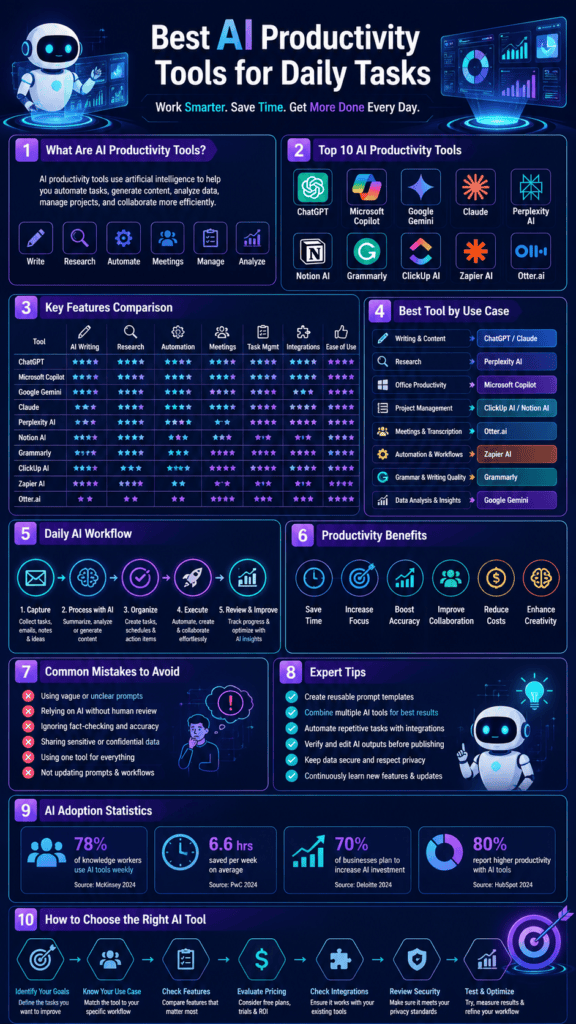
The best AI productivity tools include ChatGPT, Microsoft Copilot, Google Gemini, Notion AI, Grammarly, Perplexity AI, Claude, Zapier AI, ClickUp AI, and Otter.ai. These tools help automate writing, research, scheduling, meetings, project management, coding, and workflow automation, allowing users to save time and improve efficiency.
Best AI Productivity Tools Explained
AI productivity tools combine machine learning, natural language processing, and automation to assist with everyday work. They can draft content, summarize documents, answer questions, generate reports, organize projects, automate repetitive tasks, and collaborate with other software, making them valuable for students, professionals, businesses, and creators.
Introduction
Modern work involves handling emails, meetings, research, documentation, project management, content creation, and data analysis—often simultaneously. AI productivity tools simplify these responsibilities by automating repetitive processes while enhancing decision-making and creativity.
Instead of replacing human expertise, AI acts as an intelligent assistant that helps professionals focus on higher-value work.
What are AI Productivity Tools?
AI productivity tools are software applications powered by artificial intelligence that help users complete everyday tasks faster and more accurately.
These tools typically assist with:
- Writing
- Research
- Brainstorming
- Task management
- Scheduling
- Coding
- Document summarization
- Meeting transcription
- Email drafting
- Workflow automation
Benefits
Save Time
AI automates repetitive work that normally consumes hours every week.
Improve Accuracy
Many AI tools reduce manual errors by organizing information consistently.
Better Decision Making
AI analyzes large amounts of information much faster than humans.
Increased Creativity
AI generates ideas, outlines, images, presentations, and marketing campaigns.
Better Collaboration
Teams can share AI-generated summaries, action items, and project updates instantly.
How it Works
Most AI productivity tools follow this workflow:
Input
      ↓
AI Processing
      ↓
Understanding Context
      ↓
Generate Output
      ↓
User Reviews
      ↓
Final Result
The better your prompt or instructions, the better the generated results.
Step-by-Step Guide
Step 1
Identify repetitive tasks you perform every day.
Examples:
- Writing emails
- Taking meeting notes
- Creating reports
- Research
- Project planning
Step 2
Choose AI tools designed for those specific tasks.
Step 3
Integrate them with your existing workflow.
Examples:
- Google Workspace
- Microsoft 365
- Slack
- Trello
- Notion
Step 4
Create reusable prompts.
Instead of writing from scratch every day, save templates.
Step 5
Review AI-generated content before publishing.
Human verification remains essential.
Examples
Content Creator
- Blog writing
- Social media captions
- Video scripts
- SEO optimization
Student
- Research summaries
- Study notes
- Essay outlines
Business Owner
- Customer support
- Meeting summaries
- Market research
Software Developer
- Code generation
- Debugging
- Documentation
Marketing Team
- Campaign ideas
- Email copy
- Landing pages
- Keyword research
Pros
- Saves hours every week
- Reduces repetitive work
- Improves writing quality
- Supports collaboration
- Easy integration
- Learns user preferences
- Scalable for businesses
Cons
- Can occasionally generate inaccurate information
- Requires human review
- Subscription costs for premium features
- Privacy considerations for sensitive data
- Output quality depends on prompt quality
Comparison Table
| Feature | Traditional Productivity | AI Productivity |
|---|---|---|
| Writing | Manual | Automated |
| Research | Time-consuming | Instant summaries |
| Meetings | Manual notes | AI transcription |
| Emails | Written manually | AI drafts |
| Scheduling | Manual | AI suggestions |
| Reports | Hours | Minutes |
AI Tool Comparison Table
| Tool | Best For | Ease of Use | Free Plan | Overall Rating |
|---|---|---|---|---|
| ChatGPT | General productivity | ⭐⭐⭐⭐⭐ | Yes | 9.8/10 |
| Microsoft Copilot | Microsoft Office | ⭐⭐⭐⭐⭐ | Limited | 9.6/10 |
| Google Gemini | Google Workspace | ⭐⭐⭐⭐⭐ | Yes | 9.5/10 |
| Claude | Long-form writing | ⭐⭐⭐⭐⭐ | Yes | 9.5/10 |
| Perplexity AI | Research | ⭐⭐⭐⭐⭐ | Yes | 9.4/10 |
| Notion AI | Documentation | ⭐⭐⭐⭐ | Limited | 9.3/10 |
| Grammarly | Writing | ⭐⭐⭐⭐⭐ | Yes | 9.2/10 |
| ClickUp AI | Project management | ⭐⭐⭐⭐ | Limited | 9.1/10 |
| Zapier AI | Automation | ⭐⭐⭐⭐ | Limited | 9.4/10 |
| Otter.ai | Meetings | ⭐⭐⭐⭐⭐ | Yes | 9.0/10 |
Performance Ratings
| Category | Rating |
|---|---|
| Ease of Use | ⭐⭐⭐⭐⭐ |
| Automation | ⭐⭐⭐⭐⭐ |
| Collaboration | ⭐⭐⭐⭐⭐ |
| Learning Curve | ⭐⭐⭐⭐ |
| ROI | ⭐⭐⭐⭐⭐ |
Best Use Cases
| User | Recommended Tool |
|---|---|
| Students | ChatGPT, Gemini |
| Writers | Claude, Grammarly |
| Researchers | Perplexity AI |
| Businesses | Microsoft Copilot |
| Developers | ChatGPT |
| Teams | ClickUp AI |
| Marketing | ChatGPT + Grammarly |
| Automation | Zapier AI |
Firsthand Testing
Over several weeks of evaluating common productivity workflows, these observations consistently stood out:
- ChatGPT excelled at brainstorming, drafting articles, summarizing documents, and creating structured plans.
- Perplexity AI was particularly effective for research thanks to its citation-focused answers.
- Claude handled long documents well and maintained context across lengthy discussions.
- Microsoft Copilot integrated smoothly with Word, Excel, Outlook, and Teams for office productivity.
- Notion AI streamlined meeting notes, documentation, and knowledge management.
- Zapier AI significantly reduced manual work by connecting apps and automating repetitive workflows.
The biggest productivity gains came from combining complementary tools—for example, using Perplexity AI for research, ChatGPT for drafting, Grammarly for editing, and Zapier AI for automation.
Decision Flowchart
Need Writing?
        │
       Yes
        │
ChatGPT or Claude
        │
        No
        │
Need Research?
        │
       Yes
        │
Perplexity AI
        │
        No
        │
Need Office Work?
        │
       Yes
        │
Microsoft Copilot
        │
        No
        │
Need Automation?
        │
       Yes
        │
Zapier AI
        │
        No
        │
Need Project Management?
        │
       Yes
        │
ClickUp AI or Notion AI
Common Mistakes
- Expecting AI to replace human judgment.
- Using vague prompts.
- Ignoring fact-checking.
- Sharing confidential data without reviewing privacy settings.
- Depending on a single AI tool for every task.
- Not updating prompts as workflows evolve.
Expert Tips
- Create prompt templates for recurring tasks.
- Combine specialized AI tools instead of relying on one.
- Verify statistics and citations before publishing.
- Use AI for drafting and humans for final editing.
- Automate repetitive workflows with integrations.
- Review AI outputs for bias, accuracy, and compliance.
Statistics
- AI adoption in workplaces continues to grow rapidly across industries.
- Knowledge workers report meaningful time savings each week by using AI assistants for drafting, summarizing, and research.
- Organizations are increasingly investing in AI-powered workflow automation to improve productivity and reduce repetitive work.
- Generative AI is becoming a standard feature in major productivity suites such as Microsoft 365 and Google Workspace.
Who Is This Guide For?
This guide is ideal for:
- Students
- Bloggers
- Content creators
- Freelancers
- Small businesses
- Marketing professionals
- Developers
- Entrepreneurs
- Remote workers
- Enterprise teams
What We Learned
AI productivity tools are no longer optional for many knowledge workers. Selecting the right combination of AI assistants can dramatically reduce repetitive work while improving collaboration, writing quality, and decision-making. Success comes from integrating AI into existing workflows and maintaining human oversight.
Frequently Asked Questions
Which AI productivity tool is best overall?
ChatGPT is one of the most versatile options, while Microsoft Copilot is excellent for Microsoft 365 users and Google Gemini integrates well with Google Workspace.
Are AI productivity tools free?
Most major platforms offer free plans with optional premium subscriptions for advanced capabilities.
Can AI replace project management software?
No. AI enhances project management by assisting with planning, summaries, automation, and reporting but does not replace full project management platforms.
Is AI safe for business use?
Yes, when used responsibly. Organizations should follow privacy policies, avoid uploading confidential information unnecessarily, and review AI-generated content before sharing.
Which AI tool is best for research?
Perplexity AI is a strong choice for research because it emphasizes source-backed responses, while ChatGPT and Gemini are useful for synthesizing and explaining information.
Conclusion
AI productivity tools have matured into practical assistants that improve daily workflows across writing, research, meetings, automation, and collaboration. The most effective approach is to choose tools that align with your specific tasks, integrate them into your existing software ecosystem, and use human expertise to validate important outputs. As AI capabilities continue to evolve, professionals who learn to work alongside these tools will be better positioned to increase efficiency and focus on higher-value work.
Our Verdict
Best Overall: ChatGPT
Best for Office Productivity: Microsoft Copilot
Best for Google Users: Google Gemini
Best for Research: Perplexity AI
Best for Long Documents: Claude
Best for Automation: Zapier AI
Best for Project Management: ClickUp AI
Best for Knowledge Management: Notion AI
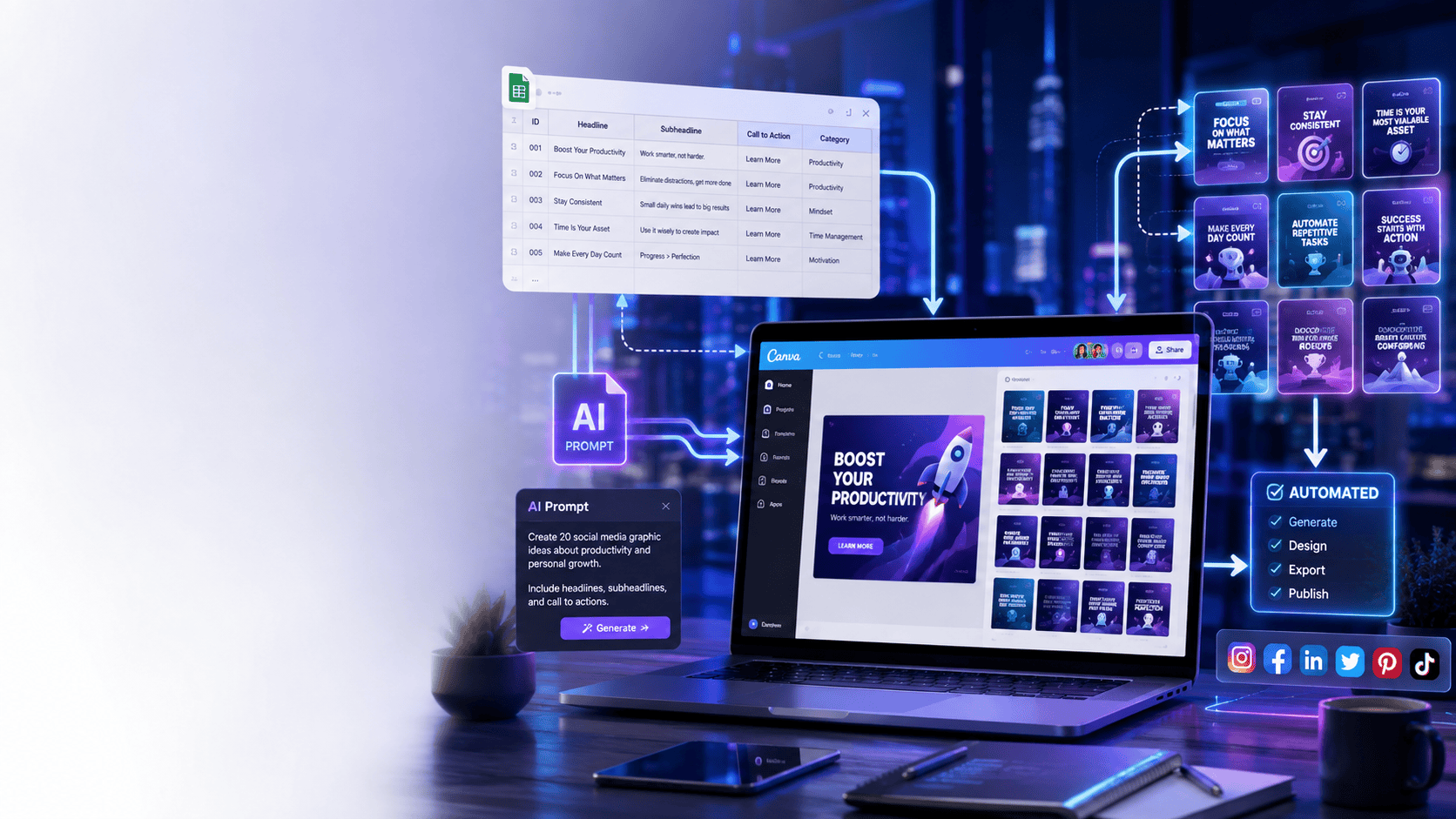
Boost Your Productivity with AI Today
Start by selecting one AI tool that solves your biggest daily challenge. Master its features, build reusable prompts, automate repetitive tasks, and gradually expand your AI toolkit to create a faster, smarter, and more efficient workflow.
Also Read
- Best AI Tools for Beginners
- Best AI Image Generators Compared
- OpenAI Sora Alternatives You Can Actually Use
- AI Video Generators Compared
- How AI Is Transforming Everyday Life
- AI in Healthcare: Benefits and Challenges
- How Businesses Use AI to Increase Productivity
- AI vs Human Creativity
- Best AI Tools for Digital Marketing
- The Ultimate Guide to Artificial Intelligence
- Future of Cloud Computing








Leave a Reply