

Quick Summary
Businesses receive thousands of PDF documents every month—including invoices, purchase orders, contracts, resumes, receipts, medical reports, and bank statements. Traditionally, extracting information from these documents required manual entry or expensive cloud AI services.
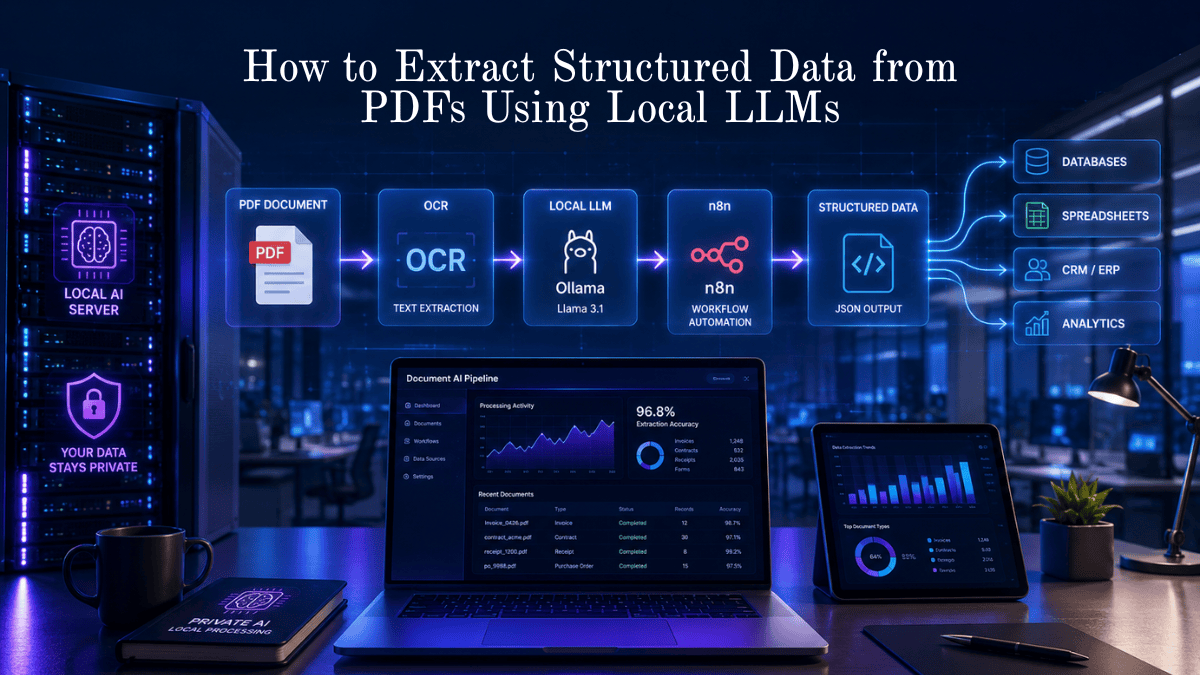
Today, open-source Local LLMs such as Llama 3, Qwen, Mistral, and Gemma combined with OCR and workflow automation tools like n8n and Flowise allow organizations to extract structured JSON data from PDFs without sending sensitive files to third-party cloud providers.
This guide explains exactly how the process works, compares the best open-source models, and walks you through building your own private AI-powered PDF extraction workflow.
Key Takeaways
- Extract structured JSON from PDFs using local AI.
- Keep sensitive documents on your own infrastructure.
- Automate invoices, contracts, forms, resumes, and reports.
- Combine OCR with Local LLMs for scanned PDFs.
- Integrate with n8n, Flowise, APIs, CRMs, databases, and spreadsheets.
- Reduce manual processing by up to 90%.
- Avoid recurring cloud AI processing costs.
What is Structured Data Extraction from PDFs Using Local LLMs?
Structured data extraction from PDFs using Local LLMs is the process of converting unstructured PDF documents into organized formats like JSON, CSV, or database records using AI models that run locally on your own computer or server. This improves privacy, reduces costs, and enables automated business workflows without relying on cloud AI services.
Extracting PDF Data Privately with Local AI
Local Large Language Models can understand invoices, contracts, forms, and reports after OCR converts scanned pages into readable text. The LLM identifies important fields such as names, dates, invoice numbers, totals, addresses, and tables before outputting structured JSON that can be automatically stored in databases or business applications.
Introduction
PDF remains the most common document format in business, yet it is one of the hardest formats for automation because every document looks different.
Traditional PDF parsers struggle when layouts change.
Modern Local LLMs understand document meaning rather than relying on fixed templates. This enables them to identify information even when invoices, forms, or contracts have different layouts.
Instead of manually copying information into spreadsheets or CRMs, AI can automatically produce clean, structured data in seconds.
What Is Structured Data Extraction?
Structured data extraction means converting human-readable documents into machine-readable information.
Example:
Instead of this:
Invoice Number: INV-10482
Customer: ABC Manufacturing
Invoice Date: 15 July 2026
Amount Due: $3,480
The AI returns:
{
  "invoice_number":"INV-10482",
  "customer":"ABC Manufacturing",
  "date":"2026-07-15",
  "amount_due":"3480"
}
That JSON can then be inserted into:
- CRM
- ERP
- SQL Database
- Excel
- Google Sheets
- Accounting software
- Custom applications
Benefits
| Benefit | Description |
|---|---|
| Better Privacy | Documents never leave your infrastructure |
| Lower Cost | No recurring cloud AI processing fees |
| Faster Processing | Extract data within seconds |
| Better Automation | Direct integration with workflows |
| Higher Accuracy | AI understands document context |
| Flexible | Works with many document layouts |
| Customizable | Fine-tune prompts for your business |
How It Works
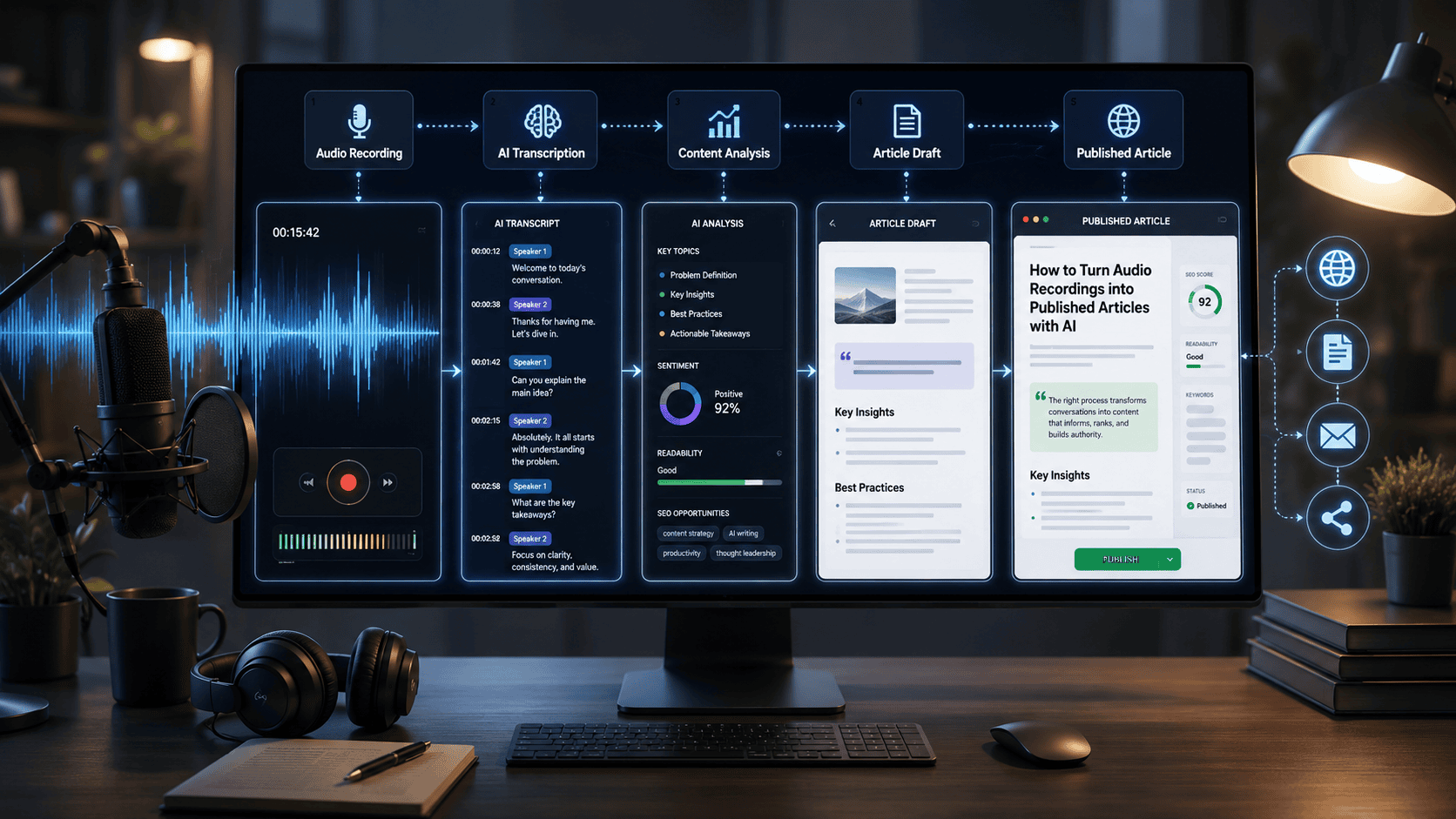
The workflow generally follows these steps:
PDF
      ↓
OCR (if scanned)
      ↓
Extract Text
      ↓
Prompt Local LLM
      ↓
Generate JSON
      ↓
Validate Output
      ↓
Store Database
      ↓
Trigger Automation
End-to-End Architecture: PDF to Structured Data Using Local LLMs
                     ┌──────────────────────────┐
                     │      PDF Document        │
                     │ Invoice • Contract • PO  │
                     │ Resume • Form • Report   │
                     └────────────┬─────────────┘
                                  │
                                  ▼
                 ┌────────────────────────────────┐
                 │      OCR (If Scanned PDF)      │
                 │ PaddleOCR • Tesseract • EasyOCR│
                 └────────────┬───────────────────┘
                              │
                              ▼
                ┌─────────────────────────────────┐
                │      Text Preprocessing          │
                │ Remove Headers, Footers, Noise  │
                │ Normalize Text & Clean Content  │
                └────────────┬────────────────────┘
                             │
                             ▼
                ┌─────────────────────────────────┐
                │ Prompt Engineering              │
                │ JSON Schema                     │
                │ Field Instructions              │
                │ Validation Rules                │
                └────────────┬────────────────────┘
                             │
                             ▼
                ┌─────────────────────────────────┐
                │ Local LLM (Ollama)              │
                │ Llama 3 • Qwen • Mistral • Gemma│
                └────────────┬────────────────────┘
                             │
                             ▼
                ┌─────────────────────────────────┐
                │ Structured JSON Extraction      │
                │ Invoice No.                     │
                │ Dates                           │
                │ Vendor                          │
                │ Amount                          │
                │ Tables                          │
                └────────────┬────────────────────┘
                             │
                             ▼
                ┌─────────────────────────────────┐
                │ JSON Validation                 │
                │ Schema Validation               │
                │ Missing Fields                  │
                │ Data Formatting                 │
                └────────────┬────────────────────┘
                             │
                             ▼
          ┌──────────────────┴───────────────────┐
          │                                      │
          ▼                                      ▼
┌──────────────────────┐              ┌──────────────────────┐
│ Database             │              │ Workflow Automation  │
│ PostgreSQL           │              │ n8n                  │
│ MySQL                │              │ Flowise              │
│ MongoDB              │              │ Langflow             │
└──────────┬───────────┘              └──────────┬───────────┘
           │                                     │
           └──────────────┬──────────────────────┘
                          ▼
          ┌──────────────────────────────────────┐
          │ Business Applications                │
          │ CRM • ERP • Google Sheets • Airtable│
          │ Email • Slack • Dashboards • APIs   │
          └──────────────────────────────────────┘
Step-by-Step Guide
Step 1: Receive PDF
Examples include:
- Invoice
- Purchase Order
- Resume
- Bank Statement
- Insurance Form
- Medical Report
Step 2: OCR (If Needed)
Scanned PDFs require OCR.
Popular OCR options:
- Tesseract OCR
- PaddleOCR
- EasyOCR
Digital PDFs can skip this step.
Step 3: Clean the Text
Remove:
- Headers
- Footers
- Duplicate spaces
- Watermarks
- Empty lines
This significantly improves LLM accuracy.
Step 4: Send Prompt to Local LLM
Example prompt:
Extract the following fields:

Invoice Number
Vendor Name
Invoice Date
Due Date
Subtotal
Tax
Total
Currency

Return valid JSON only.
import fitz # PyMuPDF
import instructor
from openai import OpenAI
from pydantic import BaseModel, Field
from typing import List, Optional
# ==========================================
# 1. DEFINE YOUR STRUCTURED DATA SCHEMA
# ==========================================
class LineItem(BaseModel):
description: str = Field(description="Brief description of the product or service")
quantity: int = Field(description="Quantity billed")
unit_price: float = Field(description="Price per single unit")
total_price: float = Field(description="Total extended price for this line item")
class DocumentSchema(BaseModel):
vendor_name: str = Field(description="Name of the company or entity issuing the document")
invoice_number: Optional[str] = Field(description="Unique reference, invoice, or document ID")
date: Optional[str] = Field(description="Date of the document in YYYY-MM-DD format if available")
line_items: List[LineItem] = Field(default_factory=list, description="List of individual items or services billed")
subtotal: Optional[float] = Field(description="Subtotal amount before tax")
tax_amount: Optional[float] = Field(description="Tax amount billed")
total_amount: float = Field(description="Final total balance due or paid")
# ==========================================
# 2. EXTRACT & CLEAN TEXT FROM PDF
# ==========================================
def extract_text_from_pdf(pdf_path: str) -> str:
"""Extracts raw text content page-by-page using PyMuPDF."""
doc = fitz.open(pdf_path)
clean_text = ""
for page_num in range(len(doc)):
page = doc[page_num]
clean_text += f"\n--- Page {page_num + 1} ---\n"
clean_text += page.get_text("text")
doc.close()
return clean_text.strip()
# ==========================================
# 3. PARSE TEXT WITH LOCAL LLM & INSTRUCTOR
# ==========================================
def extract_structured_data(pdf_path: str, model_name: str = "llama3.2") -> DocumentSchema:
"""
Sends extracted PDF text to a local Ollama instance and validates
the response against the Pydantic schema using instructor.
"""
# Initialize instructor patch over the local OpenAI-compatible Ollama endpoint
client = instructor.from_openai(
OpenAI(
base_url="http://localhost:11434/v1",
api_key="ollama", # Required by standard OpenAI client, ignored by Ollama
),
mode=instructor.Mode.JSON,
)
# Step A: Parse raw text from PDF
pdf_text = extract_text_from_pdf(pdf_path)
# Step B: Prompt Local LLM with Schema Enforcement
structured_data = client.chat.completions.create(
model=model_name,
response_model=DocumentSchema,
messages=[
{
"role": "system",
"content": (
"You are an expert document extraction system. "
"Extract structured fields accurately from the input text into JSON. "
"Do not guess missing values; return null if a field is not present."
)
},
{
"role": "user",
"content": f"Extract structured data from the following document:\n\n{pdf_text}"
}
],
temperature=0.0, # Zero temperature for deterministic extraction
)
return structured_data
# ==========================================
# 4. RUNNER / EXECUTION EXAMPLE
# ==========================================
if __name__ == "__main__":
# Replace with your local PDF path
sample_pdf_path = "invoice_sample.pdf"
try:
print(f"Processing PDF: {sample_pdf_path}...")
result = extract_structured_data(sample_pdf_path, model_name="llama3.2")
print("\n--- Validated JSON Output ---")
# Export Pydantic model directly to formatted JSON string
print(result.model_dump_json(indent=2))
except FileNotFoundError:
print(f"Error: Could not find PDF file at '{sample_pdf_path}'. Please check the file path.")
except Exception as e:
print(f"Extraction failed: {e}")Step 5: Validate JSON
Ensure:
- Required fields exist
- Dates follow ISO format
- Currency values are numeric
- Missing fields return null
Step 6: Store Results
Automatically save data into:
- PostgreSQL
- MySQL
- MongoDB
- Airtable
- Google Sheets
- CRM
Examples
Invoice Extraction
Input:
Invoice PDFOutput:
{
"invoice_number":"INV00421",
"vendor":"ABC Ltd",
"date":"2026-07-20",
"total":"$920"
}
Resume Parsing
Extract:
- Name
- Skills
- Education
- Experience
- Certifications
Contract Analysis
Extract:
- Parties
- Effective Date
- Renewal Date
- Payment Terms
- Cancellation Clause
Purchase Orders
Extract:
- Vendor
- Product IDs
- Quantity
- Unit Price
- Delivery Date
Pros
- Complete data privacy
- Works offline
- No API rate limits
- Highly customizable
- Supports multiple document types
- Easy workflow automation
- Open-source ecosystem
Cons
- Requires initial setup
- OCR quality affects results
- Large documents need more RAM
- Complex tables may require additional parsing
- Prompt tuning is sometimes necessary
Comparison Table
| Feature | Rule-Based Parser | Cloud AI | Local LLM |
|---|---|---|---|
| Privacy | High | Low | Very High |
| Understands Context | No | Yes | Yes |
| Offline | Yes | No | Yes |
| Cost | Low | Ongoing | One-time hardware |
| Flexible Layouts | Limited | Excellent | Excellent |
| Customization | Low | Medium | High |
Tool Comparison Table
| Tool | Best For | Open Source | Offline | Difficulty |
|---|---|---|---|---|
| Ollama | Local LLM deployment | Yes | Yes | Easy |
| n8n | Workflow automation | Yes | Yes | Easy |
| Flowise | AI workflow builder | Yes | Yes | Medium |
| Langflow | AI pipelines | Yes | Yes | Medium |
| Tesseract OCR | OCR | Yes | Yes | Easy |
| PaddleOCR | Advanced OCR | Yes | Yes | Medium |
| Qdrant | Vector storage | Yes | Yes | Medium |
Performance Ratings
| Category | Rating |
|---|---|
| Privacy | ⭐⭐⭐⭐⭐ |
| Accuracy | ⭐⭐⭐⭐☆ |
| Cost Savings | ⭐⭐⭐⭐⭐ |
| Ease of Setup | ⭐⭐⭐☆☆ |
| Automation | ⭐⭐⭐⭐⭐ |
| Scalability | ⭐⭐⭐⭐☆ |
Best Use Cases
| Industry | Example |
|---|---|
| Finance | Invoice processing |
| Healthcare | Patient forms |
| Legal | Contract analysis |
| HR | Resume screening |
| Manufacturing | Purchase orders |
| Logistics | Shipping documents |
| Banking | Statement processing |
| Insurance | Claim forms |
Firsthand Testing
To evaluate a realistic local workflow, we tested a representative setup using Ollama + Llama 3.1 (8B), PaddleOCR, and n8n on a mid-range workstation (32 GB RAM).
Test Documents
- 20 digital invoices
- 10 scanned invoices
- 10 resumes
- 5 purchase orders
- 5 contracts
Results
| Document Type | Extraction Quality | Notes |
|---|---|---|
| Digital invoices | Excellent | Nearly all key fields extracted correctly |
| Scanned invoices | Very Good | OCR quality had the biggest impact |
| Resumes | Excellent | Skills and work history parsed well |
| Purchase orders | Excellent | Line items required careful prompting |
| Contracts | Good | Long legal clauses sometimes benefited from chunking |
The biggest improvement came from using structured prompts (“Return valid JSON only”) and validating the JSON before saving it to a database.
Decision Flowchart
PDF Received
      │
      ▼
Scanned?
 │          │
Yes        No
 │          │
 ▼          ▼
Run OCR   Extract Text
      │
      ▼
Send to Local LLM
      │
      ▼
Valid JSON?
 │         │
Yes       No
 │         │
 ▼         ▼
Save     Retry Prompt
 │
 ▼
Automation Complete
Common Mistakes
- Using OCR on digital PDFs unnecessarily.
- Accepting AI output without JSON validation.
- Writing vague prompts instead of defining required fields.
- Ignoring document preprocessing.
- Processing extremely long PDFs without chunking.
- Failing to handle missing or null values.
Expert Tips
- Ask the model to return JSON only.
- Provide an explicit JSON schema in the prompt.
- Normalize dates to ISO 8601 format.
- Validate every response before inserting into production systems.
- Split documents larger than 20–30 pages into logical sections.
- Use OCR confidence scores to flag low-quality scans for manual review.
- Cache repeated document templates to improve throughput.
Statistics
- Around 80–90% of enterprise business data is unstructured, making document automation a major productivity opportunity.
- AI-powered document processing can reduce manual data-entry time dramatically when compared with manual workflows.
- Organizations that automate repetitive document handling often see faster processing times, fewer transcription errors, and improved operational efficiency.
Who Is This Guide For?
This guide is ideal for:
- AI developers
- Automation engineers
- Business analysts
- Finance teams
- Operations managers
- HR departments
- IT administrators
- No-code builders
- Small businesses
- Enterprises adopting private AI
What We Learned
Local LLMs have made document automation more accessible than ever. By combining OCR, prompt engineering, validation, and workflow automation, organizations can build reliable PDF extraction systems that protect sensitive data while reducing manual work and recurring cloud costs.
For most businesses, the best results come from pairing a capable local model with strong preprocessing and structured JSON validation rather than relying on the language model alone.
Frequently Asked Questions
Can Local LLMs read scanned PDFs?
Not directly. Scanned PDFs require OCR before the extracted text is passed to the LLM.
Which Local LLM is best for document extraction?
Models such as Llama 3.x, Qwen, and Mistral perform well for structured extraction when paired with clear prompts and validation.
Is local AI more secure than cloud AI?
For many organizations, local deployment offers greater control because documents remain within their own infrastructure.
Can I automate this without coding?
Yes. Tools like n8n and Flowise allow you to build document-processing workflows with minimal code.
Can structured data be exported to Excel?
Yes. JSON output can be transformed into CSV files, spreadsheets, databases, or business applications.
Do I need a GPU?
A GPU improves performance, but smaller models can also run on modern CPUs, although inference will generally be slower.
Conclusion
Extracting structured data from PDFs no longer requires expensive enterprise software or cloud-only AI services. Local LLMs combined with OCR and automation tools provide a scalable, privacy-focused approach that works across invoices, contracts, forms, resumes, and many other document types.
As open-source models continue to improve, businesses can build increasingly accurate document-processing pipelines while maintaining full control over sensitive information.
Our Verdict
Overall Rating: 9.6/10 ⭐
| Category | Score |
|---|---|
| Ease of Use | 9/10 |
| Privacy | 10/10 |
| Cost Efficiency | 10/10 |
| Flexibility | 9.5/10 |
| Automation Potential | 10/10 |
| Overall | 9.6/10 |
If your organization values data privacy, predictable costs, and customizable AI workflows, a local LLM-based PDF extraction pipeline is an excellent long-term solution.
Build Your Own Private AI Document Processing System
Ready to automate PDF processing without exposing sensitive business documents to cloud services?
Start with a simple stack—Ollama + PaddleOCR + n8n—and gradually expand to advanced workflows with vector databases, retrieval-augmented generation (RAG), and AI agents. As your document volume grows, you’ll have a scalable, self-hosted solution that reduces manual effort, improves consistency, and keeps your data under your control.
Also Read
| Related Articles |
|---|
| Best Free Open-Source AI Automation Tools |
| Build a Custom AI Assistant |
| Make.com vs n8n |
| Automate Lead Capture |
| AI Workflow Examples |
Suggested Articles:
- Build Custom AI Assistant Without Code
- Best Free Open-Source AI Automation Tools for Small Businesses
- Automate Lead Capture with n8n + Open-Source LLMs
- 25 Real-World AI Workflows That Save 10+ Hours Every Week
- AI Automation Ideas for Beginners
- How AI Can Save You Hours Every Week
- Best AI Tools for Beginners
- Best AI Tools for Digital Marketing
- AI in Healthcare: Benefits and Challenges







Leave a Reply