

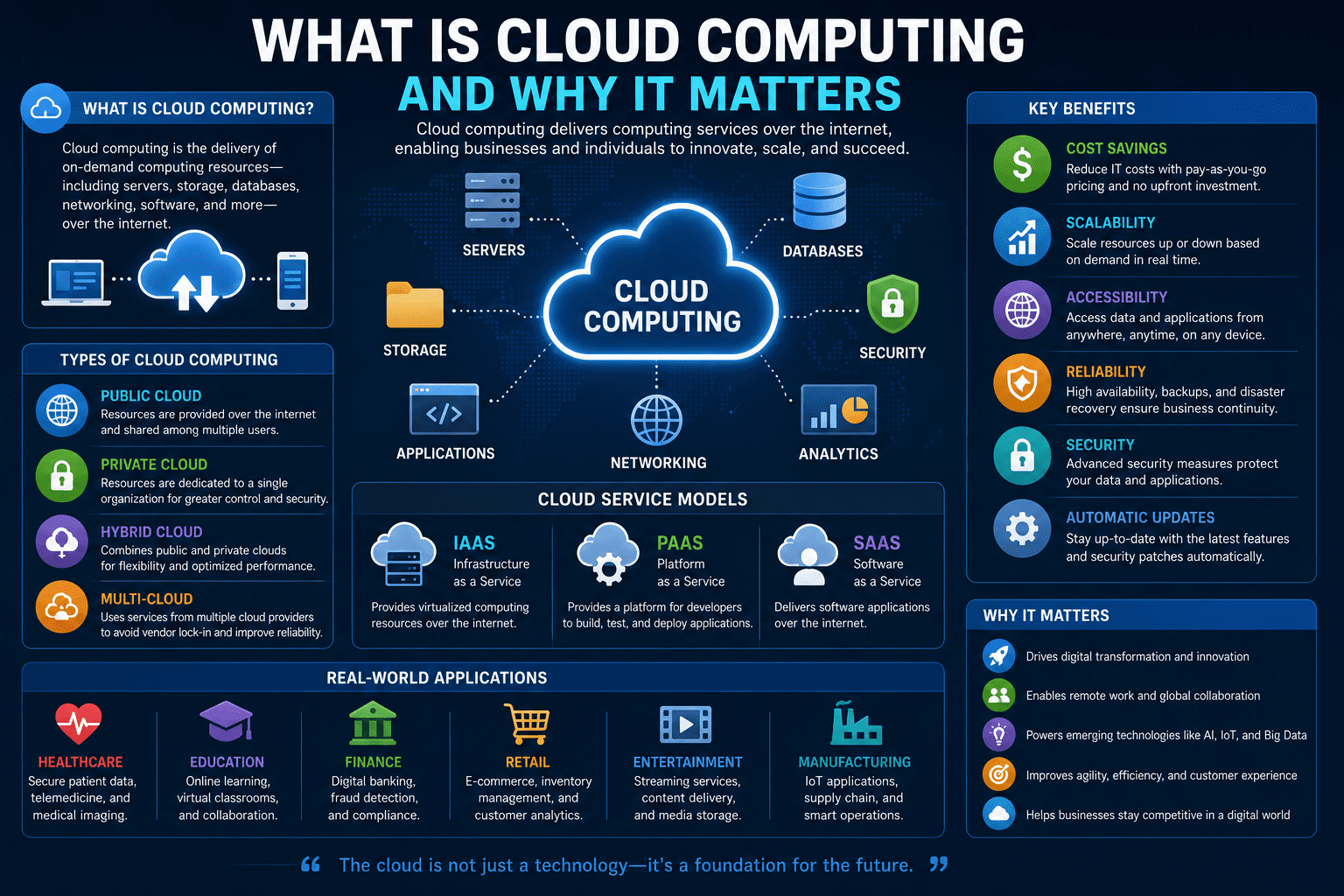
Cloud computing has become one of the most important technologies driving digital transformation across the world. Whether you are streaming movies, storing photos online, collaborating with colleagues remotely, or running a business application, chances are you are already using cloud computing in some form.
Over the past decade, cloud computing has revolutionized the way organizations manage data, deploy applications, and scale operations. It offers flexibility, cost savings, enhanced security, and access to powerful computing resources without requiring expensive infrastructure investments.
In this article, we’ll explore what cloud computing is, how it works, its different types, advantages, challenges, and why it matters in today’s technology-driven world.
What Is Cloud Computing?
Cloud computing is the delivery of computing services over the internet. Instead of owning and maintaining physical servers or data centers, users can access computing resources such as storage, databases, networking, software, and processing power through cloud providers.
Simply put, cloud computing allows individuals and businesses to use technology resources on demand without having to purchase and manage them directly.
Common cloud services include:
- Data storage
- Virtual servers
- Software applications
- Databases
- Artificial intelligence tools
- Website hosting
- Backup and disaster recovery
Cloud providers manage the infrastructure, allowing users to focus on their applications and business goals.
How Does Cloud Computing Work?
Cloud computing relies on a network of remote servers located in data centers around the world. These servers store, process, and manage data that users access via the internet.
The process typically works as follows:
- A user sends a request through an application or website.
- The request is processed by cloud servers.
- Data is retrieved or processed.
- The results are delivered back to the user in real time.
Because the infrastructure exists remotely, users can access services from almost anywhere with an internet connection.
Types of Cloud Computing
Cloud computing can be categorized into several deployment models.
Public Cloud
A public cloud is owned and operated by a third-party provider that offers resources to multiple customers over the internet.
Benefits include:
- Lower costs
- Easy scalability
- Minimal maintenance
- Quick deployment
Public clouds are commonly used by startups, small businesses, and individual users.
Private Cloud
A private cloud is dedicated to a single organization.
Advantages include:
- Greater control
- Enhanced security
- Improved compliance
- Customizable infrastructure
Private clouds are often used by large enterprises and organizations handling sensitive data.
Hybrid Cloud
A hybrid cloud combines public and private cloud environments.
Organizations can:
- Keep sensitive data in private clouds
- Use public clouds for scalability
- Optimize costs and performance
Hybrid cloud solutions provide flexibility while maintaining security.
Multi-Cloud
Multi-cloud strategies involve using services from multiple cloud providers simultaneously.
Benefits include:
- Reduced vendor dependency
- Improved reliability
- Better performance optimization
- Enhanced disaster recovery
Many modern businesses adopt multi-cloud environments to improve resilience.
Major Cloud Service Models
Cloud computing services are typically divided into three primary categories.
Infrastructure as a Service (IaaS)
IaaS provides virtualized computing resources such as:
- Servers
- Storage
- Networking
- Virtual machines
Users have control over operating systems and applications while the provider manages hardware.
Platform as a Service (PaaS)
PaaS provides a platform for developing and deploying applications.
Developers can focus on coding without managing infrastructure components.
Features often include:
- Development tools
- Databases
- Middleware
- Application hosting
Software as a Service (SaaS)
SaaS delivers software applications directly through the internet.
Examples include:
- Email services
- Collaboration tools
- Customer relationship management software
- Video conferencing platforms
Users simply access the software through a web browser without installation or maintenance.
Benefits of Cloud Computing
Cloud computing offers numerous advantages for businesses and individuals.
Cost Savings
Organizations avoid large upfront investments in hardware and infrastructure.
Benefits include:
- Reduced maintenance costs
- Pay-as-you-go pricing
- Lower operational expenses
Scalability
Cloud resources can be increased or decreased based on demand.
This flexibility helps businesses:
- Handle traffic spikes
- Support growth
- Optimize resource usage
Accessibility
Cloud services can be accessed from virtually anywhere.
Remote teams can collaborate efficiently regardless of location.
Reliability
Most cloud providers offer:
- Redundant systems
- Automatic backups
- Disaster recovery solutions
- High availability
These features help minimize downtime.
Security
Leading cloud providers invest heavily in cybersecurity measures such as:
- Encryption
- Identity management
- Threat detection
- Compliance certifications
While no system is completely risk-free, cloud platforms often provide stronger security than many organizations can implement independently.
Automatic Updates
Cloud providers handle software updates, security patches, and infrastructure maintenance.
Users benefit from:
- Improved performance
- Enhanced security
- Reduced administrative workload
Why Cloud Computing Matters
Cloud computing has become essential because it enables innovation, efficiency, and digital transformation.
Supports Digital Transformation
Businesses use cloud technology to modernize operations and remain competitive.
Cloud computing enables:
- Faster innovation
- Digital services
- Data-driven decision-making
- Improved customer experiences
Enables Remote Work
Cloud-based tools make remote and hybrid work possible by providing secure access to applications and data from anywhere.
Powers Modern Technologies
Many emerging technologies rely on cloud infrastructure, including:
- Artificial Intelligence (AI)
- Machine Learning (ML)
- Internet of Things (IoT)
- Big Data Analytics
- Blockchain
Without cloud computing, many of these technologies would be difficult and expensive to implement.
Improves Business Agility
Organizations can quickly deploy new applications, launch services, and adapt to changing market conditions.
This agility provides a significant competitive advantage.
Enhances Collaboration
Cloud platforms allow teams to:
- Share files
- Collaborate in real time
- Manage projects efficiently
- Access information instantly
This improves productivity and communication.
Real-World Applications of Cloud Computing
Cloud computing is used across virtually every industry.
Healthcare
Healthcare providers use cloud platforms for:
- Electronic medical records
- Telemedicine
- Medical imaging storage
- Healthcare analytics
Education
Educational institutions use cloud services for:
- Online learning platforms
- Virtual classrooms
- Student collaboration
- Resource sharing
Finance
Financial organizations rely on cloud computing for:
- Digital banking
- Fraud detection
- Risk management
- Financial analytics
Retail
Retailers use cloud technology for:
- E-commerce platforms
- Inventory management
- Customer analytics
- Personalized marketing
Entertainment
Streaming services depend on cloud infrastructure to deliver content to millions of users worldwide.
Challenges of Cloud Computing
While cloud computing offers many benefits, organizations should consider potential challenges.
Data Privacy Concerns
Storing sensitive information on remote servers may raise privacy concerns.
Organizations should ensure compliance with relevant regulations.
Internet Dependency
Cloud services require reliable internet connectivity.
Network outages may temporarily impact access.
Vendor Lock-In
Switching providers can sometimes be complex and costly.
Organizations should plan cloud strategies carefully.
Security Risks
Although cloud providers offer strong security, misconfigured systems can still create vulnerabilities.
Proper security practices remain essential.
Future of Cloud Computing
Cloud computing continues to evolve rapidly.
Emerging trends include:
- Edge computing
- AI-powered cloud services
- Serverless computing
- Multi-cloud adoption
- Green cloud infrastructure
- Quantum computing integration
As businesses generate more data and demand greater flexibility, cloud computing will become even more critical.
Conclusion
Cloud computing has transformed the way individuals and organizations access technology resources. By delivering computing services over the internet, cloud platforms provide flexibility, scalability, cost savings, and enhanced collaboration opportunities.
From powering remote work and digital transformation to enabling artificial intelligence and big data analytics, cloud computing plays a crucial role in today’s digital economy. While challenges such as security and privacy must be addressed, the benefits far outweigh the risks for most users.
As technology continues to advance, cloud computing will remain a foundational component of innovation, helping businesses and individuals thrive in an increasingly connected world.








Leave a Reply