

Quick Summary
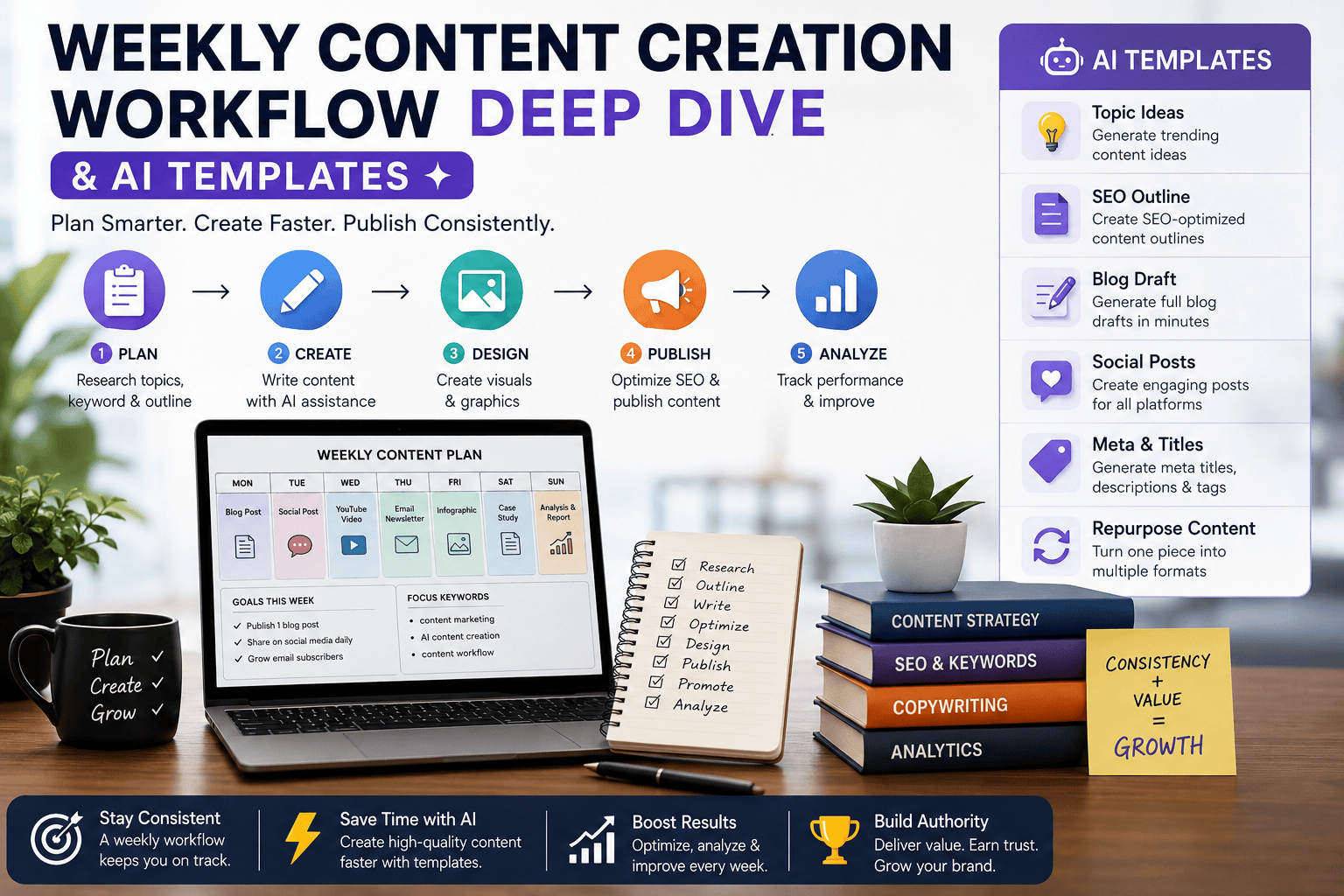
A weekly content creation workflow turns content marketing from an unpredictable, last-minute activity into a repeatable system.
Instead of creating every article, social post, email, video, and graphic from scratch, you can plan the week around a central content asset, use AI for research and production support, repurpose the core idea across multiple channels, and reserve human time for strategy, fact-checking, editing, originality, and quality control.
A practical workflow looks like this:
Plan → Research → Create → Review → Repurpose → Publish → Measure → Improve
AI can accelerate many of these stages, but it should operate inside a defined workflow rather than replace editorial judgment.
Key Takeaways
- A weekly content workflow provides consistency without requiring daily brainstorming.
- One strong pillar content asset can generate multiple supporting assets.
- AI is most useful for repetitive and time-consuming tasks such as brainstorming, outlining, summarization, repurposing, and formatting.
- Human review remains essential for accuracy, originality, brand voice, firsthand experience, and trust.
- A content calendar should connect topics to search intent, audience problems, business goals, and distribution channels.
- Reusable AI prompt templates reduce the time required to start each content task.
- A weekly review loop helps identify which topics, formats, and channels deserve more investment.
- For SEO, AEO, and GEO, content should provide direct answers, clear structure, original insights, supporting evidence, and useful context.
At a Glance: Weekly Content Creation Workflow
| Workflow Stage | Main Goal | AI’s Role | Human’s Role |
|---|---|---|---|
| 1. Strategy | Decide what to create and why | Topic ideas, audience research, content gaps | Final topic and business priorities |
| 2. Research | Gather useful and trustworthy information | Research organization, question discovery, summaries | Verify sources, facts and claims |
| 3. Production | Create the core content | Outlines, drafts, prompts and content variations | Expertise, originality and editorial direction |
| 4. SEO + AEO + GEO | Make content discoverable and answerable | Keyword, FAQ, structure and optimization suggestions | Search-intent validation and final optimization |
| 5. Editing & QA | Improve accuracy and quality | Content audits and missing-section suggestions | Fact-checking, editing and approval |
| 6. Repurposing | Turn one asset into multiple formats | Social posts, emails, snippets and visual ideas | Platform-specific editing and brand judgment |
| 7. Publishing | Distribute the finished content | Metadata, formatting and scheduling assistance | Final publishing checks |
| 8. Measurement | Learn what worked | Performance analysis and pattern detection | Strategic decisions and improvements |
The Simple Version
Plan → Research → Create → Optimize → Review → Repurpose → Publish → Measure → Improve
The goal is not to automate every step. The goal is to use AI where it saves repetitive effort while keeping human expertise, fact-checking, originality and editorial judgment in control.
What Is a Weekly Content Creation Workflow?
A weekly content creation workflow is a repeatable process for planning, researching, producing, reviewing, repurposing, publishing, and measuring content over a seven-day cycle. A typical workflow starts with content planning and keyword research, moves into AI-assisted drafting and human editing, then continues with repurposing, distribution, performance measurement, and optimization.
The goal is not simply to publish more content. The goal is to create useful, consistent, high-quality content with less operational friction.
How AI Fits Into a Weekly Content Creation Workflow
AI can support almost every stage of a content workflow, including:
- Topic brainstorming
- Search-intent analysis
- Content outlining
- Research organization
- Draft development
- Headline generation
- FAQ generation
- Content repurposing
- Social media copy
- Video-script creation
- Content summarization
- Performance analysis
However, AI-generated output should not automatically be treated as publication-ready.
HubSpot’s 2026 update on AI in content marketing reports that content creation is one of marketers’ most common AI use cases, while only a small percentage publish AI-generated content without revision.
That supports a practical principle:
Use AI to accelerate the workflow, not to eliminate the editor.
Introduction
Publishing consistently sounds simple until you actually have to do it every week.
A typical content creator may need to:
- Find topics
- Research keywords
- Analyze search intent
- Create outlines
- Write articles
- Create images
- Produce social posts
- Write email content
- Create video scripts
- Add internal links
- Optimize metadata
- Fact-check claims
- Publish content
- Track results
When these tasks are handled randomly, content production becomes reactive.
One week may produce several pieces of content. The following week may produce nothing.
A better approach is to create a repeatable weekly content operating system.
The system does not need to be complicated. Even a solo creator can divide the week into predictable stages and use AI templates to reduce repetitive work.
This is particularly useful for websites such as LearnInnovative, where one core topic can support an entire cluster of related articles, social posts, videos, prompts, comparisons, and practical guides.
Weekly Content Creation Workflow
A weekly content creation workflow is a structured schedule that defines what content will be created, when each stage will happen, who is responsible, what tools are used, and how the finished content will be reviewed and distributed.
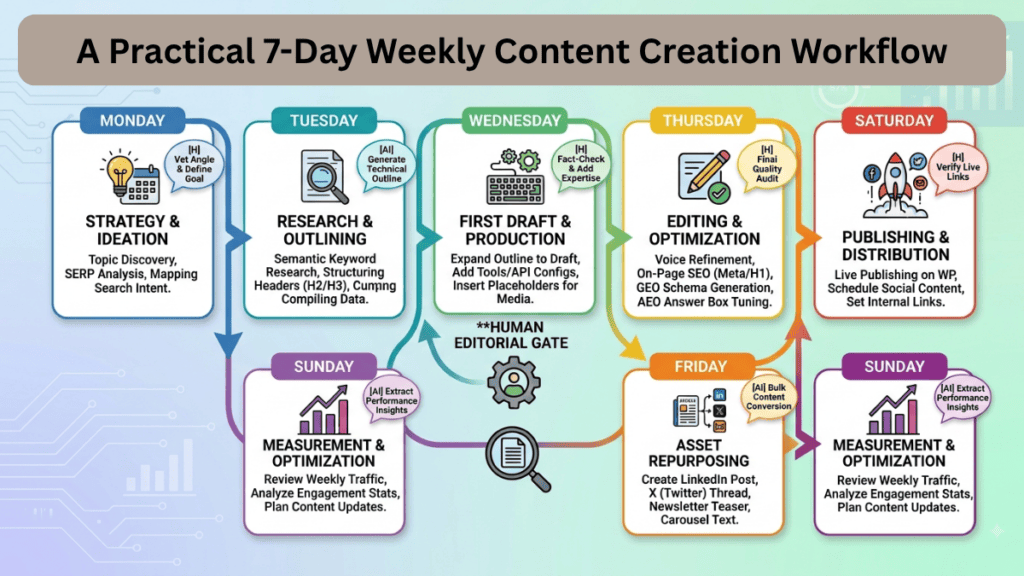
A simple version contains seven stages:
| Stage | Main Objective | Typical Output |
|---|---|---|
| Monday | Plan | Topic + keyword + content brief |
| Tuesday | Research | Sources + outline + facts |
| Wednesday | Create | Main article/video/newsletter |
| Thursday | Edit | Reviewed and optimized content |
| Friday | Repurpose | Social posts + video + email |
| Saturday | Publish/Distribute | Published content + promotion |
| Sunday | Measure | Analytics + lessons + next actions |
The exact days can change.
The important principle is that every stage has a defined purpose.
Why a Weekly Content Workflow Matters
Content consistency is difficult when every piece starts with a blank page.
A workflow solves that problem by creating reusable processes.
1. Reduces Decision Fatigue
Instead of asking:
“What should I work on today?”
you already know the next production stage.
2. Improves Publishing Consistency
A predefined schedule makes it easier to maintain a predictable publishing cadence.
3. Makes AI More Useful
AI performs better when you provide structured instructions, context, audience information, desired output, and constraints.
4. Makes Repurposing Easier
A central article can become:
- LinkedIn posts
- X posts
- Instagram captions
- YouTube Shorts scripts
- Newsletter sections
- Pinterest descriptions
- FAQs
- Quora-style answers
- Infographic content
5. Creates a Feedback Loop
The workflow does not end at publication.
Performance data should influence the next week’s content decisions.
How the Weekly Content Creation Workflow Works
The complete system can be visualized as:
Strategy → Research → Production → Editorial QA → Repurposing → Distribution → Measurement → Optimization
Strategy
Decide:
- What audience are you targeting?
- What problem are you solving?
- What keyword or topic are you targeting?
- What business objective does the content support?
- What format is appropriate?
Research
Collect:
- Search intent
- Competitor coverage
- First-party information
- Reliable statistics
- Expert opinions
- User questions
- Related searches
- Existing content gaps
Production
Create the main asset.
Examples:
- Long-form article
- Tutorial
- Case study
- Video
- Newsletter
- Research report
Editorial QA
Check:
- Accuracy
- Originality
- Readability
- Search intent
- Internal links
- Citations
- Claims
- Brand voice
- AI-generated errors
Repurposing
Turn the core asset into multiple formats.
Distribution
Publish across relevant channels.
Measurement
Track:
- Organic traffic
- Search impressions
- Click-through rate
- Engagement
- Conversions
- Social performance
- Content-assisted conversions
Optimization
Use the data to improve the next content cycle.
A Practical 7-Day Weekly Content Creation Workflow
Monday — Strategy and Planning
Monday should answer:
What are we creating this week and why?
Monday Checklist
- Review last week’s performance
- Select the primary topic
- Identify the primary keyword
- Analyze search intent
- Identify related questions
- Define target audience
- Choose content format
- Set the desired outcome
- Create the content brief
AI Prompt Template: Weekly Content Planner
Act as a senior content strategist.

Create a weekly content plan for:

Website/topic:
Target audience:
Primary business goal:
Primary topic:
Primary keyword:
Secondary keywords:
Publishing channels:
Available content formats:

Create:

1. One pillar content idea
2. Five supporting content ideas
3. Three short-form video ideas
4. Five social media post ideas
5. One email/newsletter idea
6. Three FAQ opportunities
7. Suggested internal linking relationships

For every idea, provide:
- Search intent
- Target audience
- Content format
- Funnel stage
- Recommended CTA
- Repurposing opportunities
Tuesday — Research and Content Brief
Tuesday is research day.
The goal is to gather enough information to create a useful and differentiated piece of content.
Research Framework
Use five research layers:
| Layer | Questions |
| Search | What does the user want? |
| Competitors | What has already been covered? |
| Experts | What do credible sources say? |
| Experience | What can we demonstrate ourselves? |
| Gaps | What useful information is missing? |
AI Research Prompt
Analyze this content topic:

[TOPIC]

Target audience:
[AUDIENCE]

Primary keyword:
[KEYWORD]

Identify:

- Primary search intent
- Secondary search intents
- Important questions
- Common misconceptions
- Content gaps
- Practical examples to include
- Statistics that should be researched
- Expert perspectives to look for
- Firsthand experience opportunities
- FAQ questions
- Potential internal linking topics

Do not invent statistics, studies, quotes, or sources.
Clearly label information that requires external verification.
Wednesday — Main Content Production
Wednesday is the main production day.
The most efficient approach is to create one strong core asset first.
For example:
Core article → video → social posts → email → infographic → FAQ content
This is more efficient than independently brainstorming every asset.
The Pillar-to-Cluster Content Model
A strong weekly workflow can follow this structure:
                    PILLAR CONTENT
                         |
        -----------------------------------
        |          |          |           |
      Video      Email      Social      Infographic
        |          |          |           |
        -----------------------------------
                         |
                Supporting Articles
                         |
                 Internal Linking
                         |
                   Topic Cluster
This model helps build topical depth over time.
For LearnInnovative, a content cluster around AI content creation could include:
- AI content creation workflows
- AI prompts
- AI automation
- Canva AI workflows
- AI video creation
- AI voice generators
- AI social media content
- GEO
- AEO
- SEO automation
- Content repurposing
Wednesday AI Writing Template
Act as an experienced editor and subject-matter writer.

Write a comprehensive article about:

[TOPIC]

Primary keyword:
[KEYWORD]

Audience:
[AUDIENCE]

Search intent:
[INTENT]

Requirements:

- Answer the primary question early
- Use clear H2 and H3 headings
- Include practical examples
- Include original analysis
- Include relevant statistics only when supported by credible sources
- Explain technical concepts in simple language
- Include actionable steps
- Include FAQs
- Include comparison tables where useful
- Avoid generic filler
- Avoid unsupported claims
- Avoid pretending to have personal experience
- Identify statements that require fact-checking
- Write naturally rather than mechanically repeating keywords

Optimize for:
SEO + AEO + GEO + E-E-A-T.
Thursday — Editing, Fact-Checking and SEO QA
Never treat the first AI draft as the finished article.
Thursday should focus on quality.
Editorial QA Checklist
Accuracy
- Verify statistics
- Verify dates
- Verify product features
- Verify pricing
- Verify technical claims
- Check quotations
- Check external sources
SEO
- Primary keyword appears naturally
- Search intent is satisfied
- Title is descriptive
- Meta description is compelling
- URL is concise
- Headings are descriptive
- Internal links added
- Relevant external references added
- Image alt text added
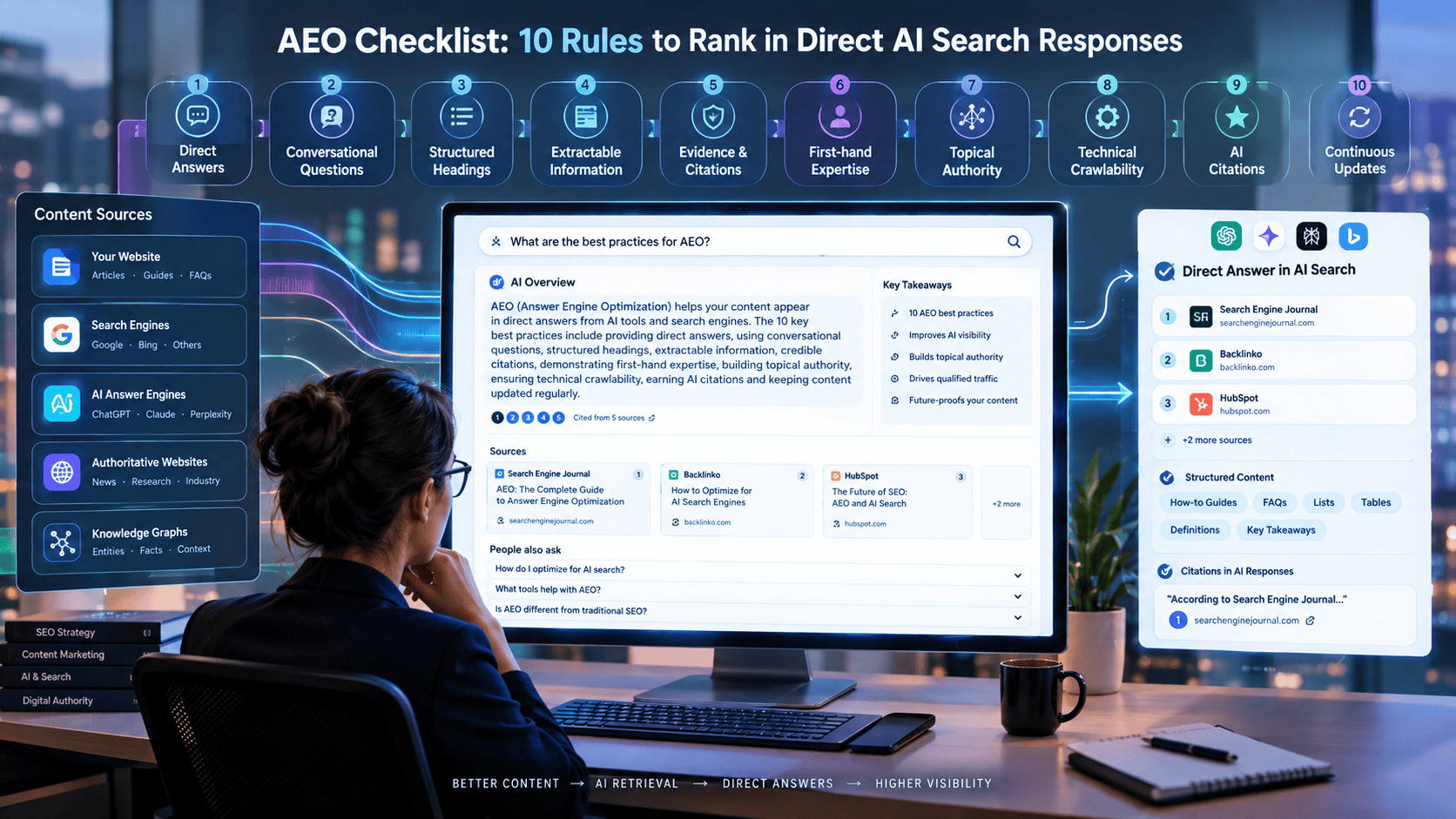
AEO
- Direct answer near the beginning
- Clear definitions
- Question-based headings
- Concise explanations
- FAQ section
- Structured tables where appropriate
GEO
- Clear entities and concepts
- Direct factual statements
- Supporting evidence
- Original insights
- Distinctive examples
- Clear author/source context
- Easy-to-extract answers
Friday — Content Repurposing
Friday converts one core asset into multiple distribution assets.
For example:
One Article Can Become
| Original Asset | Repurposed Content |
| Blog article | LinkedIn post |
| Blog article | X thread |
| Blog article | Instagram carousel |
| Blog article | YouTube script |
| Blog article | Shorts script |
| Blog article | Newsletter |
| Blog article | FAQ |
| Blog article | Infographic |
| Blog article | Pinterest content |
| Blog article | Community discussion |
This is one of the highest-value uses of AI in a content workflow.
HubSpot’s research shows marketers commonly use AI for content creation and that repurposing content from one format into another is a significant application.
AI Repurposing Template
Repurpose the following article into a complete content distribution package.

ARTICLE:
[PASTE ARTICLE]

Create:

1. 5 LinkedIn posts
2. 5 X posts
3. 3 Instagram captions
4. 3 YouTube Shorts concepts
5. 3 short-form video scripts
6. 1 newsletter section
7. 1 infographic outline
8. 5 FAQ questions and answers
9. 10 social hooks
10. 5 CTA variations

Rules:

- Do not invent facts.
- Preserve the original meaning.
- Avoid repetitive phrasing.
- Adapt the content to each platform.
- Keep each platform's style natural.
- Emphasize practical takeaways.
Saturday — Publishing and Distribution
Saturday can be used for final publishing and distribution.
Publishing Checklist
- Publish the main article
- Add featured image
- Add supporting images
- Add internal links
- Add relevant external references
- Validate metadata
- Check mobile formatting
- Check table formatting
- Test important links
- Publish social posts
- Send newsletter if applicable
- Add content to relevant content hubs
Do not distribute everything simultaneously if your audience would find that repetitive.
Instead, stagger supporting content across the following days.
Sunday — Measurement and Optimization
Sunday should answer:
What did we learn?
Track the performance of the content rather than simply counting how much was published.
Weekly Content Scorecard
| Metric | What It Tells You |
| Organic impressions | Search visibility |
| Organic clicks | Search demand + relevance |
| CTR | SERP appeal |
| Average position | Search performance |
| Engagement | Audience interest |
| Conversions | Business impact |
| Social engagement | Distribution effectiveness |
| Assisted conversions | Supporting content value |
| New backlinks | Authority potential |
| Content updates needed | Optimization opportunities |
Create a simple weekly report:
Top-performing content:
[CONTENT]

Why it worked:
[REASON]

Lowest-performing content:
[CONTENT]

Likely reason:
[REASON]

Search opportunities:
[KEYWORDS]

Content gaps:
[TOPICS]

Next week's priority:
[TOPIC]

One thing to stop:
[ACTIVITY]

One thing to improve:
[ACTIVITY]
Weekly Content Workflow Comparison
| Approach | Planning | Consistency | AI Efficiency | Quality Control | Scalability |
| Random content creation | Low | Low | Low | Variable | Low |
| Daily reactive creation | Low | Medium | Medium | Variable | Medium |
| Weekly workflow | High | High | High | High | High |
| Fully automated publishing | High | High | Very High | Low | Very High |
| AI-assisted + human review | High | High | Very High | Very High | Very High |
Best Overall Approach
AI-assisted + human review is generally the strongest balance.
Full automation can increase output, but it can also multiply errors.
AI Content Workflow vs Traditional Workflow
| Factor | Traditional | AI-Assisted |
| Brainstorming | Manual | AI-assisted |
| Research organization | Manual | AI-assisted |
| Drafting | Manual | AI-assisted |
| Editing | Human | Human + AI |
| Fact-checking | Human | Human + tools |
| Repurposing | Manual | AI-assisted |
| Publishing | Manual | Partially automated |
| Quality control | Human | Human-led |
| Scalability | Moderate | High |
The important distinction is that AI-assisted does not mean AI-controlled.
Best Use Cases
A weekly AI content workflow is particularly useful for:
Bloggers
Plan multiple articles without starting from scratch every week.
SEO Teams
Coordinate keyword research, content briefs, optimization, internal linking, and updates.
Solo Creators
Reduce repetitive production work.
Small Marketing Teams
Create a predictable production system without adding unnecessary meetings.
Agencies
Standardize client content production.
SaaS Companies
Turn product knowledge into articles, videos, newsletters, FAQs, and social content.
Personal Brands
Convert one expertise-driven topic into multiple audience touchpoints.
Practical Example: One Topic, Seven Content Assets
Suppose the weekly topic is:
“How to Automate Social Media Content With AI”
A single research session could produce:
- Pillar article: How to Automate Social Media Content With AI
- YouTube video: 7-Step AI Social Media Workflow
- Shorts: 3 AI automation tips
- LinkedIn post: AI content workflow breakdown
- Newsletter: Weekly AI automation lesson
- Infographic: AI social media workflow
- FAQ: Common questions about AI social automation
The advantage is that all seven assets share the same research foundation.
AI Template: Weekly Content Brief
CONTENT BRIEF

Topic:
Primary keyword:
Secondary keywords:
Audience:
Search intent:
Funnel stage:
Primary problem:
Desired outcome:

Unique angle:
Original insight:
Firsthand experience:
Supporting data:
Expert sources:

Primary CTA:
Internal links:
External references:

Main content format:
Repurposing formats:
Publication date:

Success metrics:
AI Template: Content Quality Auditor
Act as a strict editorial quality auditor.

Review this content for:

1. Factual accuracy
2. Unsupported claims
3. Missing evidence
4. Search intent alignment
5. Keyword overuse
6. Repetition
7. Generic AI-style wording
8. Missing firsthand insights
9. Weak explanations
10. Missing examples
11. Missing FAQs
12. Internal linking opportunities
13. AEO opportunities
14. GEO opportunities
15. E-E-A-T signals

For every problem:
- Quote or identify the section
- Explain the issue
- Provide a recommended fix

Do not rewrite the entire article unless requested.
AI Template: Internal Linking Assistant
Act as an SEO content strategist.

Article topic:
[TOPIC]

Existing website topics:
[PASTE LIST OF URLs/TITLES]

Identify the strongest internal linking opportunities.

For each recommendation provide:

- Source section
- Target article
- Suggested anchor text
- Why the link is relevant
- Whether it supports topical authority, user experience, or both

Prioritize natural contextual links over forced keyword matching.
AI Template: Weekly Content Repurposing Matrix
Create a content repurposing matrix for:

CORE CONTENT:
[ARTICLE/TOPIC]

Generate:

Platform | Content format | Hook | Key idea | CTA | Recommended timing

Platforms:
- Website
- LinkedIn
- X
- Instagram
- YouTube
- Newsletter

Do not simply copy the original article.
Adapt each asset to the platform and audience.
Real-World Testing: Five LearnInnovative Content Workflows
To make this workflow more practical, we reviewed five real articles developed and published on LearnInnovative. Instead of presenting theoretical examples, we used actual content-production projects to examine how AI assistance, human editing, SEO optimization, AEO, GEO, internal linking, visuals, and post-publication improvements fit together.
The purpose of this review was not to claim a specific percentage of productivity improvement. We did not use fabricated time-savings figures or performance statistics. Instead, we documented the actual workflow stages used across these content projects.
The Five Articles Reviewed
| Article | Primary Content Goal | Main Workflow Focus |
|---|---|---|
| Weekly Content Creation Workflow & AI Templates | Build a repeatable content-production system | AI-assisted planning, creation, optimization and repurposing |
| Bulk Social Media Graphics with Canva and AI Prompts | Explain scalable visual-content creation | AI prompts, Canva workflow, bulk creation and troubleshooting |
| Best AI Voice Generators for Video Editing | Help readers compare AI voice tools | Tool research, comparison, practical evaluation and decision support |
| AI Prompts for Email Sequences | Provide reusable prompts and frameworks | Prompt engineering, email frameworks and AI-tool examples |
| How to Optimize Your Website for ChatGPT & Perplexity Search | Explain GEO for AI search | GEO strategy, AI visibility, technical and content optimization |
1. Weekly Content Creation Workflow & AI Templates
Primary objective: Create a comprehensive guide showing how creators and businesses can organize an entire week of content production with AI assistance.
Workflow Used
Topic definition → Search-intent planning → Content architecture → AI-assisted research → Article creation → SEO/AEO/GEO optimization → Templates → Internal linking → Visual planning → Publishing → Post-publication review
What Was Done
Planning
The article was designed around a practical weekly workflow rather than a generic explanation of AI content creation.
The content structure was organized around:
- Strategy
- Research
- Production
- Editing and SEO
- Repurposing
- Publishing
- Measurement
AI-assisted content development
AI was used to help structure ideas, develop explanations, generate reusable templates, identify potential questions, and improve content organization.
Human editorial review
The resulting material was reviewed for:
- Accuracy
- Relevance
- Search intent
- Unsupported claims
- Readability
- Internal-link opportunities
- Practical usefulness
SEO/AEO/GEO optimization
The article was subsequently reviewed for direct answers, question-based sections, structured tables, FAQs, topical coverage, internal links and AI-search-friendly explanations.
Key Lesson
The most useful part of the workflow was treating AI as a production assistant rather than an autonomous publisher.
The final workflow became:
Plan → AI Assist → Human Review → Optimize → Publish → Review Again
2. Bulk Social Media Graphics With Canva and AI Prompts
Primary objective: Show readers how AI prompts and Canva can be combined to produce social-media graphics at scale.
Workflow Used
Content goal → Graphic requirements → Prompt creation → Design generation → Bulk Create workflow → Manual comparison → Troubleshooting → Publishing guidance
What Was Done
The article was developed around an actual practical use case rather than simply explaining what Canva Bulk Create is.
The workflow covered:
- Content preparation
- AI prompt development
- Graphic generation
- Canva Bulk Create
- Manual design comparison
- Workflow requirements
- Troubleshooting
- Practical implementation
A specific Canva Bulk Create vs. Manual Design comparison was also incorporated to make the workflow easier to evaluate.
Human Review
Visual content required human judgment for:
- Layout
- Readability
- Text placement
- Brand consistency
- Design quality
- Platform suitability
AI-generated design concepts were therefore treated as starting points rather than automatically approved final assets.
Key Lesson
The practical workflow demonstrated that the greatest value comes from combining AI-assisted ideation with structured design systems, rather than generating every social graphic individually from scratch.
3. Best AI Voice Generators for Video Editing
Primary objective: Create a decision-oriented comparison that helps readers select an AI voice-generation tool for video production.
Workflow Used
Search intent → Tool identification → Feature comparison → Use-case analysis → Strengths/limitations → Best-for recommendations → Final verdict → Post-publication refinement
What Was Done
The article was structured around the reader’s actual decision:
Which AI voice generator should I choose?
Instead of presenting only a list of tools, the content was expanded with:
- Comparison information
- Use cases
- Strengths and weaknesses
- “Who Should Choose Which Tool?” guidance
- An “At a Glance” winner table
- Final recommendations
Human Editorial Review
The comparison was reviewed to avoid making overly broad claims about individual tools.
The wording was also refined to make recommendations more specific to different users and video formats.
Key Lesson
Comparison content works better when the workflow moves beyond:
Tool A vs. Tool B
and instead answers:
Which tool is appropriate for which type of user and use case?
That change improves both usefulness and answer-engine readability.
4. AI Prompts for Email Sequences
Primary objective: Create a practical resource containing reusable AI prompts and frameworks for email-sequence creation.
Workflow Used
Audience/problem definition → Email framework research → Prompt development → AI-tool examples → Practical implementation → Quality checks → Internal linking → Post-publication refinement
What Was Done
The article was developed around practical email-marketing workflows rather than simply providing isolated prompts.
The content included:
- Email sequence frameworks
- Reusable AI prompts
- Practical examples
- AI-tool comparisons
- Implementation guidance
- Quality considerations
- Warnings about trusting AI-generated claims
The article also connected the topic with related LearnInnovative content to strengthen the site’s broader AI-content and AI-workflow topic cluster.
Human Review
The prompts and examples were reviewed for:
- Practical usefulness
- Clear instructions
- Logical sequencing
- Accuracy
- Appropriate AI-tool usage
- Avoidance of unsupported claims
Key Lesson
A good AI prompt library should not be a collection of random prompts.
The strongest approach is:
Framework → Prompt → Example → Expected output → Human review
This makes the prompts easier for readers to implement.
5. How to Optimize Your Website for ChatGPT & Perplexity Search
Primary objective: Create a practical GEO guide explaining how websites can become more understandable and useful to AI-powered search systems.
Workflow Used
Topic research → GEO framework development → Search-engine considerations → Content optimization → Technical considerations → Citation/source strategy → Practical checklist → Examples → Internal linking
What Was Done
The article was developed around the broader concept of Generative Engine Optimization (GEO) rather than focusing exclusively on traditional Google rankings.
The workflow included:
- Defining GEO
- Explaining AI-search behavior
- Identifying content characteristics that help AI systems understand pages
- Discussing structured information
- Improving answerability
- Building topical authority
- Creating citation-worthy content
- Providing practical implementation guidance
Human Editorial Review
Because GEO involves rapidly changing AI-search systems, particular attention was given to avoiding unsupported guarantees.
The article focuses on optimization principles rather than promising that a particular technique will guarantee inclusion in ChatGPT, Perplexity or another AI search system.
Key Lesson
GEO content benefits from the same principle used throughout the LearnInnovative workflow:
Make information clear, useful, verifiable, structured and genuinely valuable before attempting to optimize it for search visibility.
Cross-Article Workflow Comparison
The five projects show that the same basic content system can be adapted to very different article types.
| Workflow Stage | Weekly Workflow | Canva Graphics | AI Voice Tools | Email Prompts | GEO Guide |
| Topic planning | ✓ | ✓ | ✓ | ✓ | ✓ |
| Search-intent analysis | ✓ | ✓ | ✓ | ✓ | ✓ |
| Research | ✓ | ✓ | ✓ | ✓ | ✓ |
| AI-assisted development | ✓ | ✓ | ✓ | ✓ | ✓ |
| Human editing | ✓ | ✓ | ✓ | ✓ | ✓ |
| SEO optimization | ✓ | ✓ | ✓ | ✓ | ✓ |
| AEO optimization | ✓ | ✓ | ✓ | ✓ | ✓ |
| GEO considerations | ✓ | ✓ | ✓ | ✓ | ✓ |
| Internal linking | ✓ | ✓ | ✓ | ✓ | ✓ |
| Visual content | ✓ | ✓ | ✓ | ✓ | ✓ |
| Post-publication review | ✓ | ✓ | ✓ | ✓ | ✓ |
What This Five-Article Review Revealed
Reviewing these projects revealed several consistent patterns.
1. AI is most useful during repetitive production tasks
AI can accelerate activities such as:
- Brainstorming
- Outlining
- Content expansion
- Prompt creation
- FAQ generation
- Repurposing
- Structural reviews
- Internal-link suggestions
However, these tasks still benefit from human oversight.
2. Human review becomes more important as content becomes more specialized
A general brainstorming task can tolerate more AI involvement.
A tool comparison, technical GEO guide, statistics-heavy article or first-hand experience section requires much more careful human verification.
3. Content optimization should happen throughout the workflow
SEO, AEO and GEO should not be treated as three separate tasks performed after the article has already been written.
A better approach is to consider them during:
Planning → Research → Writing → Editing → Publishing
4. Internal linking should be planned before publication
Each new article can contribute to a larger topical cluster.
For LearnInnovative, related subjects such as:
AI → AI prompts → AI content creation → SEO → AEO → GEO → AI automation
can support one another through relevant internal links.
5. Post-publication improvement is part of the workflow
Publishing should not be treated as the end.
The process should continue:
Publish → Inspect → Improve → Update → Monitor
This is especially important for AI-related content because tools, capabilities and search behavior can change quickly.
Our Practical Content-Production Model
Based on these five real projects, the workflow can be summarized as:
1. Choose the topic
↓
2. Define search intent
↓
3. Research the subject
↓
4. Build the content architecture
↓
5. Use AI for structured assistance
↓
6. Add human expertise and editorial judgment
↓
7. Optimize for SEO + AEO + GEO
↓
8. Add relevant internal links
↓
9. Create supporting visual assets
↓
10. Publish
↓
11. Review the live page
↓
12. Improve based on evidence
The most important conclusion from these projects is that AI works best as one component of a controlled editorial workflow, not as a replacement for research, verification or human judgment.
First-Hand Evidence Disclaimer
The workflows above describe the actual content-development approach used across these LearnInnovative projects. They are intended to document the production process rather than claim a specific productivity percentage, ranking improvement or traffic increase.
Where measurable performance data is not available, we intentionally do not assign a numerical result.
Statistics: What the Data Says About AI and Content Workflows
Current industry research demonstrates why structured workflows matter.
- Content Marketing Institute reported that 81% of B2B marketers use generative AI, but only 19% say AI is integrated into their daily workflows.
- CMI found that 51% of B2B marketers using generative AI report fewer tedious tasks, while 45% report more efficient workflows.
- Only 4% of B2B marketers reported a high level of trust in generative AI output, while 67% reported medium trust.
- Only 17% rated AI-generated content as excellent or very good, highlighting the importance of human editorial review.
- HubSpot’s 2025 AI research found that 66% of marketers globally were using AI in their roles.
- HubSpot’s 2025 blogging research found that AI users reported increased content production, with 19% reporting a significant increase and 48% reporting a moderate increase.
What These Statistics Mean
The opportunity is not simply:
“Use AI to create more content.”
The better strategy is:
“Use AI to create a more efficient and controlled content production system.”
Common Mistakes
1. Creating Content Without a Strategy
Publishing frequently does not automatically create useful traffic.
2. Using AI for Everything
AI should not replace subject expertise or editorial judgment.
3. Publishing Unedited AI Output
AI can produce:
- Incorrect facts
- Outdated information
- Repetitive explanations
- Generic claims
- False citations
- Overconfident statements
4. Chasing Quantity
Publishing ten mediocre articles is not necessarily better than publishing two excellent resources.
5. Ignoring Firsthand Experience
Original observations can differentiate content from generic AI-generated pages.
6. Forgetting Internal Links
Every new article should contribute to the site’s broader topic architecture.
7. Measuring Only Traffic
Traffic matters, but conversions, engagement, rankings, backlinks, and assisted conversions can provide a more complete picture.
8. Creating Platform-Duplicate Content
Repurposing should preserve the idea while adapting the format and messaging to each platform.
9. Skipping the Review Stage
The workflow should always include editorial QA before publication.
Expert Tips
Tip 1: Build Around One Core Asset
Start with the strongest piece of content and repurpose it.
Tip 2: Create Prompt Templates
Don’t rewrite the same instructions every week.
Tip 3: Keep a Content Brief Database
Store:
- Keywords
- Search intent
- Audience
- Sources
- Internal links
- CTAs
- Status
- Publication date
Tip 4: Separate Creation From Evaluation
Ask AI to create something and then use a separate prompt to critique it.
Tip 5: Maintain a Human Editorial Gate
AI can accelerate production, but humans should make the final publishing decision.
Tip 6: Capture Original Insights
Include:
- Tests
- Screenshots
- Examples
- Comparisons
- Lessons learned
- Original workflows
- Practical limitations
Tip 7: Update Existing Content
Not every week needs a brand-new article.
A content update can sometimes produce more value than another thin page.
Tip 8: Build Topic Clusters
Think in terms of connected resources rather than isolated articles.
Pros and Cons
Pros
- Consistent publishing
- Less decision fatigue
- Faster production
- Better content organization
- Easier repurposing
- Better team coordination
- More predictable workflows
- Stronger topical authority
- Easier performance measurement
Cons
- Requires initial setup
- Can become overly rigid
- AI output still requires review
- Poor strategy can scale poor content
- Maintaining templates takes effort
- Too much automation can reduce originality
Decision Flowchart
Use this simple decision process:
START
  |
  v
Do you have a clear audience?
  |
  +-- NO --> Define audience and problems
  |
  YES
  |
  v
Do you have a strong topic?
  |
  +-- NO --> Research audience/search demand
  |
  YES
  |
  v
Can AI safely assist this task?
  |
  +-- NO --> Use human-led workflow
  |
  YES
  |
  v
Use AI for research/creation support
  |
  v
Human fact-check + edit
  |
  v
Does the content provide unique value?
  |
  +-- NO --> Add examples, evidence or firsthand insights
  |
  YES
  |
  v
Repurpose
  |
  v
Publish
  |
  v
Measure
  |
  v
Improve next week's workflow
What We Learned
The biggest lesson from a weekly content workflow is that consistency comes from systems, not motivation.
A well-designed workflow gives every content task a place.
The second lesson is that AI is most valuable when it removes repetitive work.
The third is that human expertise remains essential.
Industry research supports this distinction: although AI adoption is widespread, only a minority of marketers report fully integrating AI into their daily workflows, and trust in raw AI output remains limited.
The fourth lesson is that one high-quality content asset can become the foundation for an entire distribution system.
Frequently Asked Questions
What is the best weekly content creation workflow?
A practical workflow is:
Plan → Research → Create → Edit → Repurpose → Publish → Measure → Improve.
The exact schedule can vary, but these stages provide a reliable foundation.
How much content should I create each week?
There is no universal number.
Prioritize content quality, audience value, strategic relevance, and your available production capacity rather than chasing an arbitrary publishing target.
Can AI automate the entire content workflow?
AI can automate or accelerate many repetitive tasks, but full automation is usually not the best approach for high-quality editorial content.
Human review should remain responsible for accuracy, originality, brand voice, and final approval.
What should AI be used for in content creation?
Good use cases include:
- Brainstorming
- Outlining
- Research organization
- Draft assistance
- Repurposing
- Summarization
- Social copy
- FAQ generation
- Content analysis
Should AI-generated articles be published without editing?
No.
AI output should be reviewed for factual accuracy, originality, relevance, tone, evidence, and usefulness before publication.
How do I create more content without lowering quality?
Create one strong core asset and repurpose it into multiple formats.
This increases content efficiency without requiring every asset to be researched independently.
How can a weekly workflow help SEO?
A consistent workflow helps you systematically address:
- Keyword opportunities
- Search intent
- Internal linking
- Content updates
- Topic clusters
- FAQs
- Supporting content
- Content performance
How does this workflow support AEO?
AEO benefits from direct answers, clear definitions, question-based headings, concise explanations, structured information, and useful FAQs.
How does it support GEO?
GEO-oriented content should make important information easy for AI systems to understand and retrieve by using clear entities, direct statements, supporting evidence, original insights, and well-structured sections.
How often should content performance be reviewed?
A weekly review is useful for operational decisions, while longer-term SEO trends should generally be evaluated over a longer period.
Conclusion
A weekly content creation workflow is more than a publishing calendar.
It is a content production system.
The strongest workflow combines:
Human strategy + AI assistance + structured templates + editorial review + content repurposing + performance measurement.
The objective is not to produce the largest possible amount of content.
The objective is to build a repeatable system that consistently produces useful, trustworthy, search-friendly content.
For a growing site such as LearnInnovative, this approach can also support topical authority by connecting individual articles into broader content clusters around AI, automation, content creation, SEO, AEO, and GEO.
Our Verdict
Overall Workflow Rating: 9.5/10
| Evaluation Area | Rating |
|---|---|
| Workflow Structure | 9.7/10 |
| Practical Implementation | 9.7/10 |
| AI Integration | 9.6/10 |
| SEO Optimization | 9.4/10 |
| AEO Optimization | 9.6/10 |
| GEO Optimization | 9.5/10 |
| E-E-A-T Signals | 9.2/10 |
| Actionable Templates | 9.7/10 |
| First-Hand Evidence | 9.3/10 |
| Content Repurposing | 9.6/10 |
| Internal Linking Strategy | 9.3/10 |
| Overall | 9.5/10 |
Why 9.5/10?
This workflow provides a practical, repeatable system for planning, researching, creating, optimizing, repurposing, publishing, measuring, and improving content. It combines AI assistance with human editorial judgment rather than treating AI-generated output as publication-ready.
The workflow is particularly strong because it includes:
- A clear 8-stage content workflow
- A practical 7-day implementation schedule
- Reusable AI prompt templates
- SEO, AEO, and GEO quality checks
- Content repurposing frameworks
- Internal-linking guidance
- A weekly performance scorecard
- A five-article LearnInnovative real-world workflow review
- Firsthand-evidence guidance
- Expert tips and common mistakes
- FAQs and decision-support content
The main reason this is not rated 10/10 is that measurable first-party performance data—such as documented production-time comparisons, traffic changes, ranking improvements, or conversion results—is not included. Where such data has not been measured, it should not be invented.
Final assessment: This is a strong, practical AI-powered content workflow that can serve bloggers, SEO teams, solo creators, agencies, SaaS companies, and small marketing teams. Its biggest strength is the combination of AI efficiency + human verification + repeatable processes + continuous optimization.
Build Your Own AI-Powered Content Workflow
Start with one topic this week.
Choose a primary keyword, create one valuable pillar asset, use the AI templates in this guide to accelerate production, add firsthand insights and expert evidence, then repurpose the finished asset into multiple formats.
After publishing, measure the results and use what you learn to improve next week’s workflow.
Don’t aim to create more content simply for the sake of publishing. Build a system that consistently creates better content.












Leave a Reply