

Quick Summary
AI agents are changing how businesses handle repetitive tasks by combining artificial intelligence, automation tools, business applications, and decision-making capabilities. Unlike traditional automation, which follows predefined instructions, AI agents can understand requests, analyze information, make decisions within defined boundaries, and execute multiple actions toward a business goal.
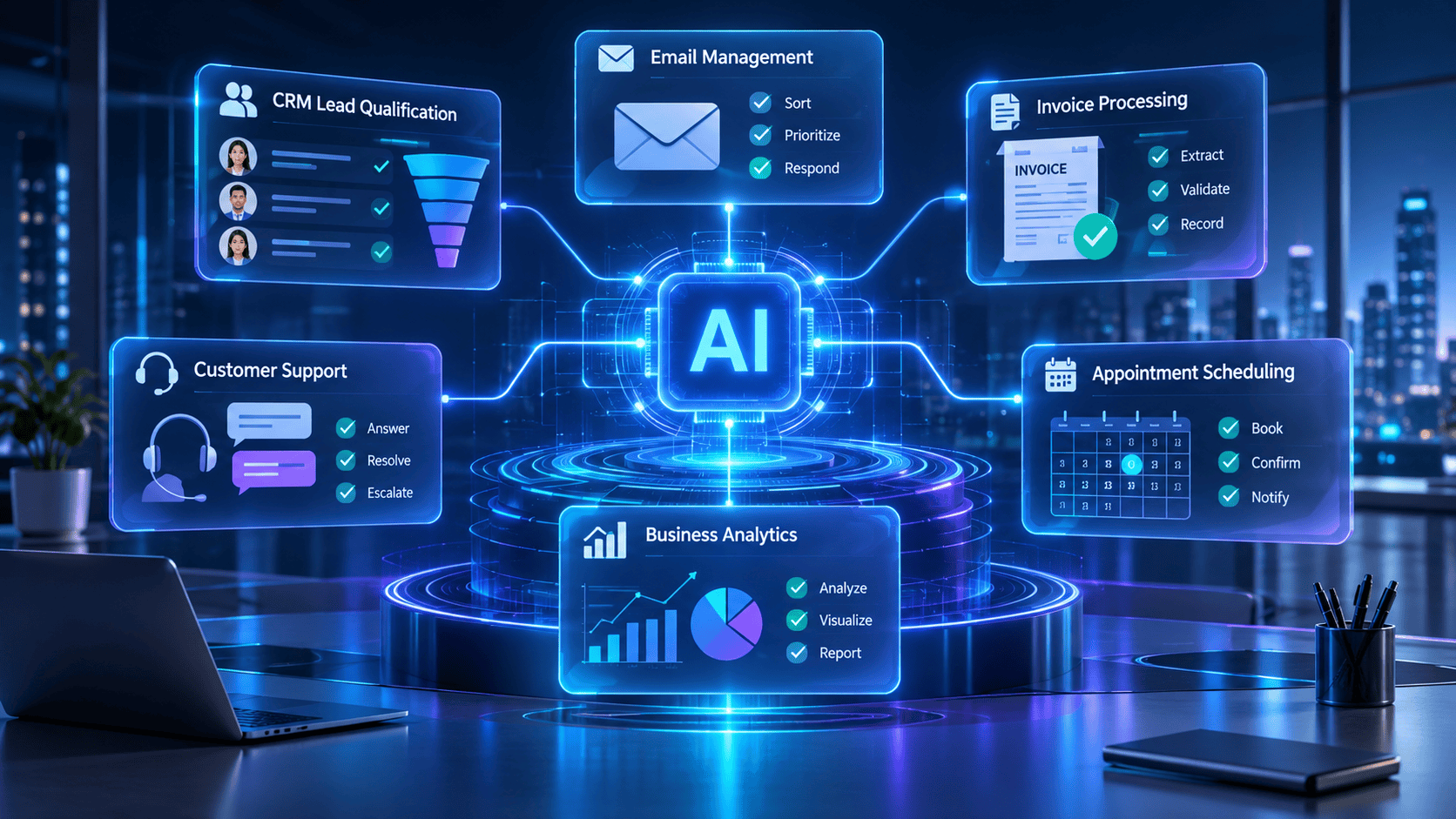
Businesses can use AI agents to automate tasks such as email management, customer support, lead qualification, appointment scheduling, invoice processing, document extraction, report generation, and internal data management.
This practical guide explains how AI agents work, which repetitive business tasks are suitable for automation, how to build an AI-powered workflow, and how to measure its performance. It also compares popular automation platforms and provides implementation examples for small businesses, agencies, and growing organizations.
The main recommendation: Start with one repetitive, low-risk workflow, measure its current performance, introduce an AI agent with clearly defined permissions, and expand automation only after validating its accuracy and business value.
Key Takeaways
- AI agents can automate repetitive business activities that involve collecting information, interpreting requests, making decisions, and taking actions.
- Unlike basic automation, AI agents can handle certain variations in input without requiring a separate rule for every situation.
- Common applications include customer support, email processing, lead qualification, invoice management, appointment scheduling, and reporting.
- Platforms such as n8n, Make.com, Zapier, and OpenAI-powered agent solutions help businesses build AI-enabled workflows.
- Human approval is important for sensitive activities such as financial transactions, customer commitments, and external communications.
- Successful automation requires reliable data, appropriate integrations, security controls, and continuous monitoring.
- Businesses should measure time saved, error rates, processing speed, operating costs, and return on investment.
At a Glance
| Area | Details |
|---|---|
| Technology | AI agents and workflow automation |
| Main purpose | Automating repetitive business operations |
| Common users | Small businesses, agencies, startups, enterprises |
| Popular applications | Emails, customer support, sales, finance, reporting |
| Automation platforms | n8n, Make.com, Zapier, OpenAI |
| Required components | AI model, tools, instructions, business data, guardrails |
| Human involvement | Supervision, approvals, exception handling |
| Main benefit | Reduced manual work and improved operational efficiency |
| Main challenge | Accuracy, security, integration, and governance |
How Can AI Agents Automate Repetitive Business Tasks?
AI agents automate repetitive business tasks by understanding instructions, accessing relevant business information, making decisions, and performing actions through connected applications. Businesses can use AI agents to manage emails, qualify leads, answer customer questions, process invoices, schedule appointments, and generate reports. To implement them, identify a repetitive task, select an AI automation platform, connect the required applications, define instructions and permissions, test the workflow, and monitor its performance.
What Are the Benefits of Using AI Agents in Business Automation?
AI agents help businesses automate multi-step activities that traditionally require employees to collect information, analyze data, make routine decisions, and perform repetitive actions. They combine large language models, application integrations, business rules, and workflow automation to complete tasks with limited human intervention.
For example, an AI-powered lead management agent can receive a website inquiry, analyze the customer’s requirements, categorize the lead, update a CRM, and prepare a personalized follow-up message. A human employee can review the message before it is sent.
The biggest advantage is not simply generating content faster. It is connecting information processing with real business actions while maintaining appropriate human oversight.
Introduction
Every business has repetitive activities that consume employee time without necessarily contributing directly to business growth.
Employees spend hours responding to similar emails, updating spreadsheets, organizing customer information, following up with leads, preparing reports, checking invoices, and transferring information between different applications.
Although these activities are necessary, performing them manually can create operational bottlenecks.
Traditional automation tools have helped businesses reduce repetitive work through predefined triggers and actions. However, conventional automation becomes difficult to manage when tasks involve unstructured information, changing requirements, or decisions that depend on context.
This is where AI agents become useful.
An AI agent can understand a business request, examine available information, decide which action is appropriate, and use connected tools to complete a workflow. It can also identify situations that require human assistance.
For example, imagine receiving 50 customer inquiries through a website every day.
Instead of manually reading each inquiry, identifying the customer’s requirements, categorizing the request, and updating a CRM, an AI agent can perform most of these activities automatically.
It can:
- Read incoming customer inquiries.
- Identify the customer’s primary requirement.
- Classify the inquiry by product, service, or urgency.
- Extract important contact information.
- Create or update a CRM record.
- Prepare an appropriate follow-up response.
- Request human approval before sending sensitive or important communications.
This approach helps businesses reduce manual workload while maintaining control over important decisions.
In this guide, we will explore how to use AI agents for repetitive business tasks, build practical automation workflows, select appropriate tools, and evaluate their performance.
What Are AI Agents in Business Automation?
AI agents are software systems that use artificial intelligence to understand objectives, make context-based decisions, interact with external tools, and complete tasks with varying degrees of autonomy.
Unlike traditional chatbots that primarily respond to user questions, AI agents can perform actions using connected applications and services.
For example, a chatbot might explain how to schedule a meeting. An AI scheduling agent could check calendar availability, identify suitable time slots, create an event, and send a confirmation after receiving the necessary authorization.
Main Components of an AI Agent
An AI agent generally includes the following components:
| Component | Function | Business Example |
|---|---|---|
| AI model | Understands instructions and reasons about tasks | Interprets customer inquiries |
| Instructions | Defines the agent’s objective and operating rules | Categorizes incoming leads |
| Tools and integrations | Connects the agent to external applications | Accesses Gmail, CRM, or spreadsheets |
| Business data | Provides relevant information and context | Retrieves customer records |
| Memory or state | Maintains relevant information across workflow steps | Tracks previous interactions |
| Guardrails | Restricts unsafe or unauthorized actions | Prevents unapproved refunds |
| Monitoring | Tracks execution and identifies failures | Records errors and completion status |
Not every AI agent requires persistent memory. Some workflows need only the information provided during the current task.
The important distinction is that an AI agent combines reasoning with the ability to take actions through approved tools.
AI Agents vs. Traditional Automation vs. AI Chatbots
These technologies solve related but different problems.
| Feature | Traditional Automation | AI Chatbot | AI Agent |
|---|---|---|---|
| Main function | Executes predefined rules | Responds to questions | Completes goal-oriented tasks |
| Decision-making | Rule-based | Limited to conversational responses | Context-based within defined boundaries |
| Handles unstructured data | Limited | Yes | Yes |
| Application integration | Yes | Sometimes | Yes |
| Multi-step execution | Predefined steps | Usually limited | Can plan and execute multiple steps |
| Adapts to changing inputs | Limited | Can interpret variations | Can adjust actions based on context |
| Human approval | Configurable | Usually conversational | Can be built into workflows |
| Best application | Repetitive predictable processes | Information and assistance | Multi-step business operations |
Example:
- Traditional automation: If an invoice arrives, save the attachment to a folder.
- AI chatbot: Explain the information contained in an invoice.
- AI agent: Read the invoice, extract relevant details, check for missing information, compare it with an existing purchase record, and prepare an accounting entry for approval.
AI agents are not automatically better for every task. A simple rule-based workflow is often more reliable and less expensive when the process is completely predictable.
Benefits of Using AI Agents for Repetitive Business Tasks
AI agents can provide several operational advantages when implemented correctly.
1. Reduce Manual Work
Employees often repeat the same actions throughout the day. AI agents can handle suitable activities such as extracting information, sorting messages, updating records, and preparing responses.
This allows employees to focus on customer relationships, problem-solving, planning, and other higher-value responsibilities.
2. Improve Operational Efficiency
AI agents can process information and coordinate multiple application actions without requiring employees to manually transfer data between systems.
For example, a sales agent can process a website inquiry, categorize the lead, update a CRM, and prepare a follow-up task within one workflow.
3. Handle Large Volumes of Requests
An automated workflow can process multiple incoming requests without requiring an employee to manually initiate every action.
Actual throughput depends on API limits, infrastructure, model response time, and the complexity of each workflow.
4. Reduce Repetitive Human Errors
Manual copying, categorization, and data entry can introduce mistakes.
AI agents can standardize these activities by following structured instructions and validating information against predefined rules.
However, AI-generated results are not automatically accurate. Validation is essential, particularly when handling financial, legal, or customer information.
5. Improve Customer Response Times
Customer support agents can classify incoming inquiries, retrieve relevant knowledge-base information, prepare answers, and route complex cases to human employees.
This can reduce delays in routine customer interactions.
6. Connect Multiple Business Applications
AI agents can work with connected tools such as:
- Email platforms
- Customer relationship management systems
- Google Sheets and Excel
- Project management applications
- Accounting software
- Calendar systems
- Customer support platforms
- Document management systems
The ability to connect applications makes AI agents useful for workflows that involve multiple departments.
7. Support Business Growth
As a business receives more inquiries, orders, documents, and support requests, manual processes can become difficult to manage.
Well-designed automation helps businesses increase operational capacity without increasing manual workload at the same rate.
How Do AI Agents Work in a Business Workflow?
AI agents typically operate through a cycle of receiving information, understanding the objective, selecting appropriate actions, using connected tools, and evaluating the result.
The AI Agent Workflow
Step 1: Receive an Input
The workflow starts when an event occurs.
Examples:
- A customer submits a contact form.
- An email arrives.
- An invoice is uploaded.
- A new order is received.
- A scheduled reporting task begins.
Step 2: Understand the Request
The AI model analyzes the input and identifies the task.
For example, it determines whether an incoming email is a sales inquiry, support request, complaint, or general question.
Step 3: Retrieve Relevant Information
The agent accesses approved business information through connected applications.
It might retrieve customer history, product information, pricing policies, previous support tickets, or internal documentation.
Step 4: Decide What to Do
The agent determines the next action according to its instructions, available information, and business rules.
For example:
- Send a routine inquiry to sales.
- Assign a technical question to support.
- Flag an urgent complaint.
- Request missing customer information.
Step 5: Execute the Action
The agent uses connected tools or APIs to perform the required operation.
Possible actions include updating a CRM, creating a spreadsheet record, drafting an email, or opening a support ticket.
Step 6: Validate the Result
The workflow checks whether the required action succeeded.
If information is missing or an integration fails, the task can be flagged for human review.
Step 7: Record and Monitor
The system stores execution details, errors, approval status, and relevant performance metrics.
Example: AI-Powered Customer Inquiry Workflow
| Stage | Action | Application |
|---|---|---|
| Trigger | Receive a website inquiry | Website form |
| Analysis | Understand customer requirements | AI model |
| Classification | Identify inquiry type | AI agent |
| Data entry | Save customer information | CRM |
| Response | Prepare a personalized reply | Email platform |
| Approval | Review the proposed reply | Human employee |
| Completion | Send approved response and log activity | Email + CRM |
This workflow demonstrates how an AI agent can connect several repetitive activities into one coordinated business process.
Step-by-Step Guide: How to Build an AI Agent for Repetitive Business Tasks
You do not need to automate your entire business immediately. Start with one task that consumes considerable employee time and follows a reasonably consistent process.
The following implementation approach works for small businesses, startups, agencies, and growing companies.
Step 1: Identify Repetitive Business Tasks
First, identify activities that employees perform repeatedly.
Look for tasks involving:
- Copying information between applications.
- Reading and categorizing emails.
- Extracting information from documents.
- Updating customer records.
- Preparing standard reports.
- Answering frequently asked questions.
- Sending routine follow-up messages.
Create a list of potential automation opportunities.
Example:
| Business Task | Frequency | Manual Effort | Automation Potential |
|---|---|---|---|
| Email categorization | Daily | High | High |
| Lead qualification | Daily | High | High |
| Invoice data extraction | Weekly | Medium | High |
| Meeting scheduling | Daily | Medium | High |
| Monthly business reporting | Monthly | High | High |
| Strategic business decisions | Occasional | High | Low |
Prioritize repetitive, well-defined, low-risk tasks with measurable outcomes.
Step 2: Map the Existing Workflow
Before creating an AI agent, understand how the task is currently completed.
Document:
- What triggers the task?
- Where does the information come from?
- Which applications are involved?
- What decisions must be made?
- What happens when information is missing?
- Which actions require human approval?
- How is successful completion verified?
For example, a lead qualification workflow might look like this:
Website Form → Lead Information → Qualification → CRM Update → Follow-Up Draft → Human Approval → Email Sent
Mapping the existing workflow helps identify unnecessary steps and prevents automating an inefficient process.
Step 3: Select the Right AI Agent Platform
Choose a platform based on your technical requirements, integrations, customization needs, and budget.
Some popular options include:
- n8n: Suitable for customizable workflows, API integrations, and self-hosted automation.
- Make.com: Useful for visual automation involving multiple applications.
- Zapier: Suitable for connecting business applications through accessible automation workflows.
- OpenAI: Provides models and agent-building capabilities for custom AI-powered applications.
The best platform depends on the workflow rather than the popularity of the tool.
Step 4: Define the Agent’s Objective
Every AI agent should have a clearly defined responsibility.
Avoid broad instructions such as:
“Manage all customer communications.”
Instead, provide specific instructions:
“You are a customer inquiry classification agent. Read incoming customer emails, identify the inquiry category, extract the customer’s name and email address, determine urgency, and create a structured record. Do not send external messages or make financial commitments. Flag unclear or sensitive inquiries for human review.”
A well-defined objective makes the agent easier to test and control.
Step 5: Connect Business Applications
Connect only the applications required for the task.
For example, a lead management agent might require:
- Website form integration for receiving inquiries.
- An AI model for interpreting customer information.
- Google Sheets or a CRM for storing records.
- Gmail for preparing follow-up messages.
- Google Calendar for scheduling approved meetings.
Use secure authentication and grant the minimum permissions necessary.
Avoid giving an agent unrestricted access to business accounts.
Step 6: Configure Instructions and Guardrails
Define the agent’s operating boundaries.
Include:
- Tasks it is allowed to perform.
- Information it can access.
- Actions it cannot perform.
- Conditions requiring human approval.
- Rules for handling missing information.
- Escalation procedures.
- Data retention and logging requirements.
For example, an invoice-processing agent may extract invoice information and prepare a payment record, but actual payment authorization should remain with an approved employee.
Step 7: Build the Workflow
Connect the trigger, AI processing, application tools, validation, and approval steps.
A basic workflow might contain:
- Trigger node.
- Input processing node.
- AI agent node.
- Data validation node.
- Application integration node.
- Human approval node.
- Completion and logging node.
For structured tasks, require the AI to return consistent fields such as:
- Customer name
- Email address
- Inquiry category
- Priority
- Summary
- Recommended next action
Structured outputs make it easier to validate and transfer information between applications.
Step 8: Test With Realistic Examples
Test the workflow using representative examples, including:
- Normal requests.
- Incomplete information.
- Duplicate records.
- Unusual customer requests.
- Incorrectly formatted documents.
- Ambiguous instructions.
- Failed application connections.
Check whether the agent makes the correct decision and whether each connected application receives the expected information.
Do not activate unrestricted autonomous execution simply because the workflow succeeds on a few examples.
Step 9: Deploy With Human Oversight
Initially, run the workflow in a supervised mode.
Allow the agent to prepare information and proposed actions while an employee reviews the results.
After collecting sufficient evidence of reliability, consider increasing automation for low-risk actions.
Keep human approval for sensitive activities.
Step 10: Measure and Improve Performance
Monitor the workflow regularly.
Important measurements include:
- Tasks completed successfully.
- Average processing time.
- Manual hours saved.
- Incorrect classifications.
- Failed integrations.
- Human intervention rate.
- Cost per completed task.
- Customer response time.
Use these results to improve instructions, validation rules, integrations, and escalation procedures.
Practical Examples: AI Agents for Repetitive Business Tasks
The following examples demonstrate how businesses can apply AI agents to everyday operations.
1. AI Email Management Agent
<image-placeholder> </image-placeholder>
Business problem: Employees receive large numbers of emails and spend time sorting, reading, categorizing, and preparing responses.
AI agent workflow:
- Detect a new incoming email.
- Analyze its subject and content.
- Classify it as sales, support, billing, or general communication.
- Identify urgent requests.
- Summarize the message.
- Draft a relevant response.
- Send the draft for employee approval.
Recommended tools: OpenAI, n8n, Gmail, Google Sheets.
Expected benefit: Less time spent sorting messages and preparing routine responses.
2. AI Lead Qualification Agent
Business problem: Sales teams receive inquiries from different sources and manually determine which leads deserve attention.
AI agent workflow:
- Collect leads from website forms.
- Extract contact details and requirements.
- Analyze the inquiry against predefined qualification criteria.
- Assign a lead category.
- Update the CRM.
- Prepare a personalized follow-up.
- Notify the relevant sales employee.
Recommended tools: OpenAI, Make.com, HubSpot, Google Sheets.
Expected benefit: More consistent lead processing and faster sales-team follow-up.
3. AI Invoice Processing Agent
Business problem: Finance teams manually read invoices and enter information into accounting systems.
AI agent workflow:
- Detect an uploaded invoice.
- Extract vendor name, invoice number, date, tax, and total amount.
- Validate required fields.
- Check for duplicate invoice numbers.
- Compare information with purchase records when available.
- Prepare an accounting entry.
- Request approval before posting or payment.
Recommended tools: OpenAI, OCR, n8n, accounting software, Google Drive.
Expected benefit: Reduced manual data entry and more consistent invoice processing.
4. AI Customer Support Agent
Business problem: Customer support teams repeatedly answer questions about shipping, returns, product information, and order status.
AI agent workflow:
- Receive a customer inquiry.
- Identify the question category.
- Retrieve relevant information from approved documentation.
- Check order information if authorized.
- Prepare a response.
- Escalate complaints or uncertain cases.
- Record the interaction.
Recommended tools: OpenAI, n8n, customer support software, knowledge-base integrations.
Expected benefit: Faster handling of routine questions and better support-team productivity.
5. AI Appointment Scheduling Agent
Business problem: Employees spend time exchanging messages to find suitable meeting times.
AI agent workflow:
- Receive a scheduling request.
- Identify the preferred date and time.
- Check authorized calendar availability.
- Suggest available time slots.
- Confirm the selected slot.
- Create the calendar event.
- Send a confirmation.
Recommended tools: OpenAI, Google Calendar, Make.com, Zapier.
Expected benefit: Reduced manual scheduling and fewer unnecessary communication exchanges.
6. AI Business Reporting Agent
Business problem: Managers spend time collecting data from different platforms and preparing routine reports.
AI agent workflow:
- Retrieve approved business data.
- Organize the information.
- Calculate relevant performance metrics using validated calculations.
- Compare results with previous reporting periods.
- Identify significant changes.
- Generate a summary.
- Share the report with authorized employees.
Recommended tools: OpenAI, n8n, Google Sheets, Looker Studio.
Expected benefit: Faster reporting and easier access to operational insights.
7. AI Document Management Agent
Business problem: Employees manually organize contracts, purchase orders, technical documents, and other business files.
AI agent workflow:
- Detect a newly uploaded document.
- Identify its document type.
- Extract relevant information.
- Generate a short summary.
- Assign appropriate metadata.
- Save the document in the correct location.
- Flag missing or sensitive information.
Recommended tools: OpenAI, OCR, n8n, Google Drive, document management systems.
Expected benefit: More organized document processing and easier information retrieval.
Pros of Using AI Agents
- Reduced repetitive workload: Automates suitable manual activities.
- Faster processing: Handles multiple workflow steps without repeated employee input.
- Application connectivity: Coordinates tasks across different business systems.
- Flexible information handling: Understands unstructured emails, documents, and requests.
- Improved consistency: Applies standardized instructions and validation rules.
- Scalable operations: Supports increasing volumes of routine work.
- Better visibility: Workflow logs help businesses monitor task execution.
Cons and Limitations of AI Agents
- Incorrect outputs: AI agents can misunderstand instructions or generate inaccurate information.
- Integration complexity: Connecting multiple business applications may require technical expertise.
- Operating costs: Model usage, APIs, infrastructure, and platform subscriptions can increase expenses.
- Security concerns: Poorly controlled access can expose confidential business information.
- Unpredictable execution: Agents may select inappropriate actions if instructions or boundaries are unclear.
- Maintenance requirements: Changes in APIs, business processes, and application permissions require ongoing attention.
- Human oversight: Important decisions still require responsible human review.
AI agents should be treated as supervised business systems, not as completely independent employees.
Comparison Table: Traditional Automation vs. AI-Powered Automation vs. AI Agents
| Evaluation Factor | Traditional Automation | AI-Powered Automation | AI Agents |
|---|---|---|---|
| Execution | Fixed rules | Rules with AI processing | Goal-oriented execution |
| Input handling | Structured | Structured and unstructured | Structured and unstructured |
| Reasoning | No | AI-assisted | Context-based |
| Workflow flexibility | Low | Medium | Higher within defined boundaries |
| Multi-step tasks | Predefined | Predefined with AI steps | Can plan and execute steps |
| Error handling | Rule-based | AI-assisted | Can assess and escalate |
| Human oversight | Optional | Recommended | Essential for sensitive actions |
| Ideal use | Predictable tasks | Classification and extraction | Complex repetitive workflows |
Recommendation: Use traditional automation for predictable operations, AI-powered automation for tasks requiring interpretation, and AI agents when workflows require contextual decisions and multiple connected actions.
AI Agent Tool Comparison: Which Platform Should You Choose?
Selecting an automation platform is an important implementation decision. The following comparison focuses on common business requirements rather than claiming that one tool is universally superior.
| Platform | Main Strength | Technical Level | Best Use Case |
|---|---|---|---|
| n8n | Flexible workflow automation and integrations | Intermediate | Custom AI business workflows |
| Make.com | Visual workflow builder | Beginner to Intermediate | Multi-application automation |
| Zapier | Accessible app integrations | Beginner | Routine business automation |
| OpenAI | AI models and custom agent capabilities | Beginner to Advanced, depending on implementation | Intelligent reasoning and custom agents |
1. n8n
n8n is a workflow automation platform that supports integrations, API connections, and AI-enabled workflows.
<image-placeholder> </image-placeholder>
Best for:
- Custom AI agents.
- Self-hosted automation.
- API-driven workflows.
- Document processing.
- Complex business integrations.
2. Make.com
Make.com offers a visual automation environment for connecting applications and designing multi-step workflows.
<image-placeholder> </image-placeholder>
Best for:
- Visual workflow building.
- Marketing automation.
- Lead management.
- Data synchronization.
- Small-business operations.
3. Zapier
Zapier helps users connect business applications and automate actions through triggers and predefined workflows. Its AI capabilities can support more intelligent automation use cases.
<image-placeholder> </image-placeholder>
Best for:
- Connecting commonly used applications.
- Simple business automation.
- Form-to-CRM workflows.
- Email and notification automation.
- Teams with limited development resources.
4. OpenAI
OpenAI provides AI models and agent-building capabilities that developers and businesses can use to create intelligent workflows.
<image-placeholder> </image-placeholder>
Best for:
- Custom AI-powered applications.
- Information extraction.
- Intelligent classification.
- Tool-using agents.
- Complex reasoning tasks.
Important: OpenAI is not a direct one-to-one replacement for n8n, Make.com, or Zapier. It can provide the intelligence layer within a broader automation architecture.
Recommended AI Automation Stack
A practical business automation stack could look like this:
| Requirement | Suggested Tool | Purpose |
|---|---|---|
| AI reasoning | OpenAI | Understands requests and generates decisions |
| Workflow orchestration | n8n or Make.com | Connects the workflow steps |
| Document extraction | OCR + AI model | Extracts information from files |
| Business database | Airtable or Google Sheets | Stores structured records |
| Communication | Gmail or Slack | Sends notifications and approved messages |
| Scheduling | Google Calendar | Manages appointments |
| Reporting | Looker Studio | Displays workflow performance |
Businesses should select tools based on existing infrastructure, security requirements, and total operating costs.
Best Use Cases: Where Should Businesses Start?
Not every business process is suitable for agent-based automation.
| Business Function | Recommended Task | Priority |
|---|---|---|
| Sales | Lead qualification and follow-up drafts | High |
| Marketing | Content classification and campaign reporting | High |
| Customer support | FAQ responses and ticket classification | High |
| Finance | Invoice extraction and validation | High, with approval |
| Human resources | Resume information extraction | Medium |
| Operations | Document organization | High |
| Administration | Meeting scheduling | High |
| Management | Business performance summaries | Medium |
The best starting point is usually a repetitive workflow with clear inputs, predictable outcomes, low consequences for mistakes, and measurable performance.
Performance Ratings: How to Evaluate an AI Agent
The following is a suggested evaluation framework, not a benchmark of actual tool performance.
| Evaluation Factor | Weight | What to Measure |
|---|---|---|
| Accuracy | 25% | Correctness of decisions and extracted data |
| Reliability | 20% | Successful workflow completion |
| Integration | 15% | Compatibility with business applications |
| Security | 15% | Access control and data protection |
| Cost efficiency | 15% | Total cost per completed task |
| Ease of maintenance | 10% | Monitoring and troubleshooting effort |
A business can score each factor from 1 to 5.
Weighted Score Formula:
Weighted Score = Σ (Individual Rating × Weight)
For example, if an agent receives an accuracy rating of 4/5, its weighted contribution is:
4 × 25% = 1.00 out of 5.
Calculate the total score across all evaluation categories to compare different implementations.
Do not use a high overall score to compensate for unacceptable security or accuracy failures. Critical requirements should also have minimum pass thresholds.
Firsthand Testing: A Practical Testing Framework for AI Business Agents
An important part of selecting an AI agent is understanding how it performs under realistic business conditions.
Rather than assuming that an agent will work reliably because it completes a demonstration, businesses should evaluate it using representative tasks, controlled test data, and measurable results.
Editorial transparency: This section provides a reproducible practical testing framework. It does not claim that LearnInnovative has conducted laboratory benchmarks or measured actual performance from the platforms mentioned in this article.
Testing Scenario: AI-Powered Lead Qualification
Objective: Automate the process of receiving, classifying, and recording website leads.
Test environment:
- AI model: OpenAI.
- Workflow platform: n8n or Make.com.
- Data storage: Google Sheets.
- Input: Sample website inquiries.
- Output: Structured lead records and follow-up drafts.
Testing Procedure
| Test | Input | Expected Result |
|---|---|---|
| Test 1 | Complete customer inquiry | Correct lead extraction |
| Test 2 | Missing phone number | Missing field identified |
| Test 3 | Unclear service requirement | Human review requested |
| Test 4 | Duplicate inquiry | Duplicate flagged |
| Test 5 | High-priority inquiry | Correct urgency classification |
| Test 6 | Malformed email address | Validation failure identified |
| Test 7 | CRM connection failure | Error logged and task escalated |
Metrics to Record
- Extraction accuracy: Percentage of correctly extracted fields.
- Classification accuracy: Percentage of correctly categorized inquiries.
- Workflow completion rate: Percentage of successfully completed tasks.
- Human intervention rate: Percentage of tasks requiring employee assistance.
- Average processing time: Time required to complete each task.
- Cost per task: Total automation expense divided by completed tasks.
Testing Spreadsheet
| Metric | Measurement |
|---|---|
| Total test inquiries | 100 |
| Correctly extracted records | Record actual result |
| Correctly classified leads | Record actual result |
| Duplicate detection | Record actual result |
| Failed workflows | Record actual result |
| Human review required | Record actual result |
| Average processing time | Record actual result |
The 100 inquiries represent a proposed test sample, not completed testing results.
How to Interpret the Results
If the agent frequently misclassifies inquiries, improve its instructions and classification criteria.
If it extracts incorrect information, introduce structured outputs and field validation.
If it fails during application integration, examine API permissions, authentication, rate limits, and error-handling logic.
If it requires human intervention too frequently, determine whether the task is sufficiently standardized for automation.
Only move toward greater autonomy after the workflow demonstrates reliable performance across normal and exceptional cases.
ROI Calculation: How Much Can AI Agents Save a Business?
Businesses should calculate the financial value of automation before deploying AI agents.
A simple ROI model compares the cost of manual work with the total cost of automated processing.
Formula:
Monthly Manual Cost = Monthly Tasks × Manual Time per Task × Hourly Employee Cost
Monthly Automation Cost = Platform Cost + AI Usage Cost + Integration Cost + Maintenance Cost
Monthly Net Savings = Manual Cost − Automation Cost
ROI (%) = (Monthly Net Savings ÷ Monthly Automation Cost) × 100
Illustrative ROI Example
Assume a business processes 1,000 customer inquiries every month.
The following figures are hypothetical and intended to demonstrate the calculation.
| Parameter | Manual Process | AI-Assisted Process |
|---|---|---|
| Monthly inquiries | 1,000 | 1,000 |
| Time per inquiry | 5 minutes | 2 minutes of human review |
| Employee hourly cost | $20 | $20 |
| Monthly labor cost | $1,666.67 | $666.67 |
| Automation platform and AI cost | $0 | $150 |
| Total monthly cost | $1,666.67 | $816.67 |
Estimated monthly net savings:
$1,666.67 − $816.67 = $850
Estimated ROI:
($850 ÷ $816.67) × 100 = 104.08%
This example assumes that the AI-assisted workflow handles the initial processing and that an employee reviews each inquiry for two minutes. It excludes initial setup costs, taxes, and any additional overhead.
Actual savings depend on workflow complexity, error rates, employee review requirements, and integration expenses.
Decision Flowchart: Should You Automate a Business Task With an AI Agent?
Use this decision process before implementing an agent.
Start: Is the task repetitive?
- No: Consider keeping it manual or using AI assistance.
- Yes: Does it follow predictable rules?
- Yes: Consider traditional automation first.
- No: Does it require understanding unstructured information or contextual decisions?
- No: Consider rule-based automation with simple AI assistance.
- Yes: Can the task be completed with approved tools and clearly defined boundaries?
- No: Redesign the process or retain human control.
- Yes: Is the risk acceptable with validation and human approval?
- No: Keep the critical decision under human control.
- Yes: Build, test, monitor, and gradually deploy the AI agent.
Common Mistakes to Avoid When Implementing AI Agents
1. Automating Too Many Tasks at Once
Starting with multiple complex workflows makes it difficult to identify errors and measure results.
Solution: Begin with one workflow and expand after successful testing.
2. Giving Agents Unrestricted Permissions
An agent with unrestricted access can potentially make unintended changes or expose sensitive information.
Solution: Apply least-privilege access and restrict sensitive actions.
3. Using Poor-Quality Business Data
Incomplete or outdated data can lead to incorrect classifications and recommendations.
Solution: Clean and validate important business information before connecting it to the agent.
4. Ignoring Human Approval
Allowing an agent to send sensitive communications, issue refunds, or authorize payments without appropriate controls creates unnecessary risk.
Solution: Introduce approval checkpoints for high-impact actions.
5. Choosing AI Agents for Simple Tasks
A basic notification or spreadsheet update may not require an AI model.
Solution: Use traditional automation when predefined rules are sufficient.
6. Not Monitoring Performance
An agent may stop working correctly after an application update, API change, or modification to business data.
Solution: Monitor execution logs, failed actions, and output quality.
7. Ignoring Security and Privacy
Business workflows may contain customer information, financial details, and confidential documents.
Solution: Use appropriate access controls, secure authentication, approved data-processing arrangements, and retention policies.
8. Expecting Completely Autonomous Operations
AI agents can misunderstand information, make incorrect decisions, or fail to use a tool correctly.
Solution: Define escalation rules and maintain human responsibility for important decisions.
Expert Tips for Building Reliable AI Agent Workflows
Tip 1: Start With a Specific Business Objective
Every agent should have one primary responsibility.
For example, build a lead qualification agent before attempting to create a complete autonomous sales department.
Tip 2: Combine AI With Traditional Automation
Use AI for interpretation and decision-making, but use deterministic operations for calculations, validation, and predictable application updates.
This hybrid approach can improve reliability and control costs.
Tip 3: Use Structured Outputs
Ask agents to return information in predefined fields rather than unrestricted paragraphs.
This makes it easier to validate outputs and transfer data between applications.
Tip 4: Introduce Human Approval at Critical Points
Require employee authorization before:
- Sending sensitive external communications.
- Issuing refunds.
- Making payments.
- Changing customer account permissions.
- Modifying important business records.
Tip 5: Build Error-Handling Mechanisms
Every workflow should account for missing information, failed API requests, duplicate records, and unexpected inputs.
Provide a clear fallback process.
Tip 6: Monitor Cost Per Completed Task
A workflow that saves employee time but consumes excessive API resources may not be financially beneficial.
Measure the full operating cost rather than looking only at model pricing.
Tip 7: Maintain an Audit Trail
Record important decisions, tool calls, approval status, and execution results.
Logs make it easier to investigate errors and demonstrate accountability.
Tip 8: Improve the Workflow Continuously
Review failed tasks and employee feedback regularly.
Use those findings to refine agent instructions, validation criteria, and business rules.
Statistics: What Does Current AI Agent Adoption Tell Us?
AI agent adoption is growing, but businesses are still working through the challenges of moving from experimentation to reliable deployment.
The following figures come from published industry research available in 2026.
1. AI Agent Experimentation Is Increasing
According to McKinsey’s November 2025 State of AI survey:
- 62% of respondents said their organizations were at least experimenting with AI agents.
- 23% reported scaling an agentic AI system in at least one business function.
- 88% reported regular AI use in at least one business function.
These figures indicate growing interest in AI agents, although experimentation and deployment at scale are different stages of adoption.
2. Large Organizations Are Scaling AI Agents
McKinsey’s August 2026 State of AI survey found:
- 40% of respondents from organizations with annual revenue exceeding $1 billion reported scaling AI agents in at least one function.
- This increased from 27% in the previous year.
- The corresponding figure among smaller organizations remained at approximately 22%.
This suggests that larger organizations are moving faster in scaling AI agents, while smaller businesses still have opportunities to explore practical applications.
3. Business Process Readiness Remains a Challenge
A Deloitte survey published in August 2026 reported:
- 42% of surveyed leaders said their organizations had tested or deployed AI agents.
- Only 15% reported scaled, orchestrated, cross-functional multi-agent adoption.
- Just 21% said their business processes were prepared or highly prepared for agentic adoption.
- 75% agreed that human collaboration with AI agents creates more value than agent-powered automation alone.
These findings reinforce the importance of process redesign, workforce readiness, and human oversight.
What Do These Statistics Mean for Businesses?
The research highlights three important points:
- AI agent adoption is increasing across industries.
- Experimentation does not automatically translate into measurable business value.
- Businesses need reliable processes, appropriate integrations, security controls, and human supervision before expanding autonomous operations.
Research sources:
- McKinsey, The State of AI in 2025.
- McKinsey, The State of AI in 2026.
- Deloitte, AI Agents Are Only the Beginning: AI Readiness and Agentic AI Success.
Note: These surveys use different respondent populations and definitions. Their percentages should not be treated as directly comparable.
Who Is This Guide For?
This guide is particularly relevant to:
| Audience | How AI Agents Can Help |
|---|---|
| Small business owners | Automate emails, appointments, and customer inquiries |
| Digital marketing agencies | Manage leads, reports, and content workflows |
| E-commerce businesses | Organize product inquiries and customer support |
| Sales teams | Qualify leads and prepare follow-up messages |
| Finance teams | Extract and validate invoice information |
| Operations managers | Coordinate repetitive administrative activities |
| Startups | Reduce manual processes as operations grow |
| IT professionals | Build customized AI-powered workflows |
Businesses do not need large technology teams to start exploring AI agents. Many workflow automation platforms provide visual builders and prebuilt integrations.
However, more complex or sensitive applications may require developers, security specialists, and process owners.
What We Learned
AI agents are most valuable when they solve a clearly defined operational problem rather than simply introducing another AI tool into the business.
The most practical implementation lessons are:
- Identify repetitive tasks before selecting an automation platform.
- Use AI agents when workflows require contextual understanding and multiple actions.
- Combine AI reasoning with traditional automation for predictable operations.
- Start with low-risk processes and gradually expand automation.
- Keep human approval for sensitive decisions.
- Validate outputs and monitor workflow performance.
- Measure actual time savings and total operating costs.
- Treat security, data quality, and maintenance as essential parts of implementation.
The goal should be to create reliable business workflows that improve productivity while keeping employees in control.
Frequently Asked Questions (FAQs)
1. What are AI agents used for in business?
AI agents are used to automate multi-step business activities such as email management, customer support, lead qualification, invoice processing, appointment scheduling, document management, and reporting. They can interpret information, make decisions within defined boundaries, and execute actions through connected applications.
2. Can AI agents automate repetitive administrative tasks?
Yes. AI agents can automate many administrative activities, including organizing emails, extracting document information, updating spreadsheets, scheduling appointments, preparing reports, and categorizing business requests. Tasks involving sensitive information should include appropriate human approval.
3. What is the difference between AI agents and workflow automation?
Traditional workflow automation follows predefined triggers, conditions, and actions. AI agents can interpret unstructured information, make context-based decisions, and select appropriate tools to achieve an objective. Businesses can combine both approaches to build more flexible automation systems.
4. Which AI agent platform is best for small businesses?
The best platform depends on technical experience and business requirements. Zapier is useful for accessible application integrations, Make.com offers visual workflow building, n8n supports flexible and customizable automation, and OpenAI provides models and capabilities for custom AI-powered agents.
5. Can I build an AI agent without coding?
Yes. Platforms such as n8n, Make.com, and Zapier offer visual workflow-building capabilities that allow users to create many AI-powered automations without writing extensive code. More advanced integrations may still require API configuration or programming.
6. How much does it cost to build an AI agent?
The cost depends on the AI model, automation platform, number of workflow executions, API usage, integrations, infrastructure, and maintenance requirements. Simple workflows may have relatively low operating costs, while complex business agents can require additional development and monitoring expenses.
7. Are AI agents better than traditional automation?
Not always. Traditional automation is often better for predictable tasks with fixed rules. AI agents are more suitable when tasks involve unstructured information, contextual decisions, and multiple actions. The best solution depends on the complexity and risk of the process.
8. Can AI agents work with Gmail and Google Sheets?
Yes. AI agents can interact with Gmail and Google Sheets through supported integrations, APIs, and workflow automation platforms. For example, an agent can analyze an incoming email, extract customer information, and create a structured spreadsheet record.
9. Are AI agents safe for business operations?
AI agents can be used safely when businesses implement appropriate security controls, access restrictions, output validation, monitoring, and human approval. Sensitive activities such as financial transactions and changes to important customer records should have additional safeguards.
10. Can AI agents replace employees?
AI agents can automate certain repetitive activities, but they do not eliminate the need for human judgment, accountability, relationship management, and complex problem-solving. In most business environments, AI agents are more useful as productivity tools that support employees.
11. How do I measure the ROI of AI agents?
Measure ROI by comparing the cost of manual work with the total cost of automation. Include employee time, AI usage, platform subscriptions, integration expenses, maintenance, and error correction. Track time saved, completion rates, accuracy, and cost per successful task.
12. What is the easiest AI agent workflow to build first?
Email classification, lead categorization, document information extraction, and routine report generation are practical starting points. Choose a workflow with clear inputs, measurable results, low operational risk, and an easy human-review process.
Conclusion
AI agents are making business automation more flexible by combining artificial intelligence with application integrations and multi-step workflow execution.
Businesses can use them to manage emails, qualify leads, process invoices, organize documents, schedule meetings, support customers, and prepare reports.
However, successful implementation requires more than connecting an AI model to business applications. It requires clear objectives, reliable data, secure permissions, workflow validation, and ongoing performance monitoring.
The best approach is to start small, identify one repetitive task, build a supervised workflow, measure its performance, and expand gradually.
Businesses that focus on practical use cases and measurable improvements can use AI agents to reduce administrative workload and create more efficient operations.
Our Verdict: Are AI Agents Worth Using for Repetitive Business Tasks?
Yes. AI agents are worth considering when repetitive business tasks require information interpretation, contextual decisions, and actions across multiple applications.
For predictable operations, traditional automation may remain the simpler and more cost-effective choice. For complex workflows involving emails, documents, customer requests, and connected applications, AI agents can provide additional flexibility.
Our recommendation is to begin with a low-risk workflow such as email classification or lead qualification. Use n8n or Make.com for workflow orchestration, an appropriate AI model for interpretation, and human approval for important actions.
The real value of AI agents is not replacing every manual activity. It is allowing employees to spend less time on repetitive processes and more time on work that requires human expertise.
Start Automating Repetitive Business Tasks With AI Agents
You do not need to automate your entire business in one day.
Start by identifying one repetitive task that consumes valuable employee time. Map the existing process, choose an appropriate AI automation platform, build a supervised workflow, and measure the results.
Explore more practical AI automation guides on LearnInnovative to understand how AI agents, workflow automation, and intelligent business systems can improve everyday operations.
Recommended next step: Build your first AI-powered business workflow using n8n or Make.com and test it with a small set of real-world business scenarios before expanding its permissions.




Leave a Reply