

Quick Summary
An interactive AI resume combines a traditional, ATS-friendly resume with a searchable online portfolio, structured career information, project evidence, and—optionally—an AI assistant that can answer questions about your experience.
The goal is not to “hack” recruiter AI or hide keywords. Instead, build a resume that is easy for ATS software, resume parsers, AI-assisted recruiting systems, and human recruiters to understand.
The strongest approach is a dual-format resume:
- A clean, single-column PDF for traditional applications.
- An interactive web resume for deeper recruiter exploration.
- Structured HTML and resume data that machines can interpret reliably.
- Evidence-backed skills, projects, achievements, and experience.
- An optional AI assistant that answers questions using your verified career information.
This approach makes your resume more useful without sacrificing compatibility with conventional hiring systems.
Key Takeaways
- An interactive AI resume should complement—not replace—a conventional ATS-friendly resume.
- Use semantic HTML, descriptive headings, structured content, and clear text rather than relying on visual design alone.
- Store your resume information in a structured source such as JSON, Markdown, or a database.
- Build project pages around evidence and outcomes, not lists of technologies.
- Add an AI assistant only if it provides useful recruiter-facing functionality.
- Keep a clean PDF version available for ATS-based applications.
- Never invent skills, employment history, certifications, metrics, or achievements simply to improve AI matching.
- Test your resume by extracting its text, checking its HTML structure, viewing it on mobile, and asking an AI system questions about your background.
- Optimize for retrievability and evidence, not keyword stuffing.
- Treat privacy, accessibility, security, and responsible AI use as part of resume design.
What Is an Interactive AI Resume?
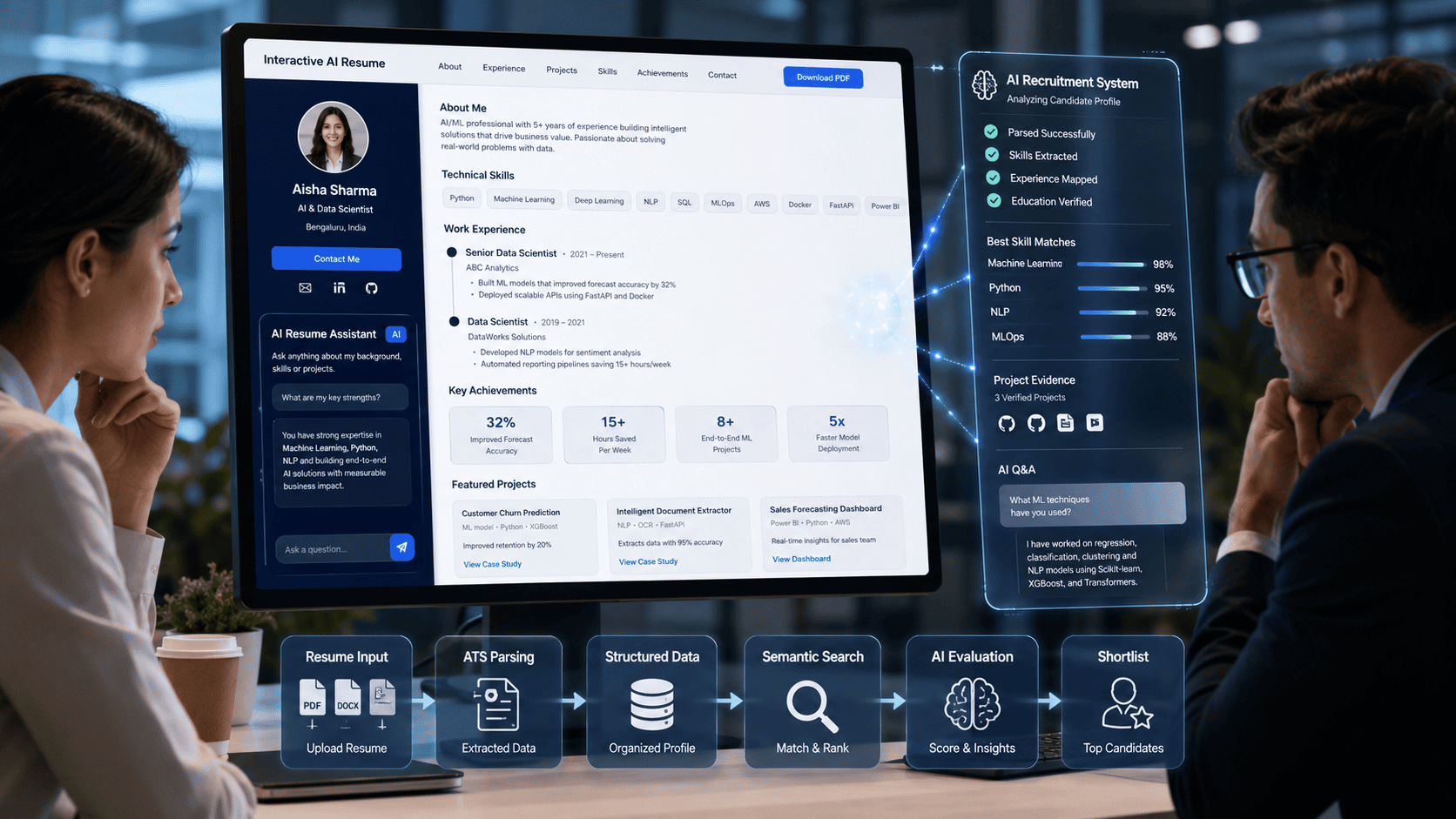
An interactive AI resume is a web-based resume that combines structured career information, interactive project details, portfolio content, and optional AI-powered question answering with a traditional ATS-friendly resume. It allows recruiters to quickly understand a candidate’s skills and experience while providing deeper information when needed.
Unlike a conventional PDF, an interactive resume can let recruiters filter projects, explore skills, view measurable achievements, inspect case studies, and ask natural-language questions about a candidate’s experience.
However, the interactive website should supplement rather than replace a conventional machine-readable resume.
How Does an Interactive AI Resume Work?
An interactive AI resume typically has five layers:
Resume Data → Structured Web Content → Interactive Interface → Optional AI Assistant → Recruiter-Friendly Export
The candidate’s verified career information is stored in a structured format. The website presents that information through semantic HTML and interactive components. An optional AI assistant retrieves information from the approved resume/project knowledge base and generates answers to recruiter questions.
The result is a resume that can serve both:
- Machines: ATSs, parsers, search engines and AI systems
- Humans: recruiters, hiring managers and technical interviewers
The important distinction is that AI should make your information easier to explore, not manufacture a more impressive version of your career.
Introduction: Why Static Resumes Are No Longer Enough
The traditional resume is still important—but the way recruiters discover, filter, and evaluate candidates is changing.
Recruiting organizations increasingly use software and AI throughout the hiring process. LinkedIn’s 2025 Future of Recruiting research reported that 37% of recruiting organizations were already experimenting with or actively integrating generative AI, up from 27% the previous year.
HireVue’s 2026 Global AI in Hiring Report, based on a survey of more than 3,100 hiring managers, found that 77% of HR teams use AI regularly, while 71% of candidates use AI for resumes. The same report found that only 41% of hiring teams fully trust AI, highlighting the importance of transparency and human judgment.
This creates an interesting problem.
Candidates are using AI to produce increasingly polished resumes, while recruiters are using AI to process increasingly large volumes of applications.
A beautifully formatted PDF can therefore become just one small part of your professional identity.
An interactive AI resume takes a different approach.
Instead of asking:
“How can I make my resume look more impressive?”
you ask:
“How can I make my professional evidence easier for both humans and machines to understand?”
That shift is the foundation of an effective AI-ready resume.
What Is an Interactive AI Resume?
An interactive AI resume is an online professional profile that goes beyond a static document.
It can contain:
- Professional summary
- Skills
- Work experience
- Education
- Certifications
- Projects
- Case studies
- GitHub repositories
- Portfolio links
- Technology filters
- Achievement metrics
- Downloadable PDF resume
- Interactive timelines
- Project search
- Recruiter-focused views
- Optional AI question-answering assistant
For example, a recruiter could visit your resume and select:
Technology → Python → AI → Automation
The website could immediately display relevant projects and experience.
A recruiter could then ask an optional AI assistant:
“Has this candidate built production automation workflows?”
Instead of generating an answer from the open internet, the assistant should retrieve information from your approved resume and project knowledge base.
For example:
Answer:
Yes. The candidate built three workflow automation systems using Python and n8n. The largest reduced a repetitive reporting process from approximately four hours to 45 minutes per week.
The important part is the evidence.
An AI assistant should never invent an answer simply because the question contains a keyword.
Why Build an Interactive AI Resume?
1. It Gives Recruiters Multiple Ways to Explore Your Experience
A conventional resume forces the recruiter to read sequentially.
An interactive resume can provide different paths.
A recruiter interested in:
- Python
- AI
- Cloud
- Data Engineering
- Automation
can immediately find relevant evidence.
2. It Separates Skills From Proof
Many resumes contain statements such as:
- Python
- Machine Learning
- AWS
- Docker
- SQL
- React
But a skill list doesn’t prove proficiency.
An interactive resume can connect every major skill to evidence.
For example:
Python
→ Project A
→ Automation system
→ GitHub repository
→ Performance result
→ Technical explanation
This creates a stronger relationship between skill → application → evidence → outcome.
3. It Allows Deeper Recruiter Questions
A recruiter may not have time to read every project.
An AI assistant can provide a quick interface for questions such as:
- “What AI projects has this candidate completed?”
- “Has the candidate worked with Docker?”
- “Which projects involved Python?”
- “What measurable results did the candidate achieve?”
- “Does the candidate have experience with APIs?”
- “What cloud platforms has the candidate used?”
The assistant should answer only from verified information.
4. It Creates a Stronger Personal Brand
Your resume website can become a central professional hub connecting:
- Resume
- Portfolio
- GitHub
- Projects
- Technical articles
- Certifications
- Case studies
- Contact information
Instead of sending recruiters to several disconnected profiles, your website becomes the central source of truth.
Statistics: Why AI-Ready Resumes Matter
Several recent datasets illustrate the changing recruitment environment.
| Statistic | What It Means |
|---|---|
| 71% of candidates use AI for resumes | Resume content is increasingly AI-assisted |
| 77% of HR teams use AI regularly | Recruiters are increasingly working with AI |
| 41% of hiring teams fully trust AI | Human review and transparency remain important |
| 37% of recruiting organizations were experimenting with or integrating GenAI | AI adoption is becoming part of recruiting workflows |
| 98.4% of Fortune 500 companies analyzed by Jobscan were using an ATS | Machine-readable resumes remain important |
HireVue’s figures come from its 2026 survey of more than 3,100 hiring managers.
LinkedIn’s 2025 research used billions of LinkedIn data points and input from more than 1,000 talent professionals.
Jobscan reported that it detected ATS usage at 492 of the Fortune 500 companies it analyzed. This does not mean every ATS works identically, but it demonstrates why candidates should not abandon conventional resume compatibility when building an interactive experience.
What These Numbers Actually Tell Us
They do not prove that every company has an AI recruiter reading your website.
Instead, they support a more defensible conclusion:
Recruitment technology is increasingly automated, so candidates benefit from making their professional information structured, clear, searchable, and evidence-based.
Core Features of an Interactive AI Resume
A strong implementation does not need every possible feature.
Start with the fundamentals.
1. Interactive Portfolio
Allow recruiters to filter projects by:
- Technology
- Industry
- Project type
- Difficulty
- Role
- Date
- Outcome
Example:
Filter: Python + AI
The site could display:
| Project | Technology | Role | Outcome |
|---|---|---|---|
| Document QA Bot | Python, LLM, RAG | Developer | Automated document querying |
| Data Automation Pipeline | Python, SQL | Engineer | Reduced manual processing |
| AI Content System | Python, API | Developer | Automated content workflow |
2. Structured Experience Timeline
Instead of presenting work experience as one long block, organize each position into:
Company → Role → Dates → Responsibilities → Achievements → Technologies → Evidence
This structure makes the information easier to scan.
3. Skills-to-Evidence Mapping
Create relationships between skills and actual projects.
For example:
Python
├── Document QA Bot
├── Automation Pipeline
└── Data Processing System

Docker
├── Local AI Environment
└── Production Deployment

RAG
├── Internal Knowledge Assistant
└── Document Search System
This is much more useful than a decorative skills bar showing “Python — 95%.”
4. Recruiter-Friendly PDF Export
This feature is essential.
Your website can be highly interactive, but recruiters may still need a conventional resume.
The downloadable PDF should use:
- Single-column layout
- Standard section headings
- Selectable text
- Normal fonts
- Clear dates
- Conventional job titles
- No critical information hidden inside images
- No unnecessary graphics
- No excessive tables
- No invisible keyword text
The U.S. National Institute of Standards and Technology (NIST) specifically recommends a simple, single-column resume layout and warns against hidden, omitted, or misaligned information.
How an Interactive AI Resume Works
A useful architecture looks like this:
                 VERIFIED RESUME DATA
                         │
              ┌──────────┴──────────┐
              │                     │
          JSON/Markdown          Database
              │                     │
              └──────────┬──────────┘
                         │
                 Resume Website
                         │
          ┌──────────────┼──────────────┐
          │              │              │
       Human UI      Structured HTML   PDF Export
          │              │
          │         Search/Parsing
          │
     Optional AI Assistant
          │
      Retrieval Layer
          │
   Verified Career Knowledge
The AI assistant should preferably use a retrieval-first architecture.
The basic workflow is:
Recruiter Question
       ↓
Question Processing
       ↓
Search Resume Knowledge Base
       ↓
Retrieve Relevant Evidence
       ↓
Generate Answer
       ↓
Show Supporting Project/Experience
This is preferable to simply connecting an LLM to a prompt containing your entire career history and asking it to “answer anything.”
Step-by-Step Guide: How to Build an Interactive AI Resume
Step 1: Define Your Target Job
Before building anything, decide what type of role the resume should support.
Examples:
- AI Engineer
- Data Analyst
- Software Developer
- Product Manager
- Digital Marketing Specialist
- UX Designer
- Cybersecurity Analyst
- Automation Engineer
Do not build one generic resume if your career spans radically different roles.
Instead, identify your primary professional positioning.
Action
Write a one-sentence positioning statement:
“I am a Python-focused AI automation engineer who builds practical LLM and workflow automation systems.”
That statement becomes the foundation for your website.
Step 2: Collect Your Verified Resume Data
Create a structured master file.
JSON is a good option:
{
  "name": "Your Name",
  "headline": "AI Automation Engineer",
  "summary": "AI engineer specializing in automation and LLM applications.",
  "skills": [
    "Python",
    "LLMs",
    "RAG",
    "Docker",
    "APIs"
  ],
  "experience": [],
  "projects": [],
  "education": [],
  "certifications": []
}
The benefit is simple:
One source of truth → multiple outputs.
You can generate:
- Website
- Portfolio
- AI assistant knowledge base
- LinkedIn content
- Project pages
from the same verified information.
Step 3: Structure Every Experience Entry
Use a consistent structure.
Recommended format
Job Title
Company | Location | Dates
What I Did
Short description of responsibilities.
What I Achieved
Quantifiable outcomes.
Technologies
Python, SQL, AWS, Docker
Evidence
GitHub / case study / project page
Weak example
Worked on automation and AI projects.
Stronger example
Built an automated document-processing workflow using Python and an LLM API, reducing a repetitive manual review process from approximately four hours to under one hour per weekly cycle.
The second version gives both humans and machines more useful information.
Step 4: Build Your Project Database
For every major project, create a structured record.
| Field | Example |
|---|---|
| Project Name | Document QA Assistant |
| Problem | Employees struggled to find information across long documents |
| Role | Developer |
| Technologies | Python, RAG, LLM |
| Dataset | Internal documentation |
| Implementation | Retrieval + generation workflow |
| Result | Faster document search |
| Repository | GitHub |
| Demo | Live URL |
| Lessons | Improved retrieval quality through chunking |
This structure can later power your interactive website and AI assistant.
Step 5: Choose Your Technology Stack
You do not need an expensive stack.
Option A: HTML + CSS + JavaScript
Best for: Beginners and simple portfolios.
Advantages:
- Cheap
- Fast
- Easy to deploy
- Minimal infrastructure
Option B: Next.js + Tailwind CSS
Best for: Developers who want a polished professional portfolio.
Advantages:
- Excellent component architecture
- Server-side rendering options
- Easy API integration
- Good deployment ecosystem
- Strong flexibility
Option C: Streamlit
Best for: Python developers who want to prototype quickly.
Advantages:
- Minimal frontend work
- Python-first
- Excellent for AI demos
- Fast prototyping
Option D: Static Site + Serverless AI Endpoint
Best for: Cost-conscious production websites.
Architecture:
Static Resume
     ↓
JavaScript Chat Interface
     ↓
Serverless API
     ↓
LLM
     ↓
Resume Knowledge Base
This prevents exposing API credentials in browser-side JavaScript.
Tool Comparison Table
| Approach | Difficulty | Cost | Customization | AI Integration | Best For |
|---|---|---|---|---|---|
| HTML/CSS/JS | Low | Very Low | Medium | Medium | Beginners |
| Next.js | Medium | Low | High | High | Developers |
| Streamlit | Low | Low | Medium | High | Python/AI users |
| Static + Serverless | Medium | Low | High | High | Production portfolios |
| Full-stack app | High | Medium | Very High | Very High | Advanced developers |
Recommended Choice
For a developer portfolio, Next.js + Tailwind CSS + a serverless AI endpoint is a strong long-term architecture.
For a simple AI portfolio, HTML/JavaScript + a serverless endpoint can be more than enough.
Step 6: Build the Human-Friendly Interface
Your homepage should answer three questions immediately:
Who are you?
Your professional identity.
What can you do?
Your core skills.
What proof do you have?
Projects, achievements, experience, and results.
A simple structure is:
[Name]
[Professional Headline]

[Short Value Proposition]

[View Projects] [Download Resume]

Skills
Experience
Featured Projects
Achievements
Education
Certifications
Contact
Avoid turning the homepage into a technology demonstration.
The recruiter should understand your value within seconds.
Step 7: Add Interactive Project Filtering
A useful filter might look like:
All | AI | Python | Automation | Cloud | DataWhen the user clicks AI, display relevant projects.
Each project card should include:
- Project name
- One-line description
- Technologies
- Outcome
- GitHub/demo
- Detailed case study
The goal is not visual novelty.
The goal is faster information retrieval.
Step 8: Add an AI Recruiter Assistant
This is the most advanced component.
A recruiter might ask:
“What experience does this candidate have with RAG?”
The assistant retrieves relevant records.
Example:
Answer
The candidate has used retrieval-augmented generation in two projects: a document QA assistant and an internal knowledge-search prototype. The projects used document chunking, embeddings, retrieval, and LLM-based response generation.
Then provide:
Related Projects
- Document QA Assistant
- Knowledge Search Prototype
This creates a much better experience than an AI assistant that simply responds with generic praise.
Step 9: Use Retrieval-Augmented Generation Carefully
If you use RAG, divide your knowledge into logical documents.
For example:
/resume
  profile.md
  skills.md
  experience.md
  education.md

/projects
  project-1.md
  project-2.md
  project-3.md

/certifications
  certification-1.md
Add metadata such as:
project: Document QA Assistant
skills: Python, RAG, LLM
role: Developer
year: 2026
This makes retrieval more precise.
Step 10: Add Guardrails to the AI Assistant
The assistant should have explicit rules.
Recommended system instructions
You are a professional resume assistant.

Answer questions only using verified information
contained in the candidate's resume and portfolio data.

Never invent:
- skills
- job experience
- employers
- certifications
- project results
- technologies
- employment dates

If the information is unavailable, say:
"The resume does not provide enough information to answer that question."

Keep answers concise and professional.

When possible, identify the relevant project or experience entry.
This is one of the most important parts of the entire system.
Step 11: Make the Website Machine-Readable
This is where SEO, AEO, GEO, and resume optimization overlap.
Use semantic HTML.
Instead of:
<div class="big-heading">
  Experience
</div>
use:
<h2>Professional Experience</h2>Instead of putting experience inside an image, use actual text.
Use:
<main>
<section>
<h1>Your Name</h1>
</section>

<section>
<h2>Professional Experience</h2>
</section>

<section>
<h2>Projects</h2>
</section>

<section>
<h2>Skills</h2>
</section>
</main>
This makes the page easier for browsers, assistive technologies, search engines, parsers, and other automated systems to interpret.
Step 12: Use Descriptive Headings
Prefer:
Professional Experience
over:
My Journey
Prefer:
Technical Skills
over:
My Superpowers
Prefer:
Featured AI Projects
over:
Things I’ve Built
Creative headings can look attractive but may reduce clarity.
For an AI-ready resume, clarity wins.
Step 13: Add Structured Data Carefully
For a professional portfolio, relevant schema types can include:
- Person
- WebSite
- ProfilePage
- BreadcrumbList
- Article, where applicable
Example:
{
  "@context": "https://schema.org",
  "@type": "Person",
  "name": "Your Name",
  "jobTitle": "AI Engineer",
  "url": "https://example.com",
  "sameAs": [
    "https://www.linkedin.com/in/example",
    "https://github.com/example"
  ]
}
Only publish information that is accurate and actually visible or appropriately represented on the page.
Schema should support your content—not replace it.
Step 14: Create a Recruiter-Focused Experience View
One of the most useful features is a dedicated recruiter mode.
For example:
Recruiter View
5+ Years Experience
Core Skills
Python · AI · Automation · APIs
Top 5 Projects
- AI Document Assistant
- Automation Platform
- Data Pipeline
- LLM Application
- Analytics Dashboard
Download Resume
Contact Candidate
This gives recruiters an abbreviated path through the information.
Step 15: Keep the Traditional Resume
Never make your interactive website the only resume format.
Provide:
Download ATS-Friendly PDF
The PDF should be:
- Single column
- Text based
- Easy to scan
- Standardized
- Concise
- Free of unnecessary graphics
NIST recommends simple, single-column resumes and specifically warns that poorly structured information can become misaligned, hidden, or omitted during review.
The Dual-Target Strategy: Human Recruiter + Recruiter AI
The most important concept in this article is the dual-target strategy.
You are not optimizing for “AI” alone.
You are optimizing for:
                 YOUR RESUME
                     │
         ┌───────────┴───────────┐
         │                       │
    MACHINE LAYER            HUMAN LAYER
         │                       │
      ATS Parser             Recruiter
      AI Systems             Hiring Manager
      Search                 Technical Lead
         │                       │
         └───────────┬───────────┘
                     │
              CLEAR EVIDENCE
Machine Layer
Focus on:
- Standard headings
- Structured text
- Relevant terminology
- Semantic HTML
- Clear dates
- Explicit technologies
- Consistent formatting
- Structured data
- Crawlable content
Human Layer
Focus on:
- Strong opening statement
- Measurable achievements
- Project evidence
- Easy navigation
- Good visual hierarchy
- Authenticity
- Concise explanations
- Clear contact options
The two layers should reinforce each other.
What Does “Optimized for Recruiter AI” Actually Mean?
There is no single universal recruiter-AI optimization standard.
Different systems may use different combinations of:
- Keyword matching
- Resume parsing
- Skills extraction
- Candidate databases
- Semantic matching
- Search
- Ranking
- Human review
- AI-assisted summaries
The safest strategy is therefore not to optimize for a hypothetical algorithm.
Instead, optimize for information retrieval.
A recruiter or system should be able to answer:
Who is this candidate?
What can they do?
Where did they use those skills?
What did they accomplish?
How recently did they use them?
Can the candidate demonstrate the work?
This is much more durable than attempting to manipulate an unknown scoring system.
SEO + AEO + GEO Optimization Strategy
Your interactive resume can also become a search-optimized professional asset.
SEO
Optimize:
- Page title
- Meta description
- H1
- H2 headings
- Project descriptions
- Internal links
- Image alt text
- Canonical URL
- Structured data
- Page speed
AEO — Answer Engine Optimization
Answer common questions directly.
For example:
What technologies does [Name] use?
Python, SQL, Docker, APIs, LLMs, and cloud technologies, depending on the candidate’s actual experience.
What AI projects has [Name] built?
List specific verified projects.
Does [Name] have Python experience?
Answer directly and connect the claim to specific work.
This makes important information easy for answer engines to extract.
GEO — Generative Engine Optimization
For AI-driven discovery, prioritize:
- Clear entities
- Explicit facts
- Consistent professional identity
- Evidence
- Context
- Descriptive headings
- Authoritative external profiles
- Project documentation
- GitHub repositories
- LinkedIn profile
- Publications
Think:
Who + What + Where + When + Evidence
rather than:
Keyword + Keyword + Keyword
Examples of Strong Resume Content
Example 1: Software Engineer
Weak
Developed web applications using React.
Better
Built and maintained React-based web applications used by internal teams, improving workflow efficiency through reusable UI components and API integrations.
Best
Built a React application that replaced a spreadsheet-based internal workflow, reducing manual processing time by approximately 60% and centralizing status tracking through API integrations.
The final version communicates:
- Technology
- Problem
- Action
- Outcome
Example 2: AI Engineer
Weak
Experienced in LLMs and RAG.
Better
Built LLM applications using retrieval-augmented generation and document processing.
Strong
Built a document QA application using retrieval-augmented generation, enabling users to query a structured knowledge base using natural-language questions.
Example 3: Data Analyst
Weak
Created dashboards in Power BI.
Strong
Developed Power BI dashboards that consolidated operational data from multiple sources, giving stakeholders a centralized view of performance metrics and trends.
Pros and Cons
Pros
- More engaging than a static resume
- Easier project exploration
- Stronger personal branding
- Can demonstrate technical ability
- Can connect skills with evidence
- Supports recruiter-specific navigation
- Can provide an AI Q&A layer
- Creates a central professional hub
- Can improve discoverability of public professional work
Cons
- Requires additional development
- AI infrastructure can introduce costs
- Poorly designed chatbots can hurt credibility
- Privacy becomes more important
- Interactive features can distract from the core resume
- Some recruiters will still prefer PDFs
- ATS compatibility cannot be guaranteed for every system
- AI-generated content can introduce inaccuracies
Common Mistakes to Avoid
1. Building a Website Instead of a Resume
A flashy portfolio is not automatically a good resume.
The recruiter should still understand:
who you are + what you do + why you’re qualified.
2. Keyword Stuffing
Do not write:
Python Python Python AI AI Machine Learning AWS Docker Python AI
This is unnatural and potentially counterproductive.
Use technologies naturally within:
- Experience
- Projects
- Skills
- Achievements
- Case studies
3. Hiding Keywords
Never place invisible keywords, tiny text, or hidden content on the page to manipulate parsers.
4. Using Skill Bars
Avoid:
Python ██████████ 95%
AWS    ████████░░ 80%
AI     █████████░ 90%
There is no meaningful objective basis for most such percentages.
Evidence is better:
Python — used in three production automation projects.
5. Letting AI Invent Experience
Never allow your assistant to answer:
“Yes, this candidate has Kubernetes production experience.”
unless your verified knowledge base actually supports it.
6. Making the AI Chatbot Too Prominent
The chatbot should not occupy the entire screen.
Recruiters should not have to chat with your website to discover your job history.
7. Exposing Your API Key
Never place an LLM API key directly in frontend JavaScript.
Use:
Browser
  ↓
Serverless API
  ↓
LLM Provider
8. Uploading Sensitive Information
Do not expose:
- Personal identification numbers
- Private addresses
- Private phone numbers
- Confidential employer information
- Internal documents
- Proprietary source code
- Private client information
The public resume should contain only information appropriate for public professional use.
Accessibility and Privacy Should Be Part of the Design
An AI-powered resume should not sacrifice accessibility for visual effects.
Use:
- Keyboard navigation
- Adequate contrast
- Descriptive link text
- Accessible form labels
- Alt text
- Semantic headings
- Screen-reader-friendly structure
- Responsive design
Privacy also matters.
If your AI assistant processes recruiter questions through an external provider, understand what information is transmitted and what the provider retains.
Do not put confidential employment information into a public AI knowledge base.
Responsible AI and Hiring
The candidate should not attempt to manipulate hiring systems.
This is especially important because AI-assisted employment decisions raise legitimate fairness and accessibility concerns.
The U.S. EEOC notes that AI systems may be used to screen resumes and evaluate applicants, and that existing employment-discrimination laws still apply when AI is used.
The EEOC also warns that algorithmic tools can potentially screen out applicants with disabilities and emphasizes the importance of reasonable accommodations.
For candidates, the practical lesson is simple:
Make your qualifications clear and authentic rather than attempting to exploit weaknesses in hiring algorithms.
Practical Testing Framework
Important Note About Testing
There is no universal recruiter-AI simulator that can guarantee how every employer will evaluate a resume.
Therefore, rather than claiming that a resume “passed recruiter AI,” use a repeatable testing framework.
Test 1: Plain-Text Extraction
Convert the PDF into plain text.
Check:
- Are all headings present?
- Are dates readable?
- Are job titles readable?
- Are skills present?
- Is the order logical?
Test 2: HTML Extraction
Inspect the webpage as text.
Ask:
If all CSS and JavaScript disappeared, would the important resume information still exist?
If the answer is no, improve the underlying HTML.
Test 3: AI Question Test
Give your public resume content to an AI model and ask:
- What is this candidate’s profession?
- What are their five strongest skills?
- What companies have they worked for?
- Which projects demonstrate Python?
- What measurable achievements are listed?
- What information is missing?
If the AI repeatedly gets basic facts wrong, your structure needs improvement.
Test 4: Recruiter Scan Test
Ask another person to answer within 30 seconds:
- Who is the candidate?
- What role are they targeting?
- What are their top skills?
- What is their strongest project?
- How can they contact them?
If these answers are unclear, simplify the page.
Test 5: Mobile Test
Check:
- Navigation
- Project cards
- Chat interface
- PDF button
- Contact form
- Typography
Test 6: Accessibility Test
Check:
- Keyboard navigation
- Heading hierarchy
- Screen-reader labels
- Color contrast
- Focus states
Performance Ratings: What Should You Measure?
Instead of rating yourself with arbitrary “AI scores,” measure the resume experience.
| Metric | Target |
|---|---|
| Resume text extraction | 100% essential information preserved |
| Key information discoverability | Immediate |
| Project filtering | Fast and intuitive |
| Mobile usability | Fully functional |
| PDF readability | Excellent |
| AI factual accuracy | Near-zero unsupported claims |
| Accessibility | Strong |
| Page performance | Fast |
| Contact discoverability | Immediate |
These are quality targets, not guarantees of hiring-system performance.
Best Use Cases
An interactive AI resume is especially useful for:
Software Developers
Show:
- GitHub
- Projects
- Technologies
- Architecture
- APIs
- Contributions
AI/ML Engineers
Show:
- Models
- RAG systems
- LLM applications
- Evaluation
- Deployment
- Datasets
- Experiments
Freelancers
Show:
- Client problems
- Solutions
- Results
- Case studies
- Services
Designers
Show:
- Portfolio
- Design process
- Case studies
- Outcomes
Product Managers
Show:
- Product launches
- Metrics
- Strategy
- Research
- Roadmaps
Students and Early-Career Candidates
Show:
- Projects
- Coursework
- Internships
- Open-source contributions
- Certifications
- Technical experiments
Who Is This Guide For?
This guide is particularly useful for:
- Developers
- AI engineers
- Data professionals
- Designers
- Product managers
- Freelancers
- Consultants
- Students
- Career changers
- Professionals applying for technology-focused roles
It is less useful if you simply need a conventional one-page resume for an application portal and have no reason to maintain a public portfolio.
Expert Tips for Building a Better AI Resume
Expert Tip 1: Evidence Beats Adjectives
Instead of:
Highly skilled AI engineer
write:
Built three LLM-powered applications using retrieval, APIs, and automated evaluation workflows.
Expert Tip 2: Connect Every Important Skill to Evidence
If you list Docker, show where you used Docker.
If you list Python, show a Python project.
If you list AWS, show the relevant deployment or infrastructure experience.
Expert Tip 3: Make Your Most Valuable Information Visible Without AI
The AI assistant should provide convenience—not access control.
A recruiter should never have to ask the chatbot:
“What is your current job?”
That information should already be visible.
Expert Tip 4: Use AI for Preparation, Not Fabrication
AI can help you:
- Analyze job descriptions
- Identify missing skills
- Improve clarity
- Prepare interview questions
- Organize project information
But your final resume should remain truthful and personally verifiable.
This is increasingly important as AI-generated applications become more common. HireVue’s 2026 research found that 71% of candidates surveyed use AI for resumes, while only 41% of hiring teams fully trust AI.
Expert Tip 5: Create Job-Specific Views
You can maintain one master resume database and generate targeted views.
For example:
Master Resume
      │
      ├── AI Engineer Resume
      ├── Python Developer Resume
      ├── Data Engineer Resume
      └── Automation Engineer Resume
This is much more scalable than maintaining completely separate resumes manually.
Expert Tip 6: Don’t Over-Engineer the Chatbot
If your resume has 20 verified facts, you don’t need a complex multi-agent architecture.
A simple retrieval system may be enough.
Build complexity only when it solves a real problem.
What We Learned
The most important lesson is that an interactive AI resume should not be treated as a trick for beating ATS systems.
The better strategy is to make professional information structured, explicit, verifiable, searchable, and easy to understand.
The strongest implementation combines:
Traditional Resume + Interactive Portfolio + Structured Data + Evidence + Optional AI Assistant
Each component has a different job.
The PDF provides compatibility.
The website provides depth.
Structured data improves consistency.
Project evidence demonstrates capability.
The AI assistant provides conversational exploration.
Together, they create a much stronger professional experience than any one component alone.
Frequently Asked Questions
What is an AI resume?
An AI resume is a resume that uses artificial intelligence either to help create, personalize, analyze, or present professional information. An interactive AI resume goes further by adding web-based interactions and potentially an AI assistant that can answer questions about the candidate.
Can an AI resume replace a traditional PDF resume?
No. It is better to provide both. Many application systems still expect conventional resume documents, so an ATS-friendly PDF should remain available.
Can recruiters really chat with an AI version of my resume?
Yes. Technically, you can connect a chatbot to a verified resume and portfolio knowledge base. However, the chatbot should clearly state when information is unavailable and should never invent candidate qualifications.
Does an interactive resume guarantee better ATS rankings?
No. ATS platforms and recruiting workflows vary. There is no universal scoring system that guarantees an interactive website will rank higher.
The safer approach is to maintain a conventional, machine-readable resume while using the website as an additional professional resource.
Should I use keywords for AI recruiting?
Yes—but naturally.
Include relevant job-specific terminology in your actual skills, experience, projects, and achievements.
Do not stuff keywords into hidden or unnatural text.
Should I hide keywords in the website?
No.
Hidden keyword techniques are unnecessary and can damage credibility.
Should my resume website use JavaScript?
It can, but critical resume information should remain accessible in the underlying page content. Do not make the entire resume dependent on client-side interactions that automated systems cannot reliably process.
What is the best technology stack for an interactive AI resume?
For developers, Next.js with Tailwind CSS and a serverless AI endpoint is a strong option.
For beginners, HTML/CSS/JavaScript is sufficient.
For Python-focused users, Streamlit can provide a quick prototype.
Can I build an AI resume for free?
Yes.
A basic version can be built using:
- HTML/CSS/JavaScript
- GitHub
- A static hosting platform
- A downloadable PDF
AI functionality may introduce API or hosting costs depending on the architecture and usage.
Should I use RAG for the resume chatbot?
RAG is a strong choice when the resume contains multiple projects, publications, case studies, or detailed experience. It allows the assistant to retrieve relevant evidence instead of relying entirely on the model’s generated memory.
What should the AI resume assistant do when it doesn’t know something?
It should say so.
For example:
“The candidate’s resume does not provide enough information to answer that question.”
This is much better than hallucinating an answer.
Should I include my photo?
For a general professional website, this depends on your industry and target market. For ATS-oriented resumes, avoid making the photo part of the machine-readable resume content. NIST’s current resume guidance explicitly recommends excluding photos and other personal or sensitive information from its application resumes.
How long should an interactive AI resume be?
The website can contain more detail than a traditional resume, but the main recruiter view should remain concise.
Think:
Short summary → evidence → optional depth.
Is an AI resume useful for students?
Yes. Students can use projects, coursework, internships, GitHub repositories, research, certifications, competitions, and practical experiments as evidence.
Conclusion
The future of resumes is unlikely to be simply “PDF versus AI.”
Instead, candidates can build a professional identity that works across multiple layers:
ATS → Search → AI-assisted recruitment → Human recruiter → Hiring manager
An interactive AI resume provides an opportunity to connect all of those experiences.
But the technology itself is not what makes the resume valuable.
The real differentiator is structured evidence.
A recruiter should be able to discover what you know, where you used it, what you achieved, and how they can verify it.
Build the website around that principle.
Use AI to make information easier to explore—not to make your experience appear larger than it really is.
That produces an AI-ready resume that is more useful, more credible, and more future-proof.
Our Verdict
An interactive AI resume is worth building—especially for developers, AI professionals, designers, consultants, and other candidates with substantial project-based work.
The best implementation is not an AI chatbot wrapped around a flashy portfolio.
It is a dual-format professional system:
ATS-friendly PDF + machine-readable website + interactive evidence + optional AI assistant.
If you have technical skills to demonstrate, this format can also serve as a portfolio project in its own right.
The key is to prioritize:
Clarity → Evidence → Structure → Accessibility → Authenticity → Interactivity
rather than:
Animation → Keyword stuffing → AI gimmicks.
Build Your AI-Ready Resume
Ready to Turn Your Resume Into an Interactive AI Portfolio?
Start with your existing resume.
Extract your verified skills, experience, achievements, and projects into a structured format. Build a simple machine-readable website first, add interactive project exploration next, and introduce an AI assistant only after the underlying information is accurate and well organized.
Your goal isn’t to build the most complicated resume.
It’s to build the easiest one for the right recruiter to understand.
Also Read
- Open-Source AI Model Weekly Roundup & Performance Benchmarks
- Make vs n8n for AI Automation
- How to Reduce LLM API Costs for Web Apps and Chatbots
- How to Extract Structured Data from PDFs Using Local LLMs
- Best AI Productivity Tools for Daily Tasks
- How to Build an AI Assistant Without Code
- How to Set Up Open WebUI for a Private Local AI Chat Experience
- Local AI vs Cloud AI: Cost, Speed, and Privacy Comparison
- How to Create a Private Document QA Bot Using AnythingLLM
- How Students and Researchers Can Use AI for Literature Reviews Ethically
- Best Free AI Note-Taking Apps for Meetings and Lectures
- How to Use AI for E-commerce Product Description Generation at Scale
- How to Use AI in Excel and Google Sheets to Automate Formulas



Leave a Reply