

Quick Summary
The best free AI note-taking app depends on what you need to capture. Fathom is one of the strongest choices for free meeting transcription and recording, while Otter.ai is particularly useful for live transcription and in-person lectures. Fireflies.ai stands out for unlimited transcription and AI summaries on its free plan, while Notta is useful for multilingual meeting and lecture workflows. tl;dv is a strong option for unlimited meeting recording and transcription, and Tactiq is a good choice if you prefer browser-based meeting transcription without adding a meeting bot.
For students who primarily work with lecture materials, an AI research notebook such as NotebookLM can complement dedicated transcription tools by helping organize and query source material.
Best overall free meeting note taker: Fathom
Best for lectures: Otter.ai
Best free transcription + AI summaries: Fireflies.ai
Best for multilingual users: Notta
Best for unlimited meeting recording: tl;dv
Best browser-based option: Tactiq
Important: Free-plan limits can change. Always verify the provider’s current pricing and usage limits before choosing a tool for regular use.
Key Takeaways
- Fathom offers unlimited recordings and storage on its free individual plan, with unlimited transcriptions and advanced summaries for the first five calls each month.
- Otter.ai provides 300 transcription minutes per month on its Basic plan, with a 30-minute limit per conversation.
- Fireflies.ai currently offers unlimited transcription and AI summaries on its free plan, but free storage is limited.
- Notta provides 120 transcription minutes per month on its free plan, with a three-minute maximum per conversation.
- tl;dv offers free unlimited meeting transcriptions and video recordings.
- Tactiq offers 10 meeting transcripts and five AI credits per month on its free plan.
- Students should prioritize lecture length, speaker identification, transcript search, export options, and language support.
- Professionals should prioritize meeting-platform compatibility, action items, integrations, privacy, and recording limits.
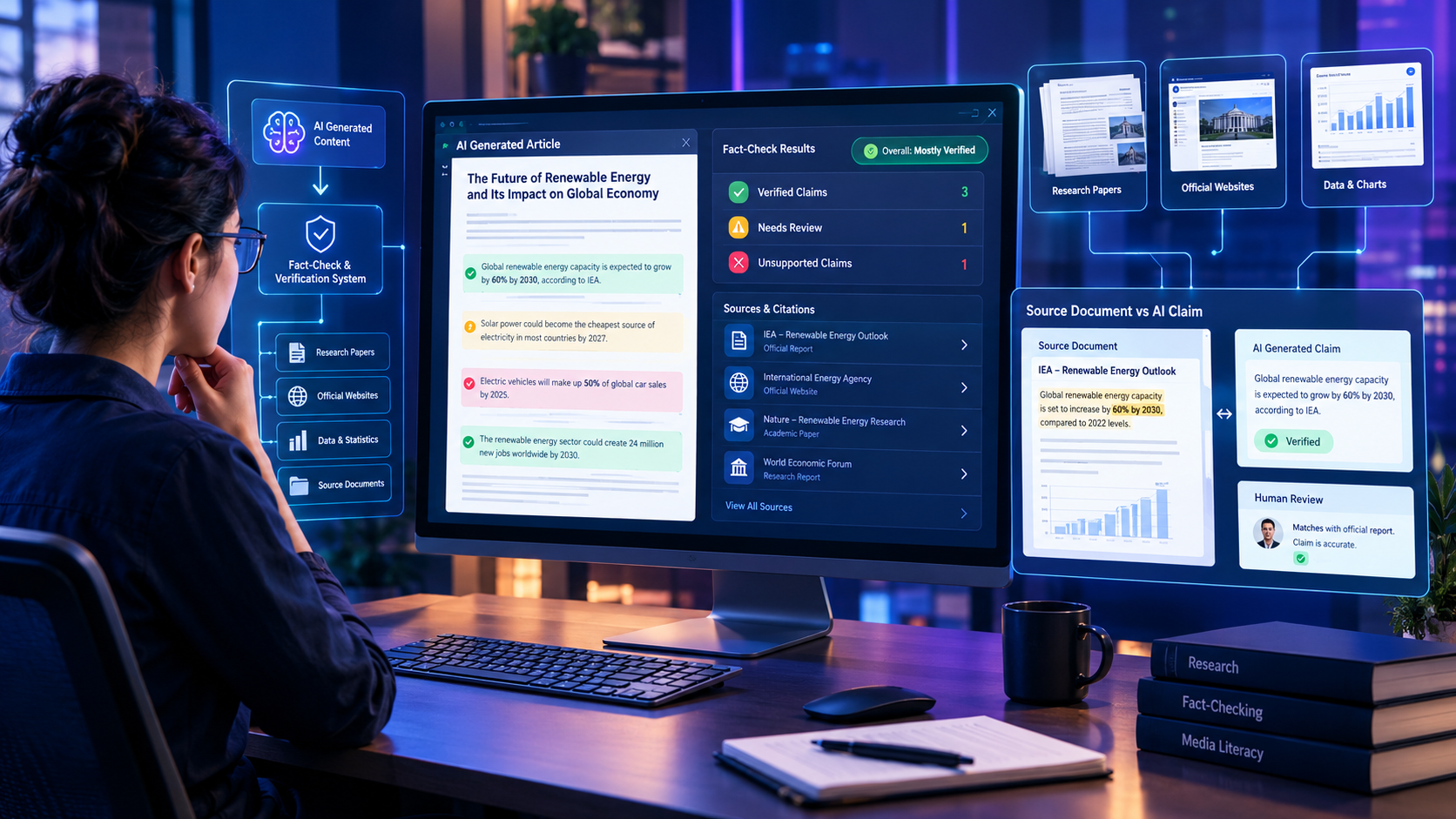
- AI-generated notes should always be reviewed before being used as official meeting minutes, academic notes, or important decisions.
At a Glance
| App | Best For | Free Offering | Main Limitation |
|---|---|---|---|
| Fathom | Meetings | Unlimited recordings, storage and transcription | Advanced AI summaries limited after five calls/month |
| Otter.ai | Lectures & live transcription | 300 transcription minutes/month | 30-minute conversation limit |
| Fireflies.ai | Meeting summaries | Unlimited transcription and AI summaries | 400 minutes of storage |
| Notta | Multilingual meetings | 120 transcription minutes/month | 3-minute conversation limit |
| tl;dv | Unlimited meeting capture | Unlimited transcription and video recording | Free plan has usage/concurrency restrictions |
| Tactiq | Browser-based meetings | 10 transcripts + 5 AI credits/month | Limited monthly usage |
Free-plan figures are based on provider documentation available in August 2026.
What is the best free AI note-taking app?
Fathom is one of the best free AI note-taking apps for meetings because its free individual plan provides unlimited recordings, storage, and transcriptions. Otter.ai is a strong choice for lectures and live transcription, while Fireflies.ai is useful for users who want unlimited transcription and AI-generated meeting summaries. The best choice depends on whether you prioritize meetings, lectures, languages, integrations, or recording limits.
Best Free AI Note-Taking Apps: Which One Should You Use?
AI note-taking apps automatically convert spoken conversations into searchable transcripts and can turn them into summaries, action items, decisions, questions, and study notes.
For meetings, Fathom, Fireflies.ai, tl;dv and Tactiq are strong choices.
For lectures and in-person conversations, Otter.ai and Notta are more suitable because they support live or recorded speech transcription.
For users who need unlimited free meeting recording and transcription, Fathom and tl;dv are particularly attractive, although their feature sets and usage policies differ.
Introduction
Taking notes manually during a meeting or lecture sounds simple until the conversation becomes fast, technical, or information-heavy.
You may need to listen, understand the speaker, write important points, remember questions, identify action items, and keep track of who said what—all at the same time.
AI note-taking apps reduce that workload by using speech recognition and generative AI to turn spoken conversations into structured notes.
Instead of trying to write every sentence, you can focus on understanding the discussion while the AI captures the conversation.
This is useful for:
- Business meetings
- Online classes
- University lectures
- Interviews
- Research discussions
- Team calls
- Client meetings
- Workshops
- Webinars
- Study sessions
However, “free” does not always mean unlimited. Some apps limit transcription minutes, others limit recordings, AI summaries, storage, or the number of meetings you can process each month.
That’s why the most important question isn’t simply “Which AI note-taking app is free?”
It is:
Which free AI note-taking app gives you enough transcription, summaries, storage, and useful features for your specific workflow?
What Is an AI Note-Taking App?
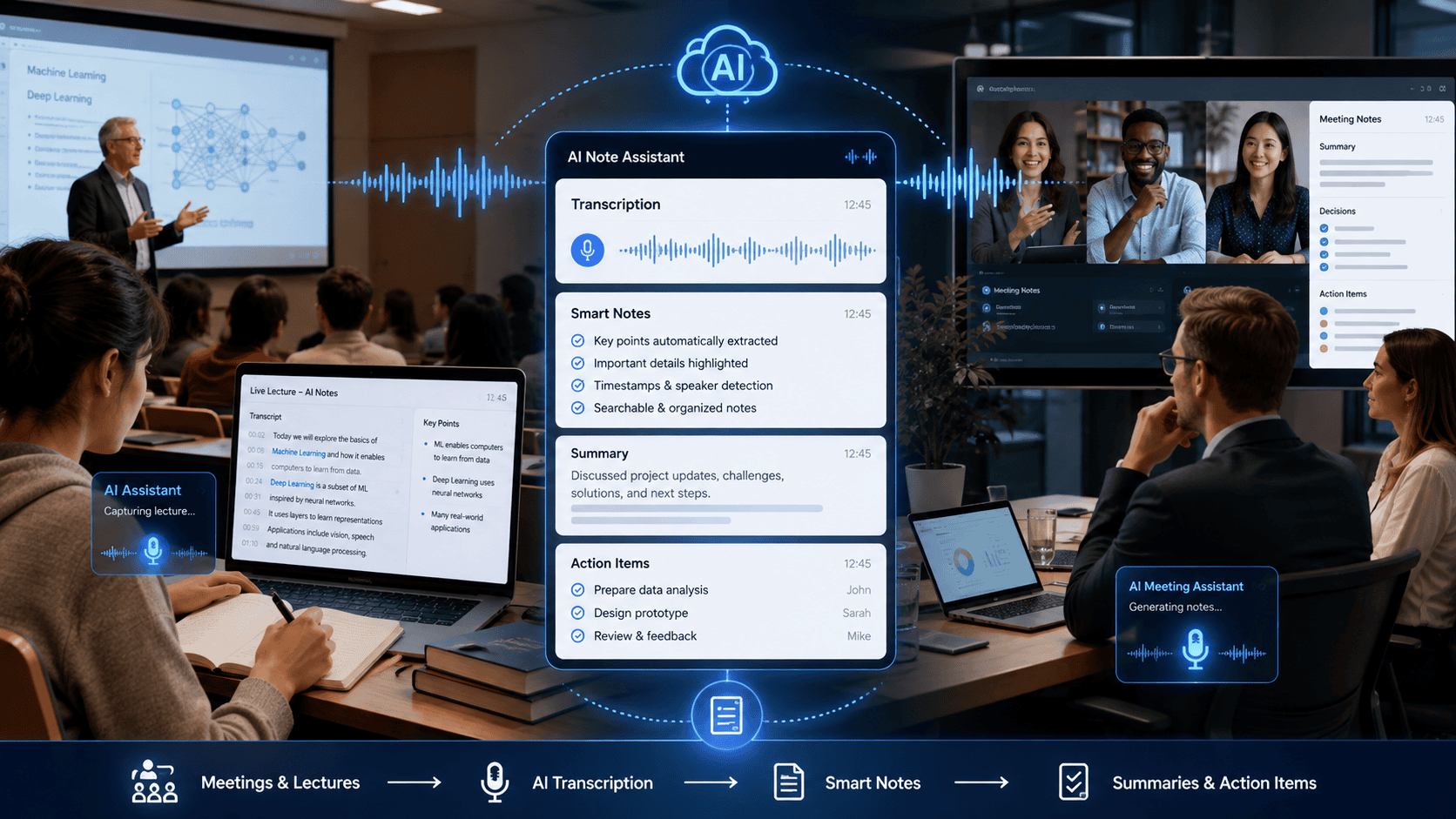
An AI note-taking app records or receives spoken audio, converts speech into text, identifies important information, and uses AI to organize the result.
A typical workflow looks like this:
Meeting or Lecture → Audio Capture → AI Transcription → Speaker Identification → Summary → Key Points → Action Items / Study Notes → Search & Review
Modern AI note takers can go beyond basic transcription.
Depending on the app, they may generate:
- Meeting summaries
- Lecture summaries
- Action items
- Decisions
- Follow-up emails
- Questions and answers
- Key topics
- Speaker-separated transcripts
- Searchable notes
- Study material
- Highlights
- AI-generated insights
How AI Note-Taking Works
Most AI note-taking applications follow five basic stages.
1. Capture the conversation
The app records audio directly or connects to a meeting platform such as Zoom, Google Meet, or Microsoft Teams.
2. Convert speech into text
Speech-recognition models transform spoken language into a transcript.
3. Identify speakers
When supported, the system separates speakers so that the transcript can show who said what.
4. Analyze the transcript
Generative AI identifies important concepts, decisions, questions, action items, and recurring topics.
5. Produce structured notes
The final output may include a short summary, detailed notes, action items, timestamps, and searchable transcript.
The quality of the final notes depends heavily on audio quality, speaker clarity, language support, terminology, and the AI model used.
Benefits of AI Note-Taking Apps
1. Save Time
You don’t need to manually transcribe a 60-minute discussion after it ends.
2. Improve Focus
Students can concentrate on the lecture instead of continuously looking down at a notebook.
Professionals can participate in meetings rather than spending the entire call documenting everything.
3. Make Conversations Searchable
A transcript allows you to search for terms, names, decisions, or questions later.
4. Generate Summaries Automatically
Instead of reviewing an entire transcript, you can start with a concise summary.
5. Capture Action Items
Meeting-focused tools can identify tasks and next steps.
6. Support Review and Revision
Students can use transcripts to revisit difficult sections of lectures.
7. Reduce Information Loss
Important details are less likely to disappear simply because you missed writing them down.
Best Free AI Note-Taking Apps
1. Fathom — Best Overall Free Meeting Note Taker
Best for: Business meetings, interviews, online discussions and individual users.
Fathom is one of the strongest free options if your priority is meeting transcription.
Its free individual plan includes unlimited recordings and storage, while transcriptions are also unlimited. Free users receive advanced AI summaries for their first five calls each month; afterward, the free plan provides a more basic summary experience. Fathom supports transcription in 38 languages.
Pros
- Unlimited recordings
- Unlimited storage
- Unlimited transcription
- 38-language transcription support
- Useful meeting summaries
- Good choice for frequent meetings
Cons
- Advanced summaries are limited to five calls per month
- Primarily designed around meetings
- Not the most lecture-focused option
Best Use Cases
- Weekly team meetings
- Client calls
- Interviews
- Sales conversations
- Project meetings
- Remote collaboration
Our rating: 9.3/10
2. Otter.ai — Best for Lectures and Live Transcription
Best for: Students, lectures, interviews and live transcription.
Otter.ai is particularly attractive for students because it can record and transcribe spoken conversations in real time.
Its current Basic plan includes 300 transcription minutes per month, with a 30-minute limit per conversation and three lifetime audio/video file imports. It also supports speaker identification and integrations with Zoom, Microsoft Teams and Google Meet.
Pros
- 300 transcription minutes/month
- Live transcription
- Speaker identification
- Mobile apps
- Useful for lectures
- Supports meeting platforms
- Searchable transcripts
Cons
- 30-minute free conversation limit
- Only three lifetime imported audio/video files
- 300 minutes may not be enough for heavy users
Best Use Cases
- University lectures
- Interviews
- Study sessions
- Short meetings
- Research discussions
Our rating: 9.1/10
3. Fireflies.ai — Best for Free AI Meeting Summaries
Best for: Professionals who want meeting transcription and summaries.
Fireflies.ai currently advertises unlimited transcription and unlimited AI summaries on its free plan. The main constraint is storage: the free tier provides 400 minutes of storage per team. The free plan also supports meeting platforms including Zoom, Google Meet and Microsoft Teams.
Fireflies also supports transcription in 100+ languages, making it one of the more interesting choices for multilingual meeting environments.
Pros
- Unlimited transcription
- Unlimited AI summaries
- 100+ languages
- Meeting search
- Mobile and desktop apps
- Multiple meeting-platform integrations
Cons
- Storage becomes the major constraint
- AI credits can limit some additional AI functionality
- Advanced features are reserved for paid plans
Best Use Cases
- Team meetings
- Sales calls
- Customer interviews
- Multilingual meetings
- Recurring business conversations
Our rating: 9.2/10
4. Notta — Best for Multilingual Users
Best for: Meetings, lectures and users working across multiple languages.
Notta’s free plan provides 120 transcription minutes per month, up to 50 file uploads per month, and 10 AI summaries. The current free plan also supports transcription for Zoom, Microsoft Teams, Google Meet and Webex. However, each conversation on the free plan is limited to three minutes.
Notta supports a wide range of languages and offers features such as speaker identification and translation on its broader platform.
Pros
- Multilingual capabilities
- Meeting-platform support
- Speaker identification
- File transcription
- Mobile and web apps
- AI summaries
Cons
- 120 minutes/month
- Three-minute free conversation limit
- Free plan is restrictive for long lectures
Best Use Cases
- Multilingual meetings
- Short lecture recordings
- Interviews
- International teams
- Short audio/video transcription
Our rating: 8.6/10
5. tl;dv — Best for Unlimited Meeting Recording
Best for: People who attend many Zoom, Google Meet or Microsoft Teams meetings.
tl;dv currently advertises free, unlimited meeting transcriptions and video recordings. It supports Zoom, Google Meet and Microsoft Teams and offers transcription in more than 30 languages.
The free plan is generous, although its terms specify usage thresholds, including a weekly recording allowance and no simultaneous recordings on the free tier.
Pros
- Unlimited transcription
- Unlimited video recordings
- Supports major meeting platforms
- 30+ languages
- AI-generated meeting insights
- Useful for frequent meetings
Cons
- Primarily meeting-focused
- Free-plan usage restrictions still apply
- Less suitable for traditional classroom lectures
Best Use Cases
- Remote meetings
- Sales calls
- Team discussions
- Client calls
- Meeting libraries
Our rating: 9.0/10
6. Tactiq — Best Browser-Based AI Note Taker
Best for: Users who want meeting transcription without relying on a traditional meeting bot.
Tactiq works through a browser extension and supports Google Meet, Zoom and Microsoft Teams. Its free plan currently includes 10 meeting transcripts and five AI credits per month.
One useful distinction is that Tactiq’s meeting credits and AI credits are separate. Meeting credits control how many meetings can receive full transcription, while AI credits power actions such as summaries, action items and questions.
Pros
- Browser-based
- No traditional meeting bot required
- 10 free transcripts/month
- AI-generated insights
- Export and sharing
- Useful for Google Meet, Zoom and Teams
Cons
- Only 10 meeting transcripts/month
- Five AI credits/month
- Primarily designed for online meetings
Best Use Cases
- Google Meet
- Zoom
- Microsoft Teams
- Short professional meetings
- Users who prefer browser-based tools
Our rating: 8.7/10
Free AI Note-Taking Apps Comparison
| Tool | Free Transcription | Free AI Summaries | Recording | Best For | Free-Tier Constraint |
| Fathom | Unlimited | Advanced: 5 calls/month | Unlimited | Meetings | Advanced summary limit |
| Otter.ai | 300 min/month | Yes | Yes | Lectures | 30-min conversation limit |
| Fireflies.ai | Unlimited | Unlimited | Yes | Meetings | 400-min storage |
| Notta | 120 min/month | 10/month | Yes | Multilingual use | 3-min conversation limit |
| tl;dv | Unlimited | Yes | Unlimited | Online meetings | Weekly/concurrency limits |
| Tactiq | 10 meetings/month | 5 AI credits/month | Browser-based | Online meetings | Monthly transcript limit |
Free plans are subject to provider changes. Check the provider’s current pricing page before publishing or making a purchase decision.
Performance Ratings
The following ratings are editorial evaluation scores, not laboratory accuracy measurements.
| Tool | Free Tier | Transcription | Meeting Features | Lecture Use | Overall |
| Fathom | 9.5/10 | 9.5/10 | 9.7/10 | 7.5/10 | 9.3/10 |
| Fireflies.ai | 9.5/10 | 9.4/10 | 9.5/10 | 8.0/10 | 9.2/10 |
| Otter.ai | 8.8/10 | 9.4/10 | 8.8/10 | 9.5/10 | 9.1/10 |
| tl;dv | 9.5/10 | 9.2/10 | 9.5/10 | 7.5/10 | 9.0/10 |
| Tactiq | 8.3/10 | 9.0/10 | 9.2/10 | 7.0/10 | 8.7/10 |
| Notta | 8.0/10 | 8.8/10 | 8.7/10 | 8.8/10 | 8.6/10 |
How These Ratings Were Determined
The editorial scoring framework considers:
- Free-plan generosity
- Transcription availability
- AI summarization
- Meeting compatibility
- Lecture suitability
- Speaker identification
- Language support
- Recording/storage limitations
- Ease of use
- Overall usefulness for the target audience
These scores should not be interpreted as independently measured transcription-accuracy percentages.
Best Use Cases
| Use Case | Recommended App | Why |
| Business meetings | Fathom | Strong free recording/transcription |
| University lectures | Otter.ai | Live transcription and mobile support |
| Unlimited meeting transcription | Fireflies.ai | Unlimited transcription on free tier |
| Multilingual meetings | Fireflies.ai / Notta | Broad language support |
| Frequent Zoom/Meet/Teams meetings | tl;dv | Unlimited free meeting recording/transcription |
| Browser-based transcription | Tactiq | Chrome-based workflow |
| Interviews | Otter.ai / Fathom | Searchable transcripts and summaries |
| Sales calls | Fireflies.ai / Fathom | Meeting summaries and workflow features |
| Short recordings | Notta | Simple free transcription workflow |
Which App Should You Choose?
Choose Fathom if:
You attend many online meetings and want the most generous free individual meeting workflow.
Choose Otter.ai if:
You’re a student, researcher, interviewer, or anyone who frequently needs live transcription.
Choose Fireflies.ai if:
You want unlimited free transcription and AI summaries and don’t mind managing storage.
Choose Notta if:
Multilingual transcription is important to your workflow.
Choose tl;dv if:
You regularly record Zoom, Google Meet or Microsoft Teams meetings and want an unlimited free recording/transcription option.
Choose Tactiq if:
You prefer a browser extension and don’t want a traditional AI meeting bot joining your call.
How to Use AI Note-Taking Apps for Lectures
Step 1: Check Your Institution’s Rules
Before recording a lecture, verify your university, school, instructor, or organization permits recording.
Step 2: Choose the Right App
For long lectures, prioritize:
- Recording length
- Monthly transcription allowance
- Speaker identification
- Mobile support
- Export options
- Searchable transcripts
Otter.ai is particularly worth considering for this use case.
Step 3: Improve Audio Quality
Place the microphone where speech is easy to hear.
Avoid:
- Loud fans
- Background conversations
- Excessive distance from the speaker
- Poor-quality microphones
Step 4: Record the Lecture
Start the transcription before the important section begins.
Step 5: Generate a Summary
After the lecture, ask the AI to organize the transcript into:
- Main concepts
- Definitions
- Examples
- Important formulas
- Questions
- Key takeaways
- Topics to review
Step 6: Verify the Notes
Never assume the AI transcript is perfect.
Check names, numbers, formulas, technical terms, quotations and important definitions against the original lecture.
Step 7: Convert the Notes Into Study Material
Use the transcript to create:
- Flashcards
- Practice questions
- Topic summaries
- Revision notes
- Concept maps
- Quiz questions
How to Use AI Note-Taking Apps for Meetings
Before the Meeting
Prepare a simple structure:
Agenda → Participants → Questions → Decisions → Action Items
During the Meeting
Allow the AI to capture the conversation while you participate actively.
After the Meeting
Review the generated summary and verify:
- Decisions
- Deadlines
- Names
- Responsibilities
- Follow-up tasks
Turn Notes Into Actions
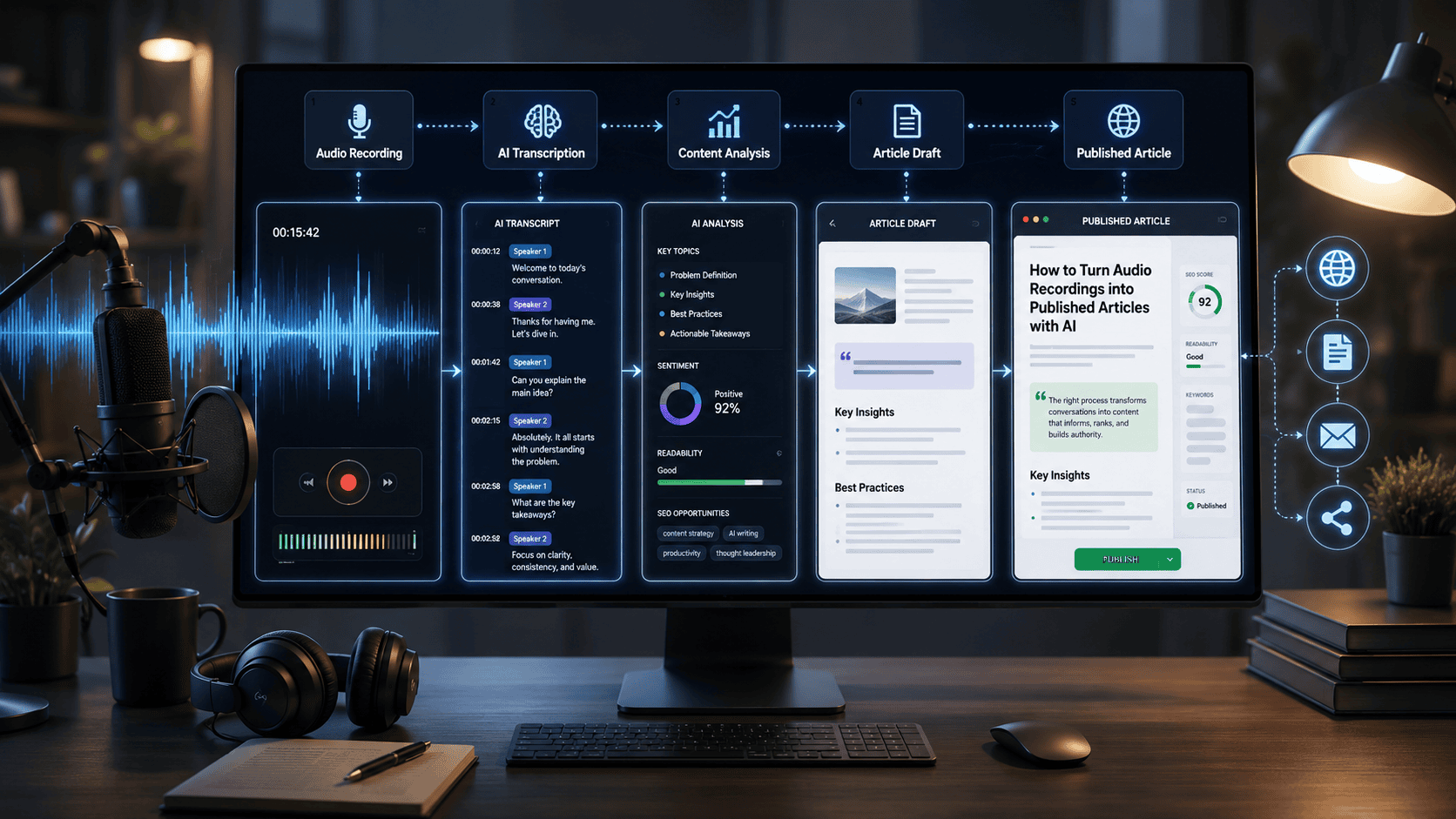
A useful workflow is:
Transcript → Summary → Decisions → Action Items → Task Manager
This turns AI note-taking from passive documentation into a practical productivity workflow.
Practical Example: Turning a Lecture Into Study Notes
Suppose a 60-minute economics lecture covers inflation.
Instead of manually writing everything, the workflow could be:
Lecture recording → AI transcript → Summary → Key definitions → Examples → Questions → Revision sheet
You could then ask the AI:
“Create a study guide from this transcript. Separate definitions, important concepts, examples, formulas, possible exam questions, and topics I should review.”
The important step is to compare the resulting study guide with the original lecture materials.
AI should assist your learning rather than replace your own understanding.
Practical Example: Turning a Meeting Into Action Items
Imagine a product-development meeting produces 40 minutes of discussion.
An AI note taker could organize the transcript into:
Decisions
- Finalize the landing-page structure.
- Review pricing before launch.
Action Items
| Task | Owner | Deadline |
| Update landing page | Marketing | Friday |
| Review pricing | Product | Thursday |
| Test checkout | Engineering | Monday |
The advantage is not simply having a transcript. The value comes from turning the conversation into structured, actionable information.
Statistics and Free-Tier Reality
One of the biggest differences between free AI note-taking apps is how providers define “free.”
For example:
- Otter.ai: 300 transcription minutes/month.
- Notta: 120 transcription minutes/month.
- Tactiq: 10 meeting transcripts/month and five AI credits/month.
- Fireflies.ai: unlimited transcription and AI summaries, with 400 minutes of storage on the free plan.
- Fathom: unlimited recordings, storage and transcription, with advanced summaries limited to five calls per month on the free tier.
- tl;dv: free unlimited meeting transcription and video recording, subject to its plan-level usage rules.
What This Means
A service advertising “unlimited transcription” may still limit storage, AI credits, recording length, exports, or other features.
Therefore, compare the actual free-tier constraint rather than looking only at the word “unlimited.”
Firsthand Testing and Editorial Methodology
Did We Personally Test Every App?
No. This article does not claim that every app was personally tested in live meetings or lectures.
Instead, the comparison uses a transparent editorial methodology based on:
- Current provider pricing pages
- Official product documentation
- Free-tier limitations
- Supported meeting platforms
- Transcription availability
- AI summarization features
- Recording/storage allowances
- Lecture suitability
- Language support
- Practical workflow considerations
This distinction matters because free-plan specifications and product capabilities can change over time.
Recommended Testing Framework for Readers
If you want to personally test two or three finalists, use the same 20–30 minute recording with each tool and compare:
- Transcript completeness
- Speaker identification
- Names and technical terms
- Summary accuracy
- Action-item accuracy
- Searchability
- Export quality
- Processing time
- Free-tier consumption
- Privacy and data controls
This provides a more meaningful comparison for your own use case than relying on a generic ranking.
Common Mistakes When Using AI Note-Taking Apps
1. Assuming AI Transcripts Are Perfect
Speech recognition can misinterpret names, jargon, accents and technical vocabulary.
2. Ignoring Recording Consent
Recording people without appropriate permission can create privacy, legal, academic or workplace issues.
3. Choosing an App Only Because It Says “Free”
Check actual minutes, storage, credits and recording limits.
4. Not Checking the Audio
Poor audio produces poor transcription.
5. Treating AI Summaries as Official Records
Important business or academic information should be verified.
6. Forgetting About Storage
Unlimited transcription is less useful if the free plan has a small storage allowance.
7. Using AI Notes Without Reviewing Them
A concise summary can accidentally omit an important qualification or context.
Expert Tips for Better AI Notes
Tip 1: Use a Dedicated Prompt
Instead of asking only for “a summary,” request a specific structure:
Summarize this transcript into key points, decisions, action items, unresolved questions, important terminology, and follow-up tasks.
Tip 2: Ask for Uncertainty
For important information, ask the AI to identify statements it is uncertain about.
Tip 3: Maintain a Consistent Note Structure
For meetings:
Summary → Decisions → Action Items → Owners → Deadlines → Open Questions
For lectures:
Topic → Key Concepts → Definitions → Examples → Questions → Revision Points
Tip 4: Keep the Original Transcript
Don’t rely solely on the AI-generated summary. The transcript provides valuable context when you need to verify something.
Tip 5: Review Critical Information
Always manually verify:
- Numbers
- Dates
- Names
- Technical terms
- Medical information
- Financial information
- Legal statements
- Academic formulas
- Important decisions
Privacy and Ethical Considerations
AI note-taking involves potentially sensitive audio and transcript data.
Before using an app for confidential meetings or lectures, check:
- Where recordings are stored
- Whether audio is retained
- Whether transcripts can be deleted
- Whether recordings can be exported
- What data-processing terms apply
- Whether the service meets your organization’s requirements
- Whether participants have been informed
For workplace meetings, follow your company’s AI and recording policies.
For lectures, follow institutional and instructor rules.
For interviews, obtain appropriate consent before recording.
Convenience should not override privacy.
Who Is This Guide For?
This guide is useful for:
- Students
- University researchers
- Teachers
- Professionals
- Freelancers
- Remote workers
- Managers
- Interviewers
- Content creators
- Anyone who regularly attends meetings or lectures
If you only need occasional transcription, a limited free plan may be sufficient.
If you attend several hours of meetings or lectures every week, prioritize tools with generous or unlimited free transcription.
Decision Flowchart
Use this simplified decision process:
Do you mainly attend meetings?
→ Yes → Do you want unlimited free recording/transcription?
→ Yes → Consider Fathom, Fireflies.ai or tl;dv
→ No → Consider Tactiq or Otter.ai
Do you mainly attend lectures?
→ Yes → Start with Otter.ai
Do you need multilingual transcription?
→ Yes → Consider Fireflies.ai or Notta
Do you want browser-based transcription without a meeting bot?
→ Yes → Consider Tactiq
Do you need unlimited meeting recording?
→ Yes → Compare Fathom and tl;dv
What We Learned
The biggest lesson from comparing free AI note-taking apps is that there is no single best application for everyone.
The strongest free option depends on what limits matter most.
If you need unlimited meeting capture, Fathom and tl;dv deserve attention.
If you need live transcription for lectures, Otter.ai is a particularly strong choice.
If you want unlimited transcription and AI summaries, Fireflies.ai has an unusually generous free offering, although its storage limit matters.
If you work across languages, Notta and Fireflies.ai become more attractive.
If you prefer a browser-first workflow, Tactiq is worth considering.
The best choice is therefore the tool whose free limitations least interfere with your actual workflow.
Frequently Asked Questions
What is the best free AI note-taking app?
Fathom is one of the best free AI note-taking apps for meetings, thanks to unlimited recordings, storage and transcription on its free individual plan. For lectures, Otter.ai is a stronger choice because of its live transcription capabilities.
What is the best free AI note taker for lectures?
Otter.ai is a strong choice for lectures because it supports live transcription, speaker identification and mobile recording. Its free plan currently includes 300 transcription minutes per month, although individual conversations are limited to 30 minutes.
Is there a completely free AI meeting note taker?
Yes. Several services offer free plans, including Fathom, Fireflies.ai, Otter.ai, tl;dv and Tactiq. However, each service places different restrictions on minutes, recordings, storage, AI features or credits.
Which AI note taker has unlimited free transcription?
Several providers currently advertise unlimited transcription on their free plans. Fireflies.ai and tl;dv are two examples, while Fathom also provides unlimited transcription for free individual users.
Is Otter.ai free?
Yes. Otter.ai has a Basic free plan with 300 transcription minutes per month, a 30-minute conversation limit and three lifetime audio/video imports.
Is Fireflies.ai free?
Yes. Fireflies.ai offers a free plan with unlimited transcription and AI summaries. The free tier currently has a 400-minute storage allowance, so users with many recordings need to monitor storage.
Is Notta free?
Yes. Notta has a permanent free plan with 120 transcription minutes per month. The free plan also limits individual conversations to three minutes.
Can AI note-taking apps record lectures?
Some can. Otter.ai and Notta support recording/transcription workflows suitable for spoken lectures, while other tools focus primarily on online meetings. Always check recording permissions and your institution’s policies before recording a lecture.
Can AI note-taking apps replace handwritten notes?
They can reduce the amount of manual note-taking required, but they should not completely replace active learning. Students should still review, organize and verify AI-generated notes.
Are AI-generated meeting notes accurate?
They can be highly useful, but accuracy varies with audio quality, accents, multiple speakers, technical terminology and background noise. Important decisions and action items should always be verified against the transcript or original recording.
Should I use a meeting bot?
It depends on your privacy requirements and workflow. Some tools join meetings as a participant, while browser-based options such as Tactiq can capture meeting transcripts without a traditional bot joining the call.
Pros and Cons of AI Note-Taking Apps
Pros
- Saves manual transcription time
- Creates searchable records
- Generates summaries quickly
- Captures action items
- Helps students review lectures
- Supports remote meetings
- Makes long conversations easier to revisit
- Can improve meeting documentation
Cons
- Free plans often have limits
- Transcription errors can occur
- AI summaries may omit context
- Privacy requires careful consideration
- Some services require meeting bots
- Audio quality affects results
- Some advanced features require paid subscriptions
Our Verdict
There is no universal winner, but the current free plans make the choice relatively straightforward.
Best Overall: Fathom
Choose Fathom if your priority is frequent online meetings and you want a very generous free plan.
Best for Lectures: Otter.ai
Choose Otter.ai if you’re a student or researcher who needs live transcription and mobile recording.
Best for Meeting Summaries: Fireflies.ai
Choose Fireflies.ai if unlimited transcription and AI summaries are more important to you than generous storage.
Best for Multilingual Workflows: Notta
Choose Notta if language support is a major part of your workflow.
Best for Unlimited Meeting Capture: tl;dv
Choose tl;dv if you frequently record Zoom, Google Meet or Microsoft Teams meetings.
Best Browser-Based Option: Tactiq
Choose Tactiq if you prefer a lightweight browser-based meeting transcription workflow.
Ultimately, the best free AI note-taking app is the one that fits your recording volume, meeting platform, language requirements and privacy expectations without forcing you into a paid plan too quickly.
Ready to Stop Taking Every Note Manually?
Try one of the free AI note-taking apps above with a real meeting, lecture or interview and compare the transcript, summary quality, accuracy and free usage limits.
Start with one tool that matches your primary use case, test it on a low-risk recording, and only upgrade if the free plan becomes a genuine limitation.
Also Read
- Open-Source AI Model Weekly Roundup & Performance Benchmarks
- Make vs n8n for AI Automation
- How to Reduce LLM API Costs for Web Apps and Chatbots
- How to Extract Structured Data from PDFs Using Local LLMs
- Best AI Productivity Tools for Daily Tasks
- How to Build an AI Assistant Without Code
- Best Free Open-Source AI Automation Tools
- How to Run LLMs Locally on Windows and Mac Using Ollama
- Best AI Voice Generator Tools for Video Editing (Free vs Paid)
- Weekly Content Creation Workflow Deep Dive & AI Templates
- Top 5 Open-Source AI Models Outperforming GPT-4 and Rivaling GPT-5 on Select Tasks
- How to Set Up Open WebUI for a Private Local AI Chat Experience
- Local AI vs Cloud AI: Cost, Speed, and Privacy Comparison
- How to Create a Private Document QA Bot Using AnythingLLM
- How Students and Researchers Can Use AI for Literature Reviews Ethically




Leave a Reply