

Introduction
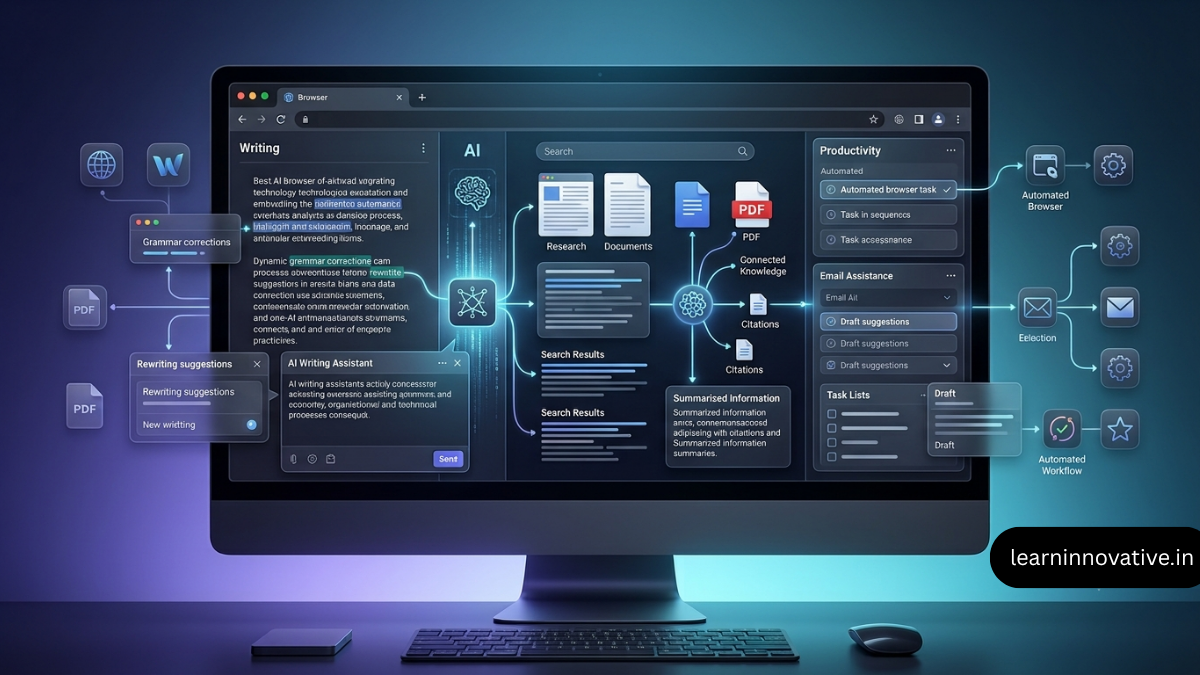
AI browser extensions have evolved from simple grammar checkers into full browser assistants capable of rewriting text, summarizing webpages, analyzing PDFs, answering questions, comparing AI models, researching sources, and automating repetitive browser tasks.
The biggest advantage is context. Instead of copying information from a webpage into an AI chatbot, a browser extension can often work directly with the page you are viewing.
Current options range from focused writing tools such as Grammarly and QuillBot to multi-purpose assistants such as Monica and Sider. Google Chrome also has built-in AI writing functionality in some regions, while AI-native browsers such as Perplexity’s Comet are moving beyond the traditional extension model.
The best choice depends on what you actually want to accomplish.
The best AI browser extension for you depends on your workflow:
- Best overall: Monica
- Best for professional writing: Grammarly
- Best for paraphrasing and rewriting: QuillBot
- Best for multi-model AI assistance: Sider
- Best for research: Sider or a research-focused AI tool
- Best for webpage/PDF summarization: Sider or Monica
- Best for browser automation: HARPA AI
- Best for AI-powered autocomplete: Compose AI
- Best for users who want many AI tools in one extension: Monica
- Best for users already invested in multiple AI models: Sider
There is no single extension that wins every category. A focused writing tool can outperform an all-in-one assistant for editing, while a research-oriented tool can be more useful for source discovery and fact-checking.
Key Takeaways
- AI browser extensions bring AI assistance directly into your browsing workflow.
- Grammarly remains a strong choice for grammar, clarity, rewriting, and professional communication.
- QuillBot is particularly useful for paraphrasing, rewriting, grammar checking, and multilingual writing.
- Sider is useful when you want multiple AI models and page-aware assistance in one browser sidebar.
- Monica combines writing, research, summarization, translation, AI chat, and other tools.
- HARPA AI goes beyond basic chat with page-aware commands, screenshots, YouTube summaries, and automation capabilities.
- You should not install multiple extensions that perform exactly the same job unless there is a specific reason.
- Privacy should be considered before giving an extension access to sensitive webpages or text fields.
- AI-generated information should always be verified, particularly for research, finance, medicine, law, and technical subjects.
- The best setup is usually one general-purpose AI extension + one specialist extension.
At a Glance
| Extension | Best For | Writing | Research | Summaries | Productivity | Free Option |
|---|---|---|---|---|---|---|
| Monica | All-in-one AI assistant | ★★★★★ | ★★★★☆ | ★★★★★ | ★★★★★ | Yes |
| Sider | Multi-model browser AI | ★★★★☆ | ★★★★★ | ★★★★★ | ★★★★★ | Yes |
| Grammarly | Professional writing | ★★★★★ | ★★☆☆☆ | ★★☆☆☆ | ★★★★☆ | Yes |
| QuillBot | Paraphrasing & rewriting | ★★★★★ | ★★☆☆☆ | ★★★☆☆ | ★★★★☆ | Yes |
| HARPA AI | Automation & page analysis | ★★★★☆ | ★★★★☆ | ★★★★★ | ★★★★★ | Yes |
| Compose AI | Writing autocomplete | ★★★★★ | ★☆☆☆☆ | ★☆☆☆☆ | ★★★★☆ | Yes |
| Chrome Help me write | Quick browser writing | ★★★★☆ | ★☆☆☆☆ | ★☆☆☆☆ | ★★★☆☆ | Availability varies |
Note: Ratings above are editorial scores based on breadth of capabilities and typical use cases, not benchmark measurements. Extension features, pricing, limits, and availability can change.
What Are AI Browser Extensions?
AI browser extensions are add-ons that integrate artificial intelligence directly into a web browser.
Instead of opening a separate AI application, copying content, switching tabs, pasting it into a chatbot, and copying the answer back, an extension can place AI functionality directly beside or inside the webpage.
For example, an AI browser extension may allow you to:
- Rewrite an email
- Correct grammar
- Summarize an article
- Explain highlighted text
- Analyze a PDF
- Research a topic
- Translate a webpage
- Generate social media content
- Draft responses
- Extract information from webpages
- Compare AI model responses
- Summarize YouTube videos
- Automate repetitive browser actions
The exact capabilities depend on the extension and the permissions it receives.
How AI Browser Extensions Work
A typical AI browser extension follows a simple workflow:
Webpage → Browser Extension → Relevant Content → AI Model → Generated Result → User Review
For example:
- You open a long research article.
- You activate the extension.
- The extension obtains relevant page content.
- That content is sent to an AI system.
- The AI analyzes the information.
- The result appears inside the browser.
- You review and use the output.
This eliminates much of the manual copy-and-paste process.
However, page access also creates privacy considerations, which is why extension permissions should never be ignored.
Best AI Browser Extensions for Writing
1. Grammarly — Best for Professional Writing
Best for: Grammar, clarity, tone, rewriting, emails, professional communication
Grammarly is one of the strongest choices when the primary objective is improving the quality of your writing.
Its browser extension works across multiple browsers and provides writing suggestions while you type online. Grammarly also offers generative AI features for composing, rewriting, ideation, and replies.
Key features
- Grammar checking
- Spelling corrections
- Clarity suggestions
- Tone assistance
- Rewriting
- AI-powered composition
- Email assistance
- Browser-wide writing support
Best use cases
Use Grammarly when you are:
- Writing emails
- Creating business proposals
- Writing social posts
- Editing blog content
- Communicating with clients
- Preparing professional messages
Advantages
- Excellent writing-focused workflow
- Works directly where you type
- Strong grammar and clarity capabilities
- Useful for business communication
Limitations
- Not primarily a research tool
- Advanced functionality may require a paid plan
- AI suggestions still require human review
Editorial rating: 9.4/10
2. QuillBot — Best for Paraphrasing
Best for: Rewriting, paraphrasing, grammar, sentence improvement
QuillBot is particularly useful when you already have text but want to improve its wording.
Its Chrome extension currently includes grammar checking, paraphrasing, AI writing, summarization, sentence rewriting, tone/clarity assistance, and other writing features.
Best use cases
QuillBot works well for:
- Rewriting awkward sentences
- Simplifying explanations
- Changing tone
- Improving readability
- Editing drafts
- Multilingual writing
- Creating alternative versions of text
Advantages
- Strong paraphrasing workflow
- Multiple writing functions
- Works directly inside web text fields
- Useful for students and content creators
Limitations
- Paraphrasing can sometimes change intended meaning
- AI-generated wording still needs review
- Some advanced features are paid
Editorial rating: 9.1/10
3. Compose AI — Best for Autocomplete
Best for: Faster typing and repetitive writing
Autocomplete-focused extensions approach AI writing differently.
Instead of generating an entire article, they attempt to predict what you want to write next.
This can be particularly useful for:
- Emails
- Short responses
- Customer messages
- Repetitive business communication
- Form fields
The advantage is speed. You spend less time typing repetitive phrases and more time reviewing the final message.
Editorial rating: 8.5/10
Best AI Browser Extensions for Research
4. Sider — Best Multi-Model Research Assistant
Best for: Research, webpage analysis, PDFs, YouTube, multiple AI models
Sider is one of the strongest options for users who want several AI models accessible from the same browser sidebar.
Its current product supports models including ChatGPT, Claude, Gemini, Grok and DeepSeek, and it can work with webpages, PDFs, videos and search results.
Why researchers may like it
You can:
- Open a research article.
- Launch the sidebar.
- Ask the AI to summarize it.
- Ask follow-up questions.
- Highlight specific passages.
- Extract important facts.
- Compare responses from different models.
This is significantly more convenient than constantly switching between browser tabs.
Best use cases
- Literature research
- Competitive research
- Technical research
- Long articles
- PDF analysis
- YouTube research
- Comparing AI responses
Advantages
- Multi-model access
- Page-aware assistance
- PDF support
- YouTube summarization
- Translation
- Research tools
Limitations
- Too feature-heavy for users who only need grammar checking
- Usage limits may apply
- AI outputs still require verification
Editorial rating: 9.5/10
5. Monica — Best All-in-One AI Browser Extension
Best for: Users who want writing, research, summarization, translation and AI tools in one place
Monica takes the all-in-one approach.
Its browser experience includes AI chat, summarization, writing, search, translation, webpage assistance and other AI tools. Monica says its extension is available for Chrome and Edge.
What makes Monica different?
Instead of installing separate extensions for:
- Writing
- Summarization
- Translation
- AI chat
- Research
- PDF analysis
you can consolidate many of those functions into one environment.
Best use cases
Monica is particularly useful for:
- Content creators
- Marketers
- Freelancers
- Researchers
- Students
- Entrepreneurs
- General AI power users
Advantages
- Very broad functionality
- Multiple AI models
- Writing assistant
- Page summarization
- Translation
- Research functionality
- PDF-related tools
Limitations
- Feature overload for simple users
- Free usage has limits
- Users should carefully review permissions and privacy policies
Editorial rating: 9.3/10
6. HARPA AI — Best for Browser Automation
Best for: AI commands, webpage analysis, automation and monitoring
HARPA AI is more automation-oriented than a conventional writing assistant.
It can connect with different AI providers, use page context, analyze screenshots, summarize YouTube videos and provide a large collection of AI commands.
Example workflow
Imagine you regularly monitor competitor websites.
Instead of manually:
Open website → inspect page → copy changes → analyze changes → create report
an automation-focused extension can help reduce several of those manual steps.
Best use cases
- Competitor monitoring
- Web research
- Page analysis
- Repetitive browser tasks
- YouTube summarization
- Screenshot analysis
- AI-powered workflows
Editorial rating: 9.0/10
Best AI Browser Extensions for Productivity
Productivity is where browser AI becomes particularly interesting.
The objective isn’t simply to generate text.
The objective is to reduce the number of steps required to complete a task.
For example:
Traditional workflow
Research article → copy text → open AI → paste → ask question → copy answer → return to article.
AI browser workflow
Research article → select text → ask AI → review answer.
That reduction in context switching can make a significant difference over hundreds of tasks.
Best AI Browser Extensions for Summarizing Web Pages
Long-form webpages are one of the easiest places to benefit from browser AI.
A good summarization extension should ideally help you:
- Identify the main argument
- Extract key points
- Understand unfamiliar concepts
- Find important statistics
- Ask follow-up questions
- Compare sections
- Determine whether the article is worth reading fully
Sider and Monica are particularly strong candidates because both are designed around page-level AI assistance.
Example prompt
Instead of asking:
Summarize this article.
Try:
Summarize this article in 7 bullet points. Identify the main argument, supporting evidence, important statistics, limitations, and three practical takeaways.
The second prompt usually produces a much more useful research summary.
AI Browser Extension Comparison Table
| Tool | Writing | Research | Summarization | AI Models | Automation | Best User |
|---|---|---|---|---|---|---|
| Grammarly | ★★★★★ | ★★☆☆☆ | ★★☆☆☆ | Focused | ★★☆☆☆ | Writers |
| QuillBot | ★★★★★ | ★★☆☆☆ | ★★★☆☆ | Focused | ★★☆☆☆ | Students/Writers |
| Sider | ★★★★☆ | ★★★★★ | ★★★★★ | Multiple | ★★★★☆ | Researchers |
| Monica | ★★★★★ | ★★★★☆ | ★★★★★ | Multiple | ★★★★☆ | AI power users |
| HARPA AI | ★★★★☆ | ★★★★☆ | ★★★★★ | Multiple | ★★★★★ | Automation users |
| Compose AI | ★★★★★ | ★☆☆☆☆ | ★☆☆☆☆ | AI writing | ★★☆☆☆ | Heavy typists |
| Chrome Help me write | ★★★★☆ | ★☆☆☆☆ | ★☆☆☆☆ | Google AI | ★★☆☆☆ | Chrome users |
Performance Ratings
These ratings are editorial workflow ratings, not laboratory benchmarks.
| Extension | Ease of Use | AI Quality | Browser Integration | Feature Depth | Overall |
|---|---|---|---|---|---|
| Monica | 9.3 | 9.2 | 9.5 | 9.8 | 9.5/10 |
| Sider | 9.2 | 9.4 | 9.6 | 9.7 | 9.5/10 |
| Grammarly | 9.7 | 9.5 | 9.8 | 9.0 | 9.4/10 |
| QuillBot | 9.3 | 9.1 | 9.5 | 9.2 | 9.1/10 |
| HARPA AI | 8.5 | 9.0 | 9.2 | 9.6 | 9.0/10 |
| Compose AI | 9.2 | 8.7 | 9.3 | 8.3 | 8.5/10 |
Free vs Paid AI Browser Extensions
One of the most important things to understand is that free does not necessarily mean unlimited.
Many AI extensions use some combination of:
- Daily query limits
- Monthly AI credits
- Limited models
- Limited document analysis
- Restricted automation
- Premium writing features
- Paid advanced models
For example, Monica explicitly states that free users have daily usage limits, while advanced functionality may require an upgrade.
QuillBot similarly provides core functionality for free while reserving expanded capabilities for premium users.
When free is enough
Choose free plans if you:
- Summarize a few articles per day
- Rewrite occasional emails
- Need basic grammar correction
- Research occasionally
- Are testing an extension
When paid makes sense
Consider upgrading if you:
- Use AI every day
- Research for several hours
- Write professionally
- Process large documents
- Need advanced AI models
- Automate repetitive workflows
- Depend on the extension for business operations
How to Choose the Right AI Browser Extension
Don’t start by asking:
Which AI extension is the best?
Instead ask:
Which repetitive browser task do I want to eliminate?
Then choose the extension accordingly.
For Writers
Choose:
Grammarly + QuillBot
Grammarly can focus on writing quality while QuillBot can provide alternative phrasing and paraphrasing.
For Researchers
Choose:
Sider + your preferred research/search platform
Sider is particularly useful when you need to interrogate webpages, PDFs and videos without constantly leaving the browser.
For Marketers
Choose:
Monica + Grammarly
Monica provides broader AI assistance while Grammarly focuses on communication quality.
For Automation Users
Choose:
HARPA AI
Its page-aware commands and automation-oriented functionality make it more appropriate for advanced workflows.
For Students
Choose:
QuillBot + Sider
Use QuillBot for writing and rewriting, while Sider can help analyze articles and documents.
However, students should use AI to understand and improve their work, not to bypass academic-integrity rules.
Privacy & Security Checklist
This is one of the most important sections of the article.
AI browser extensions can potentially interact with the content of webpages you visit. That makes extension permissions an important consideration.
Before installing one, ask:
1. What permissions does it request?
Be cautious when an extension requests broad access to websites.
2. Does it process webpage content?
Understand whether page content is sent to external AI servers.
3. What information does it store?
Check whether prompts, browsing information, account information or page content is retained.
4. Is your data used for model training?
Look for explicit statements in the provider’s privacy documentation.
5. Can you disable the extension on sensitive websites?
This is especially important for:
- Banking websites
- Healthcare portals
- Internal company dashboards
- Password managers
- Private client systems
- Confidential documents
6. Does the extension come from the legitimate developer?
Check:
- Publisher name
- Official website
- Number of users
- Reviews
- Update history
- Privacy disclosures
Don’t install an extension simply because its name contains “ChatGPT,” “Gemini,” or “Claude.”
Chrome’s Built-In AI vs Third-Party Extensions
You don’t always need a third-party extension.
Chrome itself offers AI-powered features in certain configurations. For example, Google’s Help me write can generate or refine text in web text fields, with availability depending on region, language, account and other requirements. Google also states that text, page content and the URL can be sent to Google when the feature is used.
This creates an important decision:
| Option | Advantage | Best For |
|---|---|---|
| Chrome native AI | Built into browser | Simple writing assistance |
| Specialist extension | Deeper functionality | Writing/research specialists |
| Multi-model extension | Several AI models | AI power users |
| Automation extension | Browser workflows | Advanced users |
| AI-native browser | AI integrated into browsing | Agentic workflows |
AI-native browsers are also changing the landscape. Perplexity’s Comet, for example, combines browsing with an AI assistant capable of summarization, research and supervised browser actions.
How to Use Multiple AI Extensions Together
Installing ten AI extensions doesn’t make you ten times more productive.
In fact, it can make your browser slower, clutter your interface and create overlapping functionality.
A better strategy is to assign each tool a job.
Recommended setup for content creators
Extension 1: Grammarly
Writing quality.
Extension 2: Sider
Research and webpage analysis.
Extension 3: Monica
General-purpose AI tasks.
This creates a simple workflow:
Research → Analyze → Write → Edit
Example AI Content Research Workflow
Suppose you want to write an article about AI browser extensions.
Step 1 — Research
Use Sider to analyze several relevant articles.
Step 2 — Extract information
Ask:
Extract the main claims, statistics, product names, advantages, limitations, and sources from this page.
Step 3 — Organize
Create a comparison table based on verified information.
Step 4 — Write
Use your preferred AI writing workflow to create the initial structure.
Step 5 — Edit
Run the draft through Grammarly.
Step 6 — Fact-check
Return to the original sources and verify important claims.
Step 7 — Human review
Check whether the article actually provides useful information instead of simply repeating AI-generated summaries.
This last step is critical.
Common Mistakes to Avoid
Mistake 1: Installing Too Many Extensions
More extensions don’t automatically equal more productivity.
Start with two or three.
Mistake 2: Trusting AI Summaries Blindly
An AI can misunderstand:
- Statistics
- Technical terminology
- Research findings
- Context
- Qualifications
- Dates
Always check important claims against the original source.
Mistake 3: Using AI for Sensitive Information
Don’t paste confidential information into an AI extension without understanding how that data is handled.
Mistake 4: Using AI Without a Defined Workflow
Don’t install an extension just because it is popular.
Identify the task first.
Mistake 5: Assuming AI Output Is Automatically Original
AI can produce generic or repetitive text.
Human editing, original analysis, examples and firsthand expertise remain important.
Mistake 6: Ignoring Extension Permissions
A highly capable extension may need broad browser access.
That convenience comes with additional privacy considerations.
Mistake 7: Using AI-Generated Research Without Source Verification
For articles, academic work, business decisions and technical content, treat AI as a research assistant—not the final authority.
Best Use Cases by Profession
| User | Recommended Extension | Main Use |
|---|---|---|
| Blogger | Grammarly + Sider | Research + editing |
| SEO professional | Sider + Monica | Research + content workflows |
| Student | QuillBot + Sider | Writing + learning |
| Researcher | Sider | Research and document analysis |
| Freelancer | Monica + Grammarly | Client work |
| Marketer | Monica + Grammarly | Content and communication |
| Developer | Sider/HARPA AI | Technical research |
| Sales professional | Grammarly + Monica | Email and communication |
| Business owner | Monica + HARPA AI | AI assistance + automation |
| Heavy writer | Grammarly + QuillBot | Editing + rewriting |
FAQs
What is the best AI browser extension overall?
Monica and Sider are among the strongest all-around choices because they combine multiple AI capabilities with browser-based assistance. However, Grammarly may be the better choice if writing quality is your primary concern.
What is the best AI browser extension for writing?
Grammarly is one of the strongest choices for grammar, clarity, tone and professional communication. QuillBot is particularly useful when paraphrasing and rewriting are central to your workflow.
What is the best AI browser extension for research?
For research-heavy browser workflows, Sider is a strong option because it can work with webpages, PDFs, videos and multiple AI models.
Can AI browser extensions summarize webpages?
Yes. Many modern AI browser extensions can summarize webpages and allow you to ask follow-up questions about the content.
Sider and Monica both provide page-level summarization functionality.
Are AI browser extensions free?
Many provide free tiers, but usage limits and premium features vary.
Always check the current pricing and limitations before choosing a tool for regular professional use.
Are AI browser extensions safe?
They can be, but you should evaluate their permissions, privacy policy, data retention practices and developer reputation before installing them.
Never assume that an extension is safe simply because it has a large number of users.
Can I use multiple AI browser extensions?
Yes, but it’s better to give each extension a specific role.
For example:
Sider → Research
Grammarly → Editing
Monica → General AI
This is usually more efficient than installing multiple extensions with identical functionality.
Can AI browser extensions replace ChatGPT or other AI chatbots?
Usually not completely.
Browser extensions are better at bringing AI into your existing workflow, while dedicated AI applications may provide more powerful interfaces for long conversations, projects, advanced reasoning or specialized tasks.
The two approaches can complement each other.
Are AI browser extensions useful for SEO?
Yes.
SEO professionals can use them for:
- SERP research
- Competitor analysis
- Content research
- Search-result summarization
- Keyword exploration
- Content editing
- FAQ generation
- Source discovery
- Brief creation
However, AI-generated SEO research should be verified against original sources.
Can AI browser extensions analyze PDFs?
Several modern extensions can work with PDFs.
For example, Sider explicitly supports asking questions about PDFs and extracting information from them.
Practical Testing Framework
If you want to evaluate AI browser extensions yourself, don’t judge them only by their Chrome Web Store rating.
Use the same five tasks for every extension.
Test 1 — Writing
Give each tool the same 150-word rough email.
Measure:
- Grammar
- Clarity
- Tone
- Accuracy
- Editing time
Test 2 — Research
Give each tool the same research question.
Measure:
- Source quality
- Citation quality
- Accuracy
- Completeness
- Hallucinations
Test 3 — Summarization
Give each extension the same long article.
Measure:
- Accuracy
- Important details retained
- Length
- Follow-up question quality
Test 4 — Productivity
Complete the same repetitive browser task.
Measure:
- Number of manual steps
- Time saved
- Reliability
Test 5 — Privacy
Review:
- Permissions
- Privacy policy
- Data collection
- Data retention
- Third-party sharing
This produces a much more useful evaluation than simply saying an extension is “the best.”
Expert Tips for Getting Better Results
Tip 1: Select the relevant text
Instead of asking an extension to understand an entire page, highlight the exact passage whenever possible.
Tip 2: Give the AI a role
Instead of:
Explain this.
Try:
Act as a technical editor and explain this paragraph in simple language for a beginner.
Tip 3: Specify the output format
Ask for:
- Bullet points
- Tables
- Checklists
- Step-by-step instructions
- Pros and cons
- Definitions
Tip 4: Ask for uncertainty
For research:
Identify which claims are strongly supported and which require additional verification.
Tip 5: Keep the original source open
Don’t treat the AI summary as a replacement for the source.
Tip 6: Use specialists
A dedicated writing tool can sometimes outperform an all-purpose AI assistant for writing-specific tasks.
Final Recommendations
There isn’t one universally best AI browser extension.
Your ideal choice depends on what you do in the browser.
Best Overall: Monica
Choose Monica if you want a broad collection of AI capabilities in one browser environment. Its current feature set spans chat, writing, summarization, search, translation and other AI tools.
Best for Research: Sider
Choose Sider if your workflow involves webpages, PDFs, videos and comparing responses from different AI models.
Best for Writing: Grammarly
Choose Grammarly if your main objective is improving grammar, clarity, tone and professional communication.
Best for Paraphrasing: QuillBot
Choose QuillBot when rewriting, paraphrasing and sentence improvement are central to your workflow.
Best for Automation: HARPA AI
Choose HARPA AI if you want to move beyond simple AI chat and experiment with page-aware commands and browser automation.
Best Simple Strategy
For most users, don’t install everything.
Start with:
Sider or Monica + Grammarly
Then add a specialist extension only when you identify a genuine workflow gap.
Final Verdict
AI browser extensions are becoming less about “having an AI chatbot in Chrome” and more about putting AI directly inside the tasks you already perform.
For writing, Grammarly and QuillBot remain strong specialist options. For research and page-level analysis, Sider stands out. For users who want a broad AI toolkit, Monica is compelling. For automation-oriented workflows, HARPA AI offers a different level of browser interaction.
The most productive setup isn’t necessarily the one with the most extensions.
It’s the one where each extension removes a specific source of friction from your workflow.
Also Read
- Make vs n8n for AI Automation
- How to Reduce LLM API Costs for Web Apps and Chatbots
- How to Extract Structured Data from PDFs Using Local LLMs
- How to Build an AI Assistant Without Code
- How to Set Up Open WebUI for a Private Local AI Chat Experience
- Local AI vs Cloud AI: Cost, Speed, and Privacy Comparison
- How to Create a Private Document QA Bot Using AnythingLLM
- How Students and Researchers Can Use AI for Literature Reviews Ethically
- Best Free AI Note-Taking Apps for Meetings and Lectures
- How to Use AI for E-commerce Product Description Generation at Scale
- How to Use AI in Excel and Google Sheets to Automate Formulas
- How to Build an Interactive AI Resume That Stands Out to Recruiter AI
- How Freelancers Can Package AI Automation Services as High-Ticket Offers









Leave a Reply