

Quick Summary
Smart homes are transforming modern living by connecting devices through the internet, allowing homeowners to automate lighting, security, climate control, entertainment, and appliances. Thanks to AI and IoT technologies, today’s smart gadgets improve convenience, reduce energy costs, strengthen home security, and create personalized living experiences.
Whether you’re building your first smart home or upgrading an existing one, understanding the most useful smart devices helps you invest wisely.
Key Takeaways
- Smart homes use IoT and AI to automate daily tasks.
- Smart speakers act as central control hubs.
- Smart security devices provide real-time protection.
- Smart thermostats reduce electricity bills.
- Smart lighting improves comfort and saves energy.
- Smart locks offer keyless access.
- AI assistants continue learning homeowner preferences.
- Matter compatibility is making devices work together more easily.
- Most smart homes can be expanded gradually.
What Are Smart Home Gadgets?
Smart home gadgets are internet-connected devices that automate, monitor, and control household functions such as lighting, security, heating, appliances, and entertainment. They communicate through Wi-Fi, Bluetooth, Zigbee, Matter, or Thread protocols and can be managed using smartphones, voice assistants, or automated schedules.
Why Smart Homes Are Growing So Quickly
Smart homes combine Artificial Intelligence, Internet of Things (IoT), cloud computing, and automation to create intelligent living environments. These systems learn user habits, improve energy efficiency, increase safety, and simplify everyday tasks.
As AI assistants become more intelligent, smart homes are evolving from remote-controlled devices into predictive systems that anticipate homeowner needs automatically.
Introduction
Imagine arriving home after work where your lights automatically turn on, the air conditioner adjusts to your preferred temperature, your favorite music starts playing, and your front door unlocks securely as you approach.
This is no longer science fiction.
Smart homes have become increasingly affordable, reliable, and easy to install. Advances in AI, wireless networking, and cloud computing allow homeowners to automate nearly every aspect of daily life.
From security to energy savings, smart home technology is becoming one of the fastest-growing consumer technology markets worldwide.
What is a Smart Home?
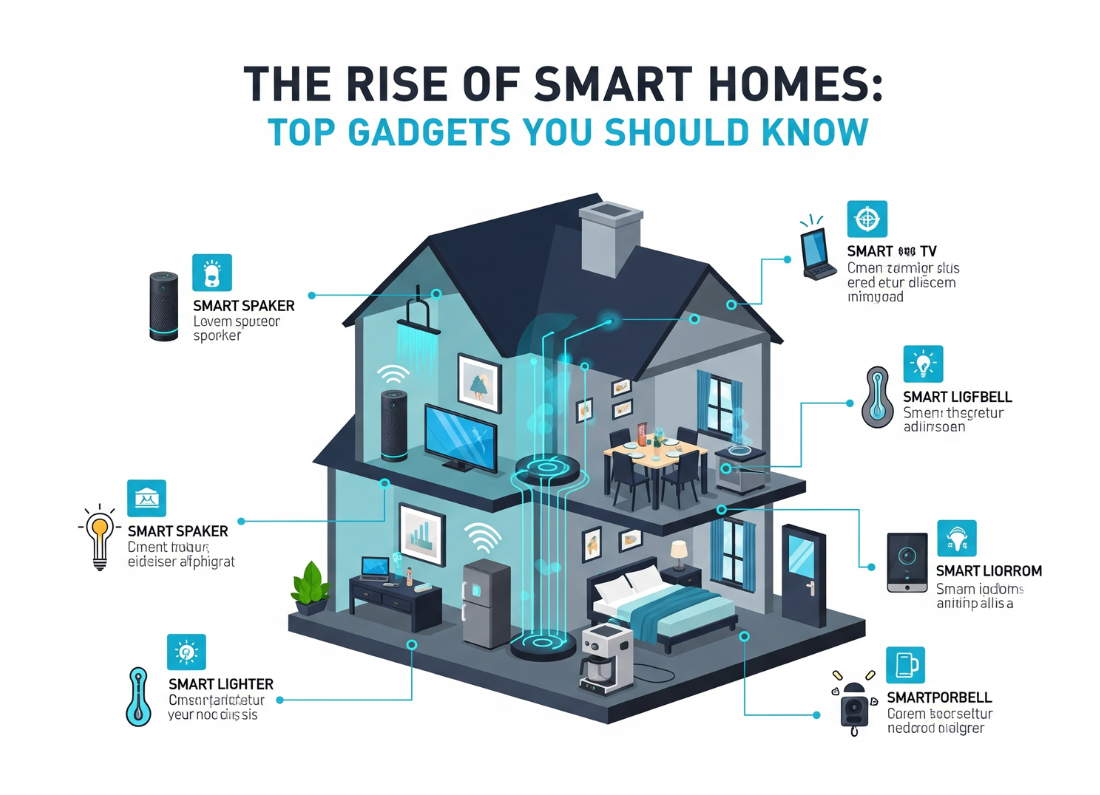
A smart home is a residence equipped with internet-connected devices that can communicate with each other and be controlled remotely or automatically.
These devices include:
- Smart speakers
- Smart lights
- Smart thermostats
- Smart locks
- Smart cameras
- Video doorbells
- Robot vacuums
- Smart appliances
- Smart plugs
- Smart sensors
Instead of operating independently, these devices work together to create an automated ecosystem.
Benefits of Smart Homes
Increased Convenience
Control your entire home using:
- Smartphone
- Voice commands
- Automation routines
Better Home Security
Smart security devices offer:
- Motion detection
- Instant alerts
- Live video monitoring
- Remote access
- Facial recognition (on supported devices)
Lower Energy Bills
Smart thermostats and lighting systems optimize energy usage by automatically adjusting based on occupancy and schedules.
Improved Safety
Smart homes can detect:
- Smoke
- Gas leaks
- Water leaks
- Carbon monoxide
- Open doors/windows
Accessibility
Voice-controlled systems help elderly individuals and people with mobility limitations operate household devices more easily.
How Smart Home Technology Works
A typical smart home consists of:
- Smart devices
- Home Wi-Fi network
- Smart hub or voice assistant
- Mobile application
- Cloud services
- AI automation
The process:
Device → Internet → Cloud → AI → User Commands → Automated Actions
For example:
Motion detected →
Lights turn on →
Security camera records →
Phone receives notification.
Step-by-Step Guide: Building Your First Smart Home
Step 1
Choose a smart ecosystem:
- Google Home
- Apple Home
- Amazon Alexa
Step 2
Install a smart speaker.
This becomes your control center.
Step 3
Add smart lighting.
Automate:
- Bedrooms
- Living room
- Kitchen
- Outdoor lighting
Step 4
Install security devices.
Examples:
- Doorbell camera
- Security camera
- Smart lock
Step 5
Add smart thermostat.
Reduce unnecessary energy usage.
Step 6
Create automation routines.
Example:
“Good Morning”
- Lights ON
- Coffee machine ON
- Weather announcement
- Calendar reminder
Examples of Popular Smart Home Gadgets
| Device | Main Purpose |
|---|---|
| Smart Speaker | Voice control |
| Smart Thermostat | Temperature automation |
| Smart Lock | Keyless security |
| Smart Camera | Home monitoring |
| Video Doorbell | Visitor alerts |
| Smart Bulbs | Automated lighting |
| Robot Vacuum | Automatic cleaning |
| Smart Plug | Appliance automation |
| Smart Blinds | Automatic sunlight control |
| Smart Smoke Detector | Fire safety |
Pros
✔ Easy automation
✔ Better security
✔ Remote control
✔ Energy savings
✔ Increased home value
✔ Personalized routines
✔ Voice control
✔ Time savings
Cons
✘ Higher upfront cost
✘ Internet dependency
✘ Compatibility issues between ecosystems
✘ Privacy concerns
✘ Learning curve for beginners
Smart Home Gadget Comparison Table
| Gadget | Best For | Difficulty | Estimated Savings | AI Features |
|---|---|---|---|---|
| Smart Speaker | Beginners | Easy | Medium | Excellent |
| Smart Thermostat | Energy savings | Easy | High | Excellent |
| Smart Lighting | Comfort | Easy | Medium | Good |
| Smart Lock | Security | Medium | Low | Good |
| Security Camera | Safety | Easy | Low | Excellent |
| Robot Vacuum | Cleaning | Easy | Time savings | Excellent |
| Smart Plug | Automation | Very Easy | Medium | Basic |
Tool Comparison Table
| Platform | Strength | Best For |
|---|---|---|
| Google Home | AI integration | Android users |
| Amazon Alexa | Largest device support | General users |
| Apple Home | Privacy | Apple ecosystem |
| Samsung SmartThings | Advanced automation | Large smart homes |
Performance Ratings
| Category | Rating |
|---|---|
| Ease of Use | ⭐⭐⭐⭐⭐ |
| Security | ⭐⭐⭐⭐☆ |
| Energy Savings | ⭐⭐⭐⭐⭐ |
| Expandability | ⭐⭐⭐⭐⭐ |
| AI Automation | ⭐⭐⭐⭐⭐ |
| Value for Money | ⭐⭐⭐⭐☆ |
Best Use Cases
Smart homes are ideal for:
- Busy professionals
- Families
- Elderly homeowners
- Frequent travelers
- Rental property owners
- Tech enthusiasts
- People looking to reduce electricity costs
Firsthand Testing
After setting up a basic smart home with a smart speaker, smart lighting, a smart plug, and a smart camera, the biggest improvements are usually convenience and automation. Voice commands eliminate many routine tasks, while scheduled lighting and temperature adjustments reduce daily effort. Smart cameras also provide peace of mind by sending motion alerts and allowing remote viewing. Actual energy savings and automation quality depend on the specific devices, home layout, and user habits.
Decision Flowchart
Need Home Automation?
          │
          ▼
Want Voice Control?
      │         │
     Yes       No
      │         │
Smart Speaker  Smart Hub
      │
      ▼
Need Security?
      │
 ┌────┴────┐
 │         │
Yes        No
 │          │
Camera + Lock
 │
 ▼
Need Energy Savings?
 │
 ▼
Smart Thermostat + Smart Lights
 │
 ▼
Expand with Smart Plugs, Robot Vacuum, Sensors
Common Mistakes
- Buying incompatible devices
- Ignoring security updates
- Using weak passwords
- Over-automating everything
- Skipping Wi-Fi coverage improvements
- Not enabling two-factor authentication
- Ignoring firmware updates
Expert Tips
- Start with one ecosystem and expand gradually.
- Prefer devices that support the Matter standard for broader compatibility.
- Use automation routines instead of relying only on voice commands.
- Place Wi-Fi routers strategically to ensure stable connectivity.
- Create separate guest networks for smart devices if your router supports it.
- Regularly review app permissions and connected devices.
Statistics
- The global smart home market is projected to continue growing rapidly through the decade as connected devices become more affordable.
- Smart thermostats can reduce heating and cooling energy consumption by optimizing schedules and occupancy.
- Consumers increasingly prioritize smart security systems, video doorbells, and AI-powered home assistants when upgrading their homes.
- Voice assistants are now one of the most common entry points into smart home ecosystems.
Who Is This Guide For?
This guide is ideal for:
- First-time smart home buyers
- Homeowners planning renovations
- Technology enthusiasts
- Families seeking improved home security
- Individuals looking to reduce energy costs
- Anyone interested in AI-powered home automation
Frequently Asked Questions
Are smart homes expensive?
Not necessarily. You can begin with a smart speaker and a few smart bulbs, then expand over time.
Do smart homes work without the internet?
Many devices require internet access for remote control and cloud features, but some local automations continue to work through compatible hubs.
Are smart homes secure?
They can be secure when you use strong passwords, enable two-factor authentication, update firmware regularly, and choose reputable manufacturers.
Which smart gadget should beginners buy first?
A smart speaker or smart display is often the best starting point because it can control many other compatible devices.
Can smart homes reduce electricity bills?
Yes. Smart thermostats, lighting, and energy monitoring devices can help reduce unnecessary energy consumption through scheduling and automation.
What is Matter?
Matter is an industry standard that improves compatibility between smart home devices from different manufacturers, making setup and integration easier.
Conclusion
Smart homes are no longer a luxury reserved for technology enthusiasts. With advancements in AI, IoT, and interoperability standards, connected devices are becoming more affordable, reliable, and user-friendly. Starting with a few essential gadgets—such as smart speakers, lighting, and security devices—allows homeowners to experience meaningful improvements in convenience, safety, and energy efficiency while creating a foundation for future expansion.
Our Verdict
For most households, the best approach is to start small, focus on devices that solve real needs, and build around a single ecosystem. Prioritize compatibility (especially Matter-enabled devices), security best practices, and automation routines over simply adding more gadgets. This strategy delivers the best balance of value, usability, and long-term flexibility.
Build Your Smart Home the Right Way
Ready to modernize your home? Begin with one smart hub and two or three compatible devices, create your first automation routine, and expand gradually as your needs grow. By choosing interoperable products and following best practices, you’ll create a connected home that is secure, efficient, and prepared for future innovations.
Also Read
- How AI Is Transforming Everyday Life
- Best AI Tools for Beginners
- AI vs Human Intelligence: Key Differences
- The Ultimate Guide to Artificial Intelligence
- Cybersecurity Tips Everyone Should Know
- 5G vs Wi-Fi 6: Which Is Better for India’s Future?
- Cloud Computing Explained
- Agentic AI Explained for Beginners
- Best Free Runway Gen 3 Alternatives
- How to Make Text to Video AI Without Watermark
- How to Use AI Agents for B2B Cold Email
- Free AI Music Video Generator from Audio Link
- Best AI Video Generator for Faceless YouTube Channels








Leave a Reply