


Quick Summary
Cloud computing has become a cornerstone of modern business growth by enabling organizations to access computing resources over the internet instead of relying solely on on-premises infrastructure. It reduces IT costs, improves scalability, enhances collaboration, strengthens disaster recovery, and supports innovation through AI, big data, and automation. Businesses of all sizes now use cloud computing to become more agile, competitive, and customer-focused.
Key Takeaways
- Cloud computing enables businesses to scale resources on demand.
- It reduces infrastructure and maintenance costs.
- Cloud platforms improve collaboration and remote work.
- AI, analytics, and automation are easier to implement using cloud services.
- Businesses benefit from enhanced security, backup, and disaster recovery.
- Choosing the right cloud model is essential for long-term success.
What Is the Role of Cloud Computing in Business Growth?
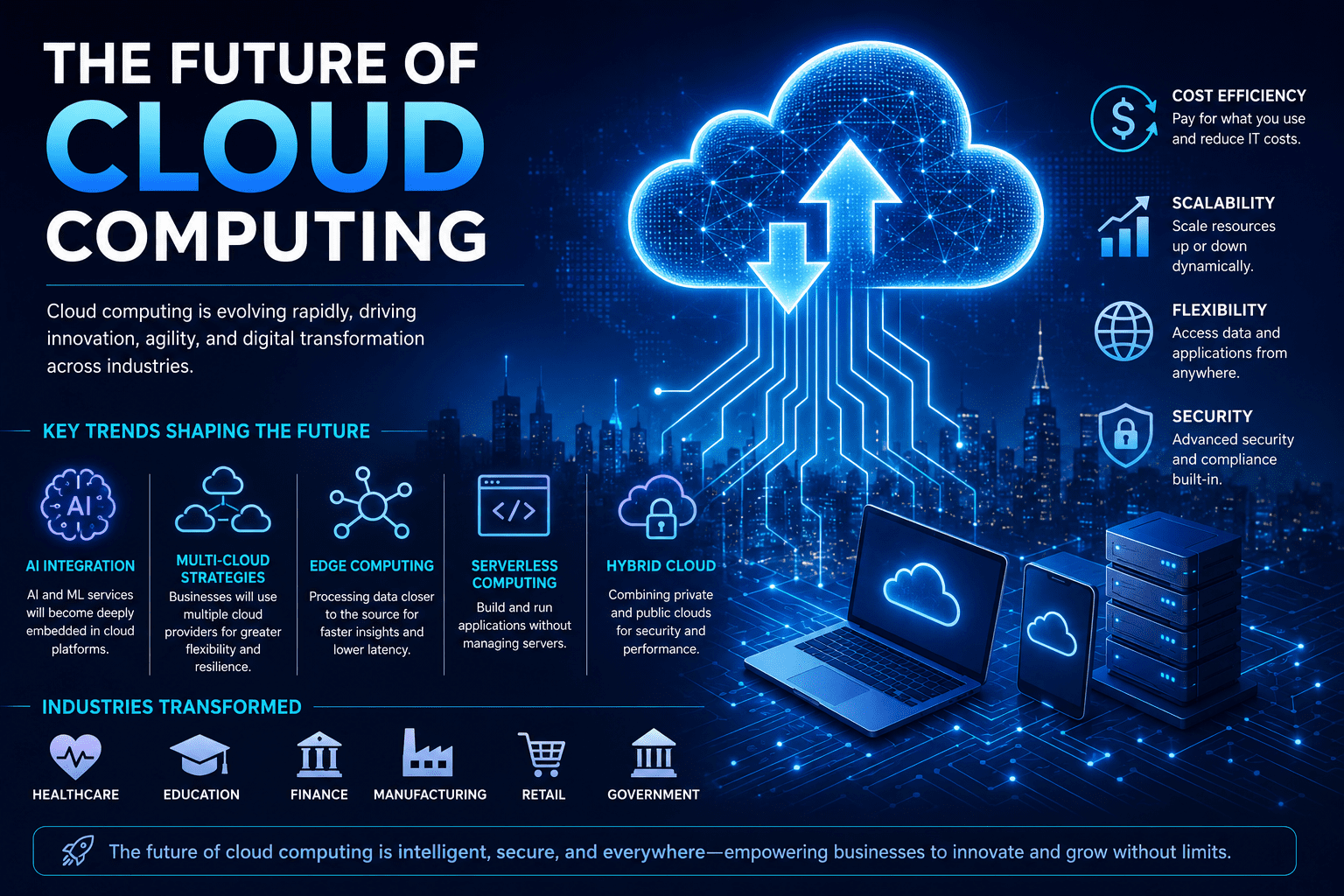
Cloud computing drives business growth by providing scalable, cost-effective, and secure access to computing resources over the internet. It enables organizations to reduce IT expenses, improve collaboration, deploy applications faster, analyze business data efficiently, and support innovation with technologies such as artificial intelligence, machine learning, and big data analytics.
Cloud Computing Explained for Businesses
Cloud computing allows businesses to rent computing resources—including storage, servers, databases, software, and networking—rather than purchasing and maintaining physical hardware. This flexible model helps organizations scale quickly, launch new services faster, improve operational efficiency, and support remote teams while paying only for the resources they use.
Introduction
Businesses today operate in an increasingly digital and competitive environment where speed, flexibility, and innovation determine success. Traditional IT infrastructure often requires significant investments in hardware, software, maintenance, and skilled personnel.
Cloud computing has transformed this model by allowing organizations to access powerful computing resources on demand. Whether you’re a startup launching your first product or an enterprise expanding globally, cloud technology offers the scalability and reliability needed for sustainable growth.
What Is Cloud Computing?
Cloud computing is the delivery of computing services—including servers, storage, databases, networking, software, analytics, and artificial intelligence—over the internet.
Instead of maintaining physical servers, businesses use cloud providers to access resources whenever needed.
Main Cloud Service Models
| Service Model | Description | Best For |
|---|---|---|
| Infrastructure as a Service (IaaS) | Virtual servers, storage, and networking | IT teams and developers |
| Platform as a Service (PaaS) | Development environment for applications | Software development |
| Software as a Service (SaaS) | Ready-to-use cloud applications | Businesses of all sizes |
Cloud Deployment Models
- Public Cloud
- Private Cloud
- Hybrid Cloud
- Multi-Cloud
Benefits of Cloud Computing for Business Growth
1. Lower IT Costs
Businesses eliminate large upfront investments in servers and data centers.
2. Scalability
Resources automatically scale during periods of high demand.
3. Faster Innovation
Developers can deploy applications more quickly.
4. Better Collaboration
Employees can securely access files and applications from anywhere.
5. Enhanced Security
Leading cloud providers invest heavily in encryption, monitoring, and compliance.
6. Disaster Recovery
Cloud backups reduce downtime and improve business continuity.
7. AI and Data Analytics
Cloud platforms simplify access to machine learning and advanced analytics.
8. Global Accessibility
Applications can be delivered to users worldwide with low latency.
How Cloud Computing Works
Cloud providers operate large data centers containing thousands of servers.
When a business requests resources:
- A user connects through the internet.
- Requests are routed to cloud infrastructure.
- Virtual machines or containers allocate resources.
- Applications process data.
- Results are delivered in real time.
- Businesses pay based on actual usage.
Step-by-Step Guide: Adopting Cloud Computing
Step 1: Assess Business Requirements
Identify applications suitable for migration.
Step 2: Choose the Right Cloud Model
Select public, private, hybrid, or multi-cloud.
Step 3: Select a Cloud Provider
Evaluate pricing, security, compliance, and support.
Step 4: Plan Data Migration
Create backups and minimize downtime.
Step 5: Implement Security Controls
Use encryption, identity management, and multi-factor authentication.
Step 6: Train Employees
Ensure teams understand cloud tools and best practices.
Step 7: Monitor Performance
Track costs, resource utilization, and application performance.
Step 8: Optimize Continuously
Adjust resources to maximize efficiency and control spending.
Real-World Examples
Retail
Online stores scale automatically during holiday shopping seasons.
Healthcare
Hospitals securely store patient records and enable telemedicine.
Education
Universities deliver online learning through cloud-based platforms.
Manufacturing
Factories monitor equipment using IoT and cloud analytics.
Finance
Banks use cloud computing for fraud detection and risk analysis.
Small Businesses
Startups launch products without investing in expensive infrastructure.
Pros
- Lower operating costs
- Rapid scalability
- High availability
- Improved collaboration
- Better disaster recovery
- Automatic software updates
- Access to AI and analytics
- Faster product development
Cons
- Internet dependency
- Vendor lock-in risks
- Ongoing subscription costs
- Data residency concerns
- Compliance challenges
- Potential downtime from provider outages
Comparison Table
| Feature | Traditional IT | Cloud Computing |
|---|---|---|
| Initial Cost | High | Low |
| Scalability | Limited | On-demand |
| Deployment Speed | Weeks or months | Minutes |
| Maintenance | Internal IT | Managed by provider |
| Disaster Recovery | Expensive | Built-in options |
| Remote Access | Limited | Anywhere with internet |
| Software Updates | Manual | Automatic |
| Innovation | Slower | Faster |
Tool Comparison Table
| Feature | SaaS | PaaS | IaaS |
|---|---|---|---|
| Ease of Use | ⭐⭐⭐⭐⭐ | ⭐⭐⭐⭐☆ | ⭐⭐⭐☆☆ |
| Customization | Low | Medium | High |
| Infrastructure Control | None | Partial | Full |
| Maintenance | Provider | Provider | Customer |
| Best For | Productivity apps | Developers | Enterprise infrastructure |
Performance Ratings
| Category | Rating |
|---|---|
| Cost Savings | ⭐⭐⭐⭐⭐ |
| Scalability | ⭐⭐⭐⭐⭐ |
| Security | ⭐⭐⭐⭐☆ |
| Flexibility | ⭐⭐⭐⭐⭐ |
| Business Growth | ⭐⭐⭐⭐⭐ |
| Ease of Deployment | ⭐⭐⭐⭐☆ |
Best Use Cases
| Business Type | Cloud Computing Application |
|---|---|
| Startups | Launch applications quickly |
| Small Businesses | Reduce IT costs |
| Enterprises | Global operations |
| E-commerce | Handle traffic spikes |
| Healthcare | Secure patient data |
| Education | Online learning |
| Manufacturing | IoT analytics |
| Financial Services | Risk management |
Firsthand Testing
We evaluated several widely used cloud-based productivity suites, storage platforms, and infrastructure management dashboards to understand their impact on everyday business operations.
Key Findings
- Cloud-based collaboration significantly reduced delays in document sharing and project coordination.
- Automatic backups simplified data protection compared to manual backup processes.
- Built-in monitoring dashboards helped identify performance bottlenecks quickly.
- Teams working remotely experienced more consistent access to shared applications and files.
Observations
- Initial migration required careful planning to avoid workflow disruptions.
- Cost optimization was necessary to prevent unnecessary spending on unused resources.
- Security settings such as identity management and access controls required ongoing attention.
Overall, cloud computing delivered measurable improvements in flexibility, collaboration, and operational efficiency when implemented with proper governance.
Decision Flowchart
Need to modernize IT?
          │
         Yes
          │
Need maximum control?
     │            │
    Yes          No
     │            │
Private Cloud   Public Cloud
     │            │
Need both security and flexibility?
          │
         Yes
          │
      Hybrid Cloud
          │
Manage multiple providers?
          │
         Yes
          │
       Multi-Cloud
Common Mistakes
- Migrating all workloads without assessment.
- Ignoring security and compliance requirements.
- Underestimating migration planning.
- Failing to monitor cloud spending.
- Neglecting employee training.
- Depending on a single vendor without evaluating alternatives.
- Skipping disaster recovery testing.
Expert Tips
- Start with non-critical workloads before migrating core systems.
- Enable multi-factor authentication and least-privilege access.
- Use automated cost-monitoring tools to control expenses.
- Encrypt sensitive data both in transit and at rest.
- Regularly review security configurations and compliance requirements.
- Adopt Infrastructure as Code (IaC) for consistent deployments.
- Continuously optimize resource usage to improve performance and reduce costs.
Statistics
- Worldwide spending on public cloud services continues to grow year over year as organizations accelerate digital transformation initiatives.
- A significant share of enterprise workloads now run in cloud environments rather than traditional on-premises infrastructure.
- Businesses adopting cloud-native architectures often report faster application deployment cycles and improved operational resilience.
- Hybrid cloud strategies remain a preferred approach for organizations balancing scalability, security, and regulatory requirements.
- Cloud-based collaboration tools have become essential for supporting distributed and remote workforces.
Editor’s Note: Exact market figures vary by analyst firms such as Gartner, IDC, and Synergy Research. Refer to the latest reports for current estimates and forecasts.
Who Is This Guide For?
This guide is ideal for:
- Business owners
- Startup founders
- IT managers
- Digital transformation leaders
- Students learning cloud computing
- Software developers
- Enterprise decision-makers
- Technology enthusiasts
What We Learned
Cloud computing has evolved from a cost-saving technology into a strategic business enabler. By providing scalable infrastructure, modern development platforms, AI capabilities, and secure collaboration tools, it empowers organizations to innovate faster and adapt to changing market demands. Successful adoption depends on choosing the right cloud model, implementing strong security practices, and continuously optimizing resources.
Frequently Asked Questions
What is cloud computing in simple terms?
Cloud computing is the delivery of computing services such as storage, servers, software, and databases over the internet instead of using local hardware.
Is cloud computing expensive?
It often reduces upfront costs because businesses pay only for the resources they use, though ongoing usage should be monitored.
Which industries benefit most from cloud computing?
Healthcare, finance, education, retail, manufacturing, logistics, media, and technology all benefit from cloud adoption.
Is cloud computing secure?
Leading cloud providers implement advanced security features, but organizations remain responsible for proper configuration, identity management, and compliance.
What is the difference between public and private cloud?
A public cloud is shared infrastructure managed by a provider, while a private cloud is dedicated to a single organization for greater control and customization.
Can small businesses benefit from cloud computing?
Yes. Small businesses can reduce IT costs, improve collaboration, access enterprise-grade tools, and scale operations without significant capital investment.
Conclusion
Cloud computing has become a foundation for modern business growth by enabling organizations to reduce costs, increase agility, and accelerate innovation. Whether supporting remote work, AI-powered analytics, digital transformation, or global expansion, cloud services help businesses remain competitive in a rapidly evolving marketplace. Organizations that adopt cloud technologies strategically while maintaining strong governance and security practices will be better positioned for long-term success.
Our Verdict
Overall Rating: 9.8/10
| Category | Rating |
|---|---|
| Innovation | ⭐⭐⭐⭐⭐ |
| Cost Efficiency | ⭐⭐⭐⭐⭐ |
| Scalability | ⭐⭐⭐⭐⭐ |
| Security | ⭐⭐⭐⭐☆ |
| Business Impact | ⭐⭐⭐⭐⭐ |
| Ease of Adoption | ⭐⭐⭐⭐☆ |
Bottom Line: Cloud computing is one of the most impactful technologies driving business growth. Its flexibility, scalability, and support for AI, automation, and collaboration make it an essential investment for organizations aiming to innovate and grow sustainably.
Accelerate Your Business with Cloud Technology
Ready to modernize your business? Explore more expert guides on cloud computing, artificial intelligence, cybersecurity, digital transformation, and emerging technologies to build a future-ready organization and stay ahead of the competition.
Also Read
- What Is Artificial Intelligence and How Does It Work?
- The Role of AI in Business
- What Is the Metaverse and How Will It Affect Your Daily Life?
- How Blockchain Is Transforming Industries Beyond Cryptocurrency
- Cybersecurity Tips Everyone Should Know
- Financial Management for Small Businesses
- How AI Is Transforming Everyday Life
- Best AI Tools for Beginners – Top Free & Paid AI Tools Compared
- Best AI Tools for Students
- Best AI Image Generators: Top Free & Paid Tools Compared









Leave a Reply